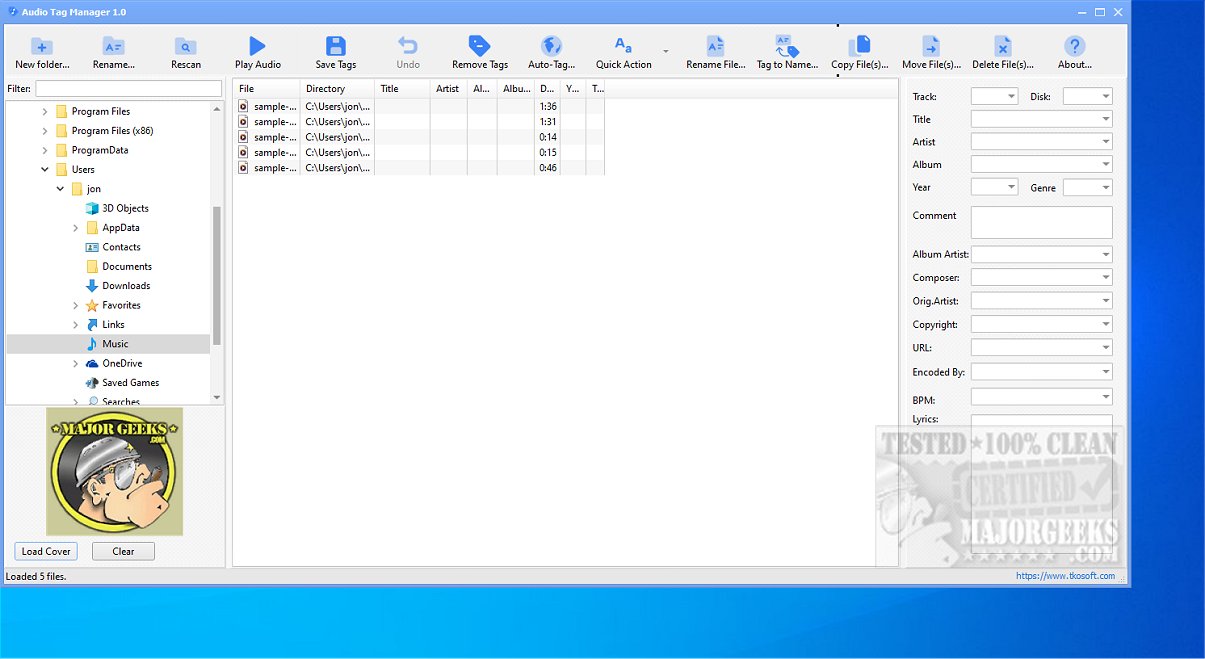
Audio Tag Manager 2.0 is a free and versatile audio tag editor designed for effective management of music files. Supporting a wide range of audio formats such as MP3, FLAC, OGG, APE, M4A, WMA, and WAV, it provides a comprehensive solution for organizing, cleaning, and renaming your music collection.
Key Features of Audio Tag Manager:
1. Metadata Editing: Users can efficiently edit important metadata fields such as Title, Artist, Album, Year, Track Number, Genre, Composer, and more to enhance the information associated with their audio files. This allows for customization on both individual files and bulk updates across multiple selections, streamlining music library management.
2. File Renaming: The tool offers robust file renaming capabilities, enabling users to rename audio files using tag-based patterns. This feature helps organize files with inconsistent naming conventions, resulting in a more polished music library.
3. Auto-Tagging via MusicBrainz: A standout feature allows users to automatically search for and retrieve accurate music metadata online through MusicBrainz. This is particularly useful for files that lack proper tags, as it can quickly populate essential details like song titles and release years.
4. Cover Art Management: The software facilitates the management of album cover art, allowing users to load, replace, or clear embedded images, ensuring a visually appealing music collection.
5. Batch Editing and Presets: Users can perform batch edits on multiple audio files and utilize built-in presets for common tag-cleaning tasks. The flexibility to create custom presets tailored to individual workflows enhances the software's functionality.
6. User-Friendly Interface: Designed with ease of use in mind, Audio Tag Manager allows for quick adjustments to audio metadata, significantly boosting efficiency, especially for large collections.
Conclusion:
Audio Tag Manager 2.0 is an ideal solution for anyone looking to maintain an accurate, clean, and well-organized music collection. Its combination of powerful features, including metadata editing, renaming capabilities, auto-tagging, and cover art management, makes it a standout choice for music enthusiasts and professionals alike. With its user-friendly interface and efficient workflows, it ensures that managing audio tracks is a hassle-free experience. Whether you're a casual listener or a dedicated audiophile, Audio Tag Manager 2.0 is a valuable tool for optimizing your music library
Key Features of Audio Tag Manager:
1. Metadata Editing: Users can efficiently edit important metadata fields such as Title, Artist, Album, Year, Track Number, Genre, Composer, and more to enhance the information associated with their audio files. This allows for customization on both individual files and bulk updates across multiple selections, streamlining music library management.
2. File Renaming: The tool offers robust file renaming capabilities, enabling users to rename audio files using tag-based patterns. This feature helps organize files with inconsistent naming conventions, resulting in a more polished music library.
3. Auto-Tagging via MusicBrainz: A standout feature allows users to automatically search for and retrieve accurate music metadata online through MusicBrainz. This is particularly useful for files that lack proper tags, as it can quickly populate essential details like song titles and release years.
4. Cover Art Management: The software facilitates the management of album cover art, allowing users to load, replace, or clear embedded images, ensuring a visually appealing music collection.
5. Batch Editing and Presets: Users can perform batch edits on multiple audio files and utilize built-in presets for common tag-cleaning tasks. The flexibility to create custom presets tailored to individual workflows enhances the software's functionality.
6. User-Friendly Interface: Designed with ease of use in mind, Audio Tag Manager allows for quick adjustments to audio metadata, significantly boosting efficiency, especially for large collections.
Conclusion:
Audio Tag Manager 2.0 is an ideal solution for anyone looking to maintain an accurate, clean, and well-organized music collection. Its combination of powerful features, including metadata editing, renaming capabilities, auto-tagging, and cover art management, makes it a standout choice for music enthusiasts and professionals alike. With its user-friendly interface and efficient workflows, it ensures that managing audio tracks is a hassle-free experience. Whether you're a casual listener or a dedicated audiophile, Audio Tag Manager 2.0 is a valuable tool for optimizing your music library
Audio Tag Manager 2.0 released
Audio Tag Manager is a free audio tag editor that lets you efficiently edit, organize, clean, and rename your music files. This versatile tool supports a variety of audio formats, including MP3, FLAC, OGG, APE, M4A, WMA, and WAV, making it a comprehensive solution for managing your music collection.