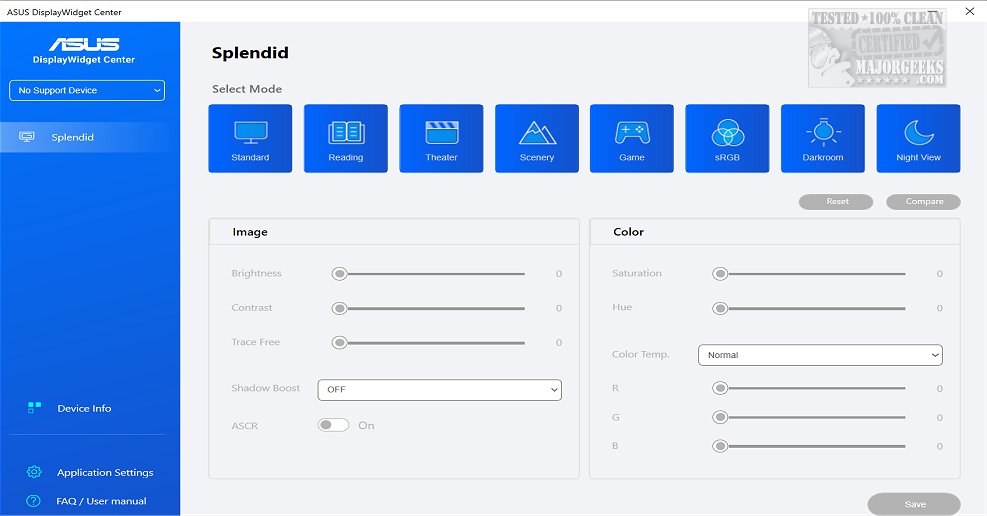
ASUS has released version 1.4.1.0 of its DisplayWidget Center, an advanced monitor management tool designed specifically for ASUS monitors. This application enables users to optimize their display settings, including screen brightness, contrast, and color temperature, catering to the distinct needs of designers, gamers, and users engaged in prolonged monitor use. The software features a user-friendly interface, making it easy to customize monitor settings.
One of the standout features of the DisplayWidget Center is the MultiScreen capability, which helps users streamline their workflow by providing customizable window layouts for enhanced productivity. Additionally, users can take advantage of the Picture-in-Picture (PIP) and Picture-by-Picture (PBP) functionalities that allow for the simultaneous viewing of multiple input sources, facilitating multitasking.
The DisplayWidget Center also includes a KVM (Keyboard, Video, Mouse) feature, enabling control over two systems with a single monitor, keyboard, and mouse. This functionality simplifies file transfers between systems, provided the monitor supports KVM.
For enhanced viewing experiences, the App Tweaker feature allows users to customize their display settings for specific applications, such as optimizing browser settings for cinema viewing or fine-tuning FPS games for optimal performance. Furthermore, the OLED Care feature is designed to protect OLED monitors by preventing burn-in issues through pixel cleaning and uniform brightness maintenance.
Overall, ASUS DisplayWidget Center provides a comprehensive solution for users looking to maximize their monitor's potential and customize their viewing experience. With its wide range of features, including workflow optimization, multi-source viewing, and OLED protection, users can enjoy a highly personalized and efficient monitoring experience.
In addition to these features, future updates could see the inclusion of more sophisticated AI-driven adjustments based on user behavior, further enhancing the personalization aspect. Additionally, integration with smart home systems for automatic adjustments based on ambient light could also be a valuable enhancement, providing users with even more control and convenience
One of the standout features of the DisplayWidget Center is the MultiScreen capability, which helps users streamline their workflow by providing customizable window layouts for enhanced productivity. Additionally, users can take advantage of the Picture-in-Picture (PIP) and Picture-by-Picture (PBP) functionalities that allow for the simultaneous viewing of multiple input sources, facilitating multitasking.
The DisplayWidget Center also includes a KVM (Keyboard, Video, Mouse) feature, enabling control over two systems with a single monitor, keyboard, and mouse. This functionality simplifies file transfers between systems, provided the monitor supports KVM.
For enhanced viewing experiences, the App Tweaker feature allows users to customize their display settings for specific applications, such as optimizing browser settings for cinema viewing or fine-tuning FPS games for optimal performance. Furthermore, the OLED Care feature is designed to protect OLED monitors by preventing burn-in issues through pixel cleaning and uniform brightness maintenance.
Overall, ASUS DisplayWidget Center provides a comprehensive solution for users looking to maximize their monitor's potential and customize their viewing experience. With its wide range of features, including workflow optimization, multi-source viewing, and OLED protection, users can enjoy a highly personalized and efficient monitoring experience.
In addition to these features, future updates could see the inclusion of more sophisticated AI-driven adjustments based on user behavior, further enhancing the personalization aspect. Additionally, integration with smart home systems for automatic adjustments based on ambient light could also be a valuable enhancement, providing users with even more control and convenience
ASUS DisplayWidget Center 1.4.1.0 released
ASUS DisplayWidget Center offers a comprehensive monitor management solution that allows you to optimize, personalize, and fully utilize your display to suit your needs and preferences.