ASCOMP Screencapt 3.006 has been released, introducing an advanced screen recording tool that simplifies the process of capturing screen activity and saving it in various video formats like MP4, AVI, and FLV. This versatile software is ideal for creating high-quality video content, whether for tutorials, webinars, or gameplay recordings.
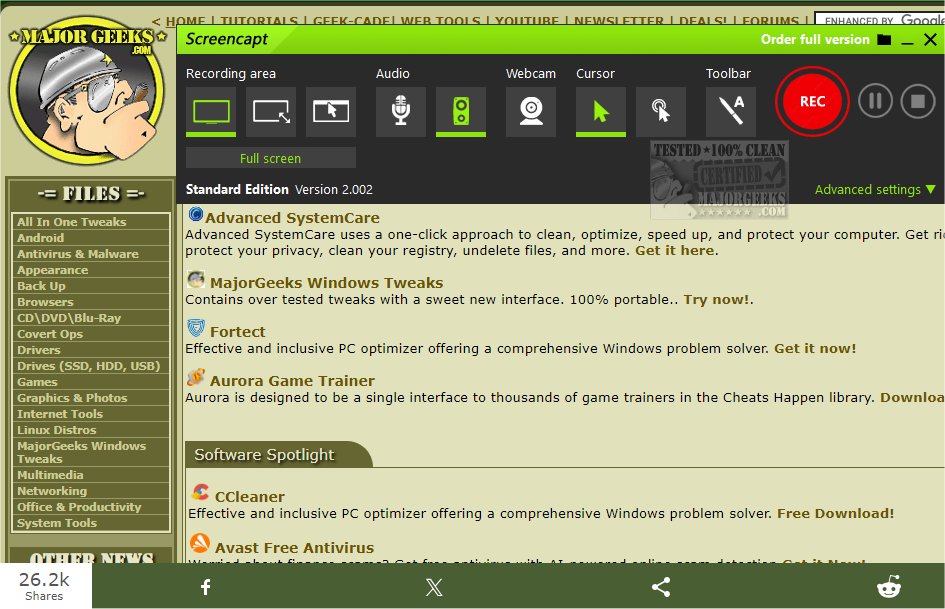
ASCOMP Screencapt features an intuitive interface that caters to a broad range of recording needs, enabling users to effortlessly record the entire screen, a selected area, or specific application windows. The software also includes integrated audio recording capabilities, allowing users to add commentary or system sounds directly into their recordings, which is particularly useful for instructional videos and presentations.
One of the standout features of ASCOMP Screencapt is the ability to add webcam overlays, allowing users to capture their reactions in real time and create more engaging and personalized content. Moreover, the tool offers advanced options for cursor recording, including the ability to hide the cursor or apply special effects, enhancing the clarity of software demonstrations and tutorials.
Utilizing the H.264 codec, ASCOMP Screencapt provides efficient compression without sacrificing image quality, with users able to adjust compression levels to balance file size and clarity. It supports a maximum frame rate of 120 FPS, ensuring smooth recordings suitable for fast-paced gaming or dynamic applications.
The software also enables users to draw directly on the screen and add annotations during recording, which significantly enhances the engagement and clarity of the final video content.
In summary, ASCOMP Screencapt stands out as an efficient and flexible tool for screen recording, suitable for a variety of applications. Its user-friendly design, combined with powerful features, makes it an excellent choice for anyone looking to create professional-quality video content.
In future updates, users can anticipate further enhancements and additional features that could include improved editing tools, more output formats, and additional customization options for annotations and overlays, ensuring ASCOMP Screencapt remains a leading choice in screen recording software
ASCOMP Screencapt features an intuitive interface that caters to a broad range of recording needs, enabling users to effortlessly record the entire screen, a selected area, or specific application windows. The software also includes integrated audio recording capabilities, allowing users to add commentary or system sounds directly into their recordings, which is particularly useful for instructional videos and presentations.
One of the standout features of ASCOMP Screencapt is the ability to add webcam overlays, allowing users to capture their reactions in real time and create more engaging and personalized content. Moreover, the tool offers advanced options for cursor recording, including the ability to hide the cursor or apply special effects, enhancing the clarity of software demonstrations and tutorials.
Utilizing the H.264 codec, ASCOMP Screencapt provides efficient compression without sacrificing image quality, with users able to adjust compression levels to balance file size and clarity. It supports a maximum frame rate of 120 FPS, ensuring smooth recordings suitable for fast-paced gaming or dynamic applications.
The software also enables users to draw directly on the screen and add annotations during recording, which significantly enhances the engagement and clarity of the final video content.
In summary, ASCOMP Screencapt stands out as an efficient and flexible tool for screen recording, suitable for a variety of applications. Its user-friendly design, combined with powerful features, makes it an excellent choice for anyone looking to create professional-quality video content.
In future updates, users can anticipate further enhancements and additional features that could include improved editing tools, more output formats, and additional customization options for annotations and overlays, ensuring ASCOMP Screencapt remains a leading choice in screen recording software
ASCOMP Screencapt 3.006 released
ASCOMP Screencapt is a powerful screen recording tool designed to capture screen activity easily and save the recordings in various video formats, including MP4, AVI, and FLV.