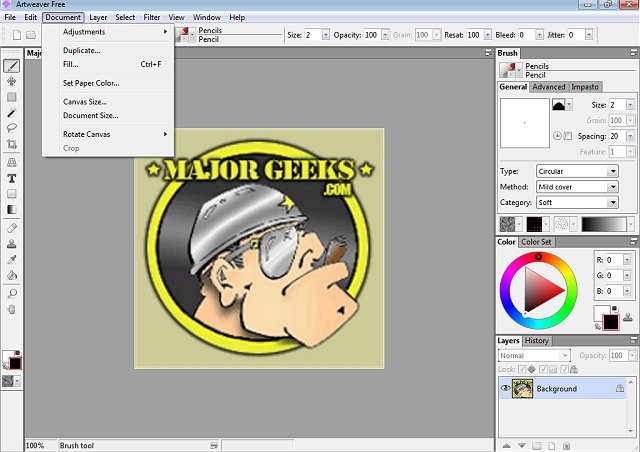
Artweaver Free 8.1.5 has been released, providing a fantastic opportunity for aspiring digital artists to explore their creativity without the financial burden of expensive software. This digital painting application is equipped with an extensive range of tools, including various brushes and effects, allowing users to transform photos into sketches or play with colors.
Unleash Your Inner Digital Artist
Artweaver Free stands out as a budget-friendly alternative to high-end programs like Photoshop, offering a lightweight yet powerful platform for digital art creation. Whether you are interested in sketching, airbrushing, or experimenting with textures, Artweaver Free serves as a comprehensive digital art studio for your PC.
Packed with Features for Beginners & Pros
The software boasts a highly customizable brush system that caters to all artistic styles, featuring tools like pencils, airbrushes, and oil brushes. Users can adjust parameters such as pressure, size, and opacity to achieve their desired strokes. The inclusion of layer support and grouping facilitates the creation of complex compositions, granting artists full control over their work much like in professional software.
Artweaver Free also enables users to work with Photoshop files, ensuring compatibility for those collaborating with Photoshop users. It supports various Photoshop-compatible filters, which broaden creative possibilities through the use of plug-ins. Furthermore, artists who utilize drawing tablets will appreciate the program’s pressure-sensitive input, which allows for smooth and natural brush strokes.
For those seeking collaborative features, the Artweaver Plus version introduces real-time collaboration, enabling multiple artists to work on the same project simultaneously—perfect for team projects or educational settings.
Two Versions to Choose From
Artweaver is available in two versions: Artweaver Free, which offers fundamental tools for casual artists, and Artweaver Plus (Shareware), which includes advanced features such as improved performance and real-time collaboration. Users can try the Plus version without restrictions for a 14-day trial before deciding to upgrade.
Pros and Cons
Pros:
- Free and feature-rich for casual artists
- Layer support, PSD file compatibility, and Photoshop plug-ins
- Customizable brush engine with pen pressure sensitivity
- Excellent for use with drawing tablets
- 14-day trial available for Artweaver Plus
Cons:
- The interface may appear outdated to some users
- Lacks some advanced tools found in premium software like Photoshop or Corel Painter
- The free version does not include real-time collaboration
Geek Verdict
Artweaver Free is a commendable choice for beginners or hobbyist artists seeking an accessible digital painting tool. With its robust features, including layers, custom brushes, and tablet support, it's well-equipped for anyone starting their digital art journey. For those who desire more capabilities, the Plus version enhances the experience with additional features and collaborative tools. Overall, Artweaver Free offers significant value, making it a worthy contender in the realm of digital painting software.
Further Exploration
For those interested in enhancing their digital art experience, consider exploring tutorials or communities focused on Artweaver to maximize your use of the software. You could also look into complementary tools or projects that can further expand your skills and creativity in the digital art space
Unleash Your Inner Digital Artist
Artweaver Free stands out as a budget-friendly alternative to high-end programs like Photoshop, offering a lightweight yet powerful platform for digital art creation. Whether you are interested in sketching, airbrushing, or experimenting with textures, Artweaver Free serves as a comprehensive digital art studio for your PC.
Packed with Features for Beginners & Pros
The software boasts a highly customizable brush system that caters to all artistic styles, featuring tools like pencils, airbrushes, and oil brushes. Users can adjust parameters such as pressure, size, and opacity to achieve their desired strokes. The inclusion of layer support and grouping facilitates the creation of complex compositions, granting artists full control over their work much like in professional software.
Artweaver Free also enables users to work with Photoshop files, ensuring compatibility for those collaborating with Photoshop users. It supports various Photoshop-compatible filters, which broaden creative possibilities through the use of plug-ins. Furthermore, artists who utilize drawing tablets will appreciate the program’s pressure-sensitive input, which allows for smooth and natural brush strokes.
For those seeking collaborative features, the Artweaver Plus version introduces real-time collaboration, enabling multiple artists to work on the same project simultaneously—perfect for team projects or educational settings.
Two Versions to Choose From
Artweaver is available in two versions: Artweaver Free, which offers fundamental tools for casual artists, and Artweaver Plus (Shareware), which includes advanced features such as improved performance and real-time collaboration. Users can try the Plus version without restrictions for a 14-day trial before deciding to upgrade.
Pros and Cons
Pros:
- Free and feature-rich for casual artists
- Layer support, PSD file compatibility, and Photoshop plug-ins
- Customizable brush engine with pen pressure sensitivity
- Excellent for use with drawing tablets
- 14-day trial available for Artweaver Plus
Cons:
- The interface may appear outdated to some users
- Lacks some advanced tools found in premium software like Photoshop or Corel Painter
- The free version does not include real-time collaboration
Geek Verdict
Artweaver Free is a commendable choice for beginners or hobbyist artists seeking an accessible digital painting tool. With its robust features, including layers, custom brushes, and tablet support, it's well-equipped for anyone starting their digital art journey. For those who desire more capabilities, the Plus version enhances the experience with additional features and collaborative tools. Overall, Artweaver Free offers significant value, making it a worthy contender in the realm of digital painting software.
Further Exploration
For those interested in enhancing their digital art experience, consider exploring tutorials or communities focused on Artweaver to maximize your use of the software. You could also look into complementary tools or projects that can further expand your skills and creativity in the digital art space
Artweaver Free 8.1.5 released
Artweaver Free lets you paint creatively with the help of a vast range of painting tools so you can create sketches from photos or experiment with colors.