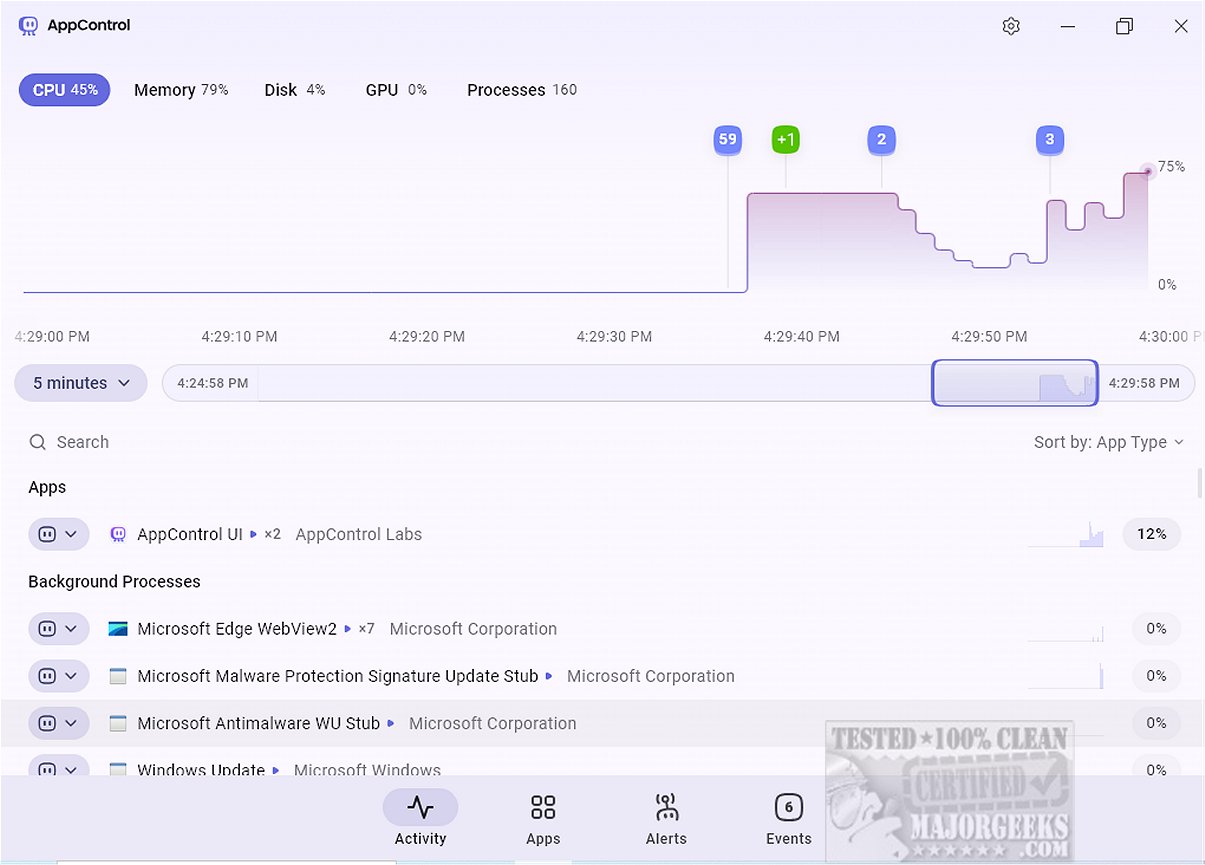
AppControl has launched version 1.3.0.335b, enhancing its reputation as a robust system monitoring tool that allows users to easily track their computer's resource usage over time. This tool serves as a solid alternative to the traditional Task Manager by providing a clear and intuitive interface that simplifies technical jargon and offers detailed insights into CPU, GPU, memory, disk usage, and temperature.
User-Friendly Interface and Historical Data Tracking
The application features a modern design that facilitates easy navigation through a scrollable timeline, displaying resource usage and events for the past three days. This capability lets users identify spikes in resource consumption and understand their causes, which is valuable for troubleshooting and implementing preventive measures.
AppControl also presents a consolidated view of running applications, background processes, and Windows processes, similar to the Task Manager. Users can terminate or disable processes, although it currently does not support suspending individual browser tabs like Task Manager does. A standout feature of AppControl is its app insights, which explain selected processes, reducing the need for users to look up information about common Windows applications online.
Focus on Privacy Monitoring
A unique aspect of AppControl is its emphasis on privacy-related events. The Apps tab allows users to monitor applications and their access to hardware resources, such as cameras and microphones. Custom alerts can be set for critical privacy events, such as when an application accesses sensitive hardware or activates location tracking.
Monitoring Process Actions
The Events tab offers a thorough overview of actions taken by running processes, enabling users to track when applications are launched, updated, or when hardware components are accessed or modified.
Areas for Improvement
Despite its user-friendly design and valuable features, AppControl lacks certain functionalities that could improve its overall utility. For instance, it does not allow users to restart Windows Explorer or initiate new processes directly within the tool. Additionally, it could benefit from options to display running services and startup applications.
Conclusion
In summary, AppControl emerges as a powerful alternative to the conventional Task Manager, providing a comprehensive suite of features tailored for power users. With real-time and historical monitoring, customizable alerts, and continuous event tracking, AppControl gives users deeper insights into their system's performance and activities. This tool empowers users to maintain control over their device's resources, ultimately enhancing their computing experience. Users seeking assistance can access the developer's help section when needed.
Future Enhancements
Moving forward, AppControl could further solidify its position in the market by incorporating features like process suspension, the ability to restart critical system services, and enhanced visualizations for a more in-depth resource analysis. These additions would not only increase its functionality but also appeal to a broader audience looking for an all-in-one system monitoring solution
User-Friendly Interface and Historical Data Tracking
The application features a modern design that facilitates easy navigation through a scrollable timeline, displaying resource usage and events for the past three days. This capability lets users identify spikes in resource consumption and understand their causes, which is valuable for troubleshooting and implementing preventive measures.
AppControl also presents a consolidated view of running applications, background processes, and Windows processes, similar to the Task Manager. Users can terminate or disable processes, although it currently does not support suspending individual browser tabs like Task Manager does. A standout feature of AppControl is its app insights, which explain selected processes, reducing the need for users to look up information about common Windows applications online.
Focus on Privacy Monitoring
A unique aspect of AppControl is its emphasis on privacy-related events. The Apps tab allows users to monitor applications and their access to hardware resources, such as cameras and microphones. Custom alerts can be set for critical privacy events, such as when an application accesses sensitive hardware or activates location tracking.
Monitoring Process Actions
The Events tab offers a thorough overview of actions taken by running processes, enabling users to track when applications are launched, updated, or when hardware components are accessed or modified.
Areas for Improvement
Despite its user-friendly design and valuable features, AppControl lacks certain functionalities that could improve its overall utility. For instance, it does not allow users to restart Windows Explorer or initiate new processes directly within the tool. Additionally, it could benefit from options to display running services and startup applications.
Conclusion
In summary, AppControl emerges as a powerful alternative to the conventional Task Manager, providing a comprehensive suite of features tailored for power users. With real-time and historical monitoring, customizable alerts, and continuous event tracking, AppControl gives users deeper insights into their system's performance and activities. This tool empowers users to maintain control over their device's resources, ultimately enhancing their computing experience. Users seeking assistance can access the developer's help section when needed.
Future Enhancements
Moving forward, AppControl could further solidify its position in the market by incorporating features like process suspension, the ability to restart critical system services, and enhanced visualizations for a more in-depth resource analysis. These additions would not only increase its functionality but also appeal to a broader audience looking for an all-in-one system monitoring solution
AppControl 1.3.0.335b released
AppControl offers a comprehensive system monitoring tool that provides users with an intuitive way to track resource usage over time.