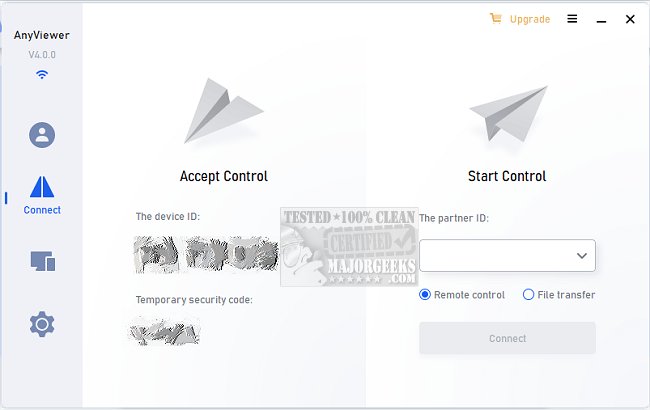
AnyViewer has recently launched version 5.8.0, a robust and user-friendly remote desktop software designed for Windows PCs and Windows Server. This application offers users the ability to access their computers remotely from virtually anywhere, leveraging internet connectivity for seamless desktop connections.
With AnyViewer, users can control a PC from another PC, as well as from mobile devices such as iOS and Android. The software supports both account logins and security code entries for unattended access, enhancing flexibility and convenience. A standout feature of AnyViewer is its high-definition picture quality combined with virtual mouse and touch control, which collectively ensure an optimal remote working experience.
The application is also equipped to facilitate remote support for family, friends, and clients, allowing users to resolve IT issues quickly through instant chat capabilities. Users can easily access important data and applications that are exclusive to their office computers, replicating the office environment remotely. The program further supports quick file transfers, ensuring that vital information is readily available.
To enhance security, AnyViewer provides options to disable mouse and keyboard control and blackout remote screens, preventing unauthorized access to sensitive information. Strong authentication measures are integrated, alleviating concerns about being locked out of cloud-based ERP or CRM systems.
Furthermore, the software facilitates stable connections by sharing device IDs, ensuring users can maintain reliable access to their computers even when away from the office. This makes AnyViewer a top choice for remote work solutions, as long as the user's computer remains connected to the internet.
Extension
In addition to its current features, AnyViewer could benefit from further enhancements to solidify its position as a leading remote desktop solution. For instance, incorporating a multi-factor authentication system could augment security, providing an extra layer of protection against unauthorized access.
Moreover, integrating AI-driven tools for troubleshooting common IT issues could facilitate more efficient remote support, allowing users to resolve problems without needing extensive technical knowledge. Additionally, developing mobile applications that offer even more functionality, such as remote printing or enhanced file management capabilities, could further improve the user experience.
Lastly, the introduction of customizable user interfaces and themes could enable users to personalize their remote workspace, making it more comfortable and aligned with their preferences. These enhancements, combined with the existing robust features, would position AnyViewer as an even more indispensable tool for professionals navigating the growing demands of remote work
With AnyViewer, users can control a PC from another PC, as well as from mobile devices such as iOS and Android. The software supports both account logins and security code entries for unattended access, enhancing flexibility and convenience. A standout feature of AnyViewer is its high-definition picture quality combined with virtual mouse and touch control, which collectively ensure an optimal remote working experience.
The application is also equipped to facilitate remote support for family, friends, and clients, allowing users to resolve IT issues quickly through instant chat capabilities. Users can easily access important data and applications that are exclusive to their office computers, replicating the office environment remotely. The program further supports quick file transfers, ensuring that vital information is readily available.
To enhance security, AnyViewer provides options to disable mouse and keyboard control and blackout remote screens, preventing unauthorized access to sensitive information. Strong authentication measures are integrated, alleviating concerns about being locked out of cloud-based ERP or CRM systems.
Furthermore, the software facilitates stable connections by sharing device IDs, ensuring users can maintain reliable access to their computers even when away from the office. This makes AnyViewer a top choice for remote work solutions, as long as the user's computer remains connected to the internet.
Extension
In addition to its current features, AnyViewer could benefit from further enhancements to solidify its position as a leading remote desktop solution. For instance, incorporating a multi-factor authentication system could augment security, providing an extra layer of protection against unauthorized access.
Moreover, integrating AI-driven tools for troubleshooting common IT issues could facilitate more efficient remote support, allowing users to resolve problems without needing extensive technical knowledge. Additionally, developing mobile applications that offer even more functionality, such as remote printing or enhanced file management capabilities, could further improve the user experience.
Lastly, the introduction of customizable user interfaces and themes could enable users to personalize their remote workspace, making it more comfortable and aligned with their preferences. These enhancements, combined with the existing robust features, would position AnyViewer as an even more indispensable tool for professionals navigating the growing demands of remote work
AnyViewer 5.8.0 released
AnyViewer is a secure and speedy software for remote desktop on Windows PCs and Windows Server.