Alt-Tab Terminator version 6.7 has been released, introducing an enhanced utility that significantly improves the traditional ALT-Tab functionality in Windows. This application provides a modernized replacement screen that aids users in previewing and managing their open applications more effectively.
The primary goal of Alt-Tab Terminator is to give users greater control over window previews. While the default ALT-Tab feature is straightforward, it lacks the comprehensive capabilities that Alt-Tab Terminator offers. The utility replaces the default task switcher with a more sophisticated interface, allowing users to see live previews of their open windows, even those with multiple child windows. Moreover, it can also be configured to replace the Win-Tab keyboard shortcut used for navigating through applications across multiple desktops.
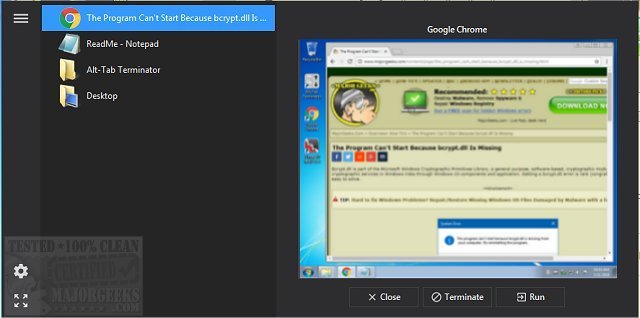
One of the standout features of Alt-Tab Terminator is its ability to present a complete desktop preview alongside the names of the applications, making it easier to identify what you need at a glance. The application organizes all open windows into a clean task list, enabling smoother navigation via keyboard shortcuts or mouse input. Users can also personalize their experience by adjusting settings such as color schemes and toggling between compact and full-screen modes.
Key features of Alt-Tab Terminator include:
- Task Preview: Live previews of applications for better visualization.
- Quick & Easy Navigation: Navigate using keyboard shortcuts or mouse actions.
- Clear Large Labels: A vertical task list with large icons for each window title, facilitating quicker identification of the desired application.
In summary, Alt-Tab Terminator 6.7 is a powerful tool for Windows users seeking an improved task-switching experience, making multitasking more efficient and visually manageable. With its user-friendly features and customization options, it stands out as a valuable addition to any productivity toolkit.
As technology continues to evolve, we can anticipate further enhancements in user interface design and task management utilities like Alt-Tab Terminator, potentially integrating more advanced features such as AI-driven task suggestions or seamless transitions between applications, making the multitasking experience even more intuitive
The primary goal of Alt-Tab Terminator is to give users greater control over window previews. While the default ALT-Tab feature is straightforward, it lacks the comprehensive capabilities that Alt-Tab Terminator offers. The utility replaces the default task switcher with a more sophisticated interface, allowing users to see live previews of their open windows, even those with multiple child windows. Moreover, it can also be configured to replace the Win-Tab keyboard shortcut used for navigating through applications across multiple desktops.
One of the standout features of Alt-Tab Terminator is its ability to present a complete desktop preview alongside the names of the applications, making it easier to identify what you need at a glance. The application organizes all open windows into a clean task list, enabling smoother navigation via keyboard shortcuts or mouse input. Users can also personalize their experience by adjusting settings such as color schemes and toggling between compact and full-screen modes.
Key features of Alt-Tab Terminator include:
- Task Preview: Live previews of applications for better visualization.
- Quick & Easy Navigation: Navigate using keyboard shortcuts or mouse actions.
- Clear Large Labels: A vertical task list with large icons for each window title, facilitating quicker identification of the desired application.
In summary, Alt-Tab Terminator 6.7 is a powerful tool for Windows users seeking an improved task-switching experience, making multitasking more efficient and visually manageable. With its user-friendly features and customization options, it stands out as a valuable addition to any productivity toolkit.
As technology continues to evolve, we can anticipate further enhancements in user interface design and task management utilities like Alt-Tab Terminator, potentially integrating more advanced features such as AI-driven task suggestions or seamless transitions between applications, making the multitasking experience even more intuitive
Alt-Tab Terminator 6.7 released
Alt-Tab Terminator is a sleek utility designed to enhance the default Windows ALT-Tab functionality by enabling a replacement screen that is perfect for previewing and managing running applications.