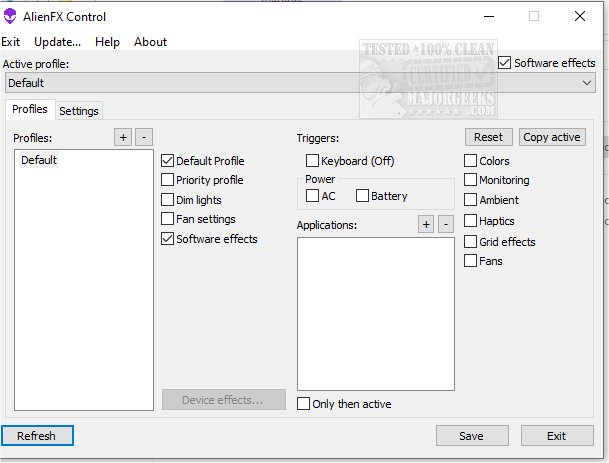
AlienFx Tools 9.6.0 has been released, providing Alienware owners with an advanced suite designed for improved control over their systems. This software suite includes features for managing system lights, fan settings, and power configurations, making it easier to customize and optimize performance. For users facing issues like excessive noise or overheating, the AlienFX Tools offer solutions to diagnose and resolve these problems.
Key components of the AlienFx Tools suite include:
- AlienFX Control: A lightweight alternative to the Alienware Command Center (AWCC), this tool (only 500kb) allows users to manage lights, including software and hardware effects, while also controlling fan speeds, monitoring temperatures, and adjusting power settings.
- AlienFX Monitor: This system monitoring tool provides real-time health data and allows users to display critical parameters directly in the system tray.
- AlienFX-CLI: A command-line interface that enables users to modify and check the status of their AlienFX lights through terminal commands.
- LightFX: An emulator for Dell's LightFX library that supports all API functions, suitable for any game compatible with LightFX/AlienFX.
- AlienFan GUI Control: A user-friendly utility for adjusting fan and power settings, allowing customization based on system temperature sensors.
- AlienFan-CLI: This command-line tool provides fans and lights control, alongside power setting adjustments from the terminal.
- AlienFX-Config: A straightforward script for backing up, restoring, or deleting configuration settings from the registry.
Additionally, users can manage profiles via the Control menu to switch between different operating modes easily, and specific profiles can be allocated to applications or triggered by key commands.
For those new to the tools, the developer has provided a detailed beginner's guide to help users get started effectively. The AlienFx Tools suite is aimed at enhancing the overall user experience for Alienware owners, emphasizing ease of use and comprehensive control over their systems.
As technology continues to evolve, future updates may include even more features, such as improved compatibility with emerging hardware, enhanced monitoring capabilities, and further integration with gaming applications, ensuring that Alienware users can maintain optimal performance and personalization
Key components of the AlienFx Tools suite include:
- AlienFX Control: A lightweight alternative to the Alienware Command Center (AWCC), this tool (only 500kb) allows users to manage lights, including software and hardware effects, while also controlling fan speeds, monitoring temperatures, and adjusting power settings.
- AlienFX Monitor: This system monitoring tool provides real-time health data and allows users to display critical parameters directly in the system tray.
- AlienFX-CLI: A command-line interface that enables users to modify and check the status of their AlienFX lights through terminal commands.
- LightFX: An emulator for Dell's LightFX library that supports all API functions, suitable for any game compatible with LightFX/AlienFX.
- AlienFan GUI Control: A user-friendly utility for adjusting fan and power settings, allowing customization based on system temperature sensors.
- AlienFan-CLI: This command-line tool provides fans and lights control, alongside power setting adjustments from the terminal.
- AlienFX-Config: A straightforward script for backing up, restoring, or deleting configuration settings from the registry.
Additionally, users can manage profiles via the Control menu to switch between different operating modes easily, and specific profiles can be allocated to applications or triggered by key commands.
For those new to the tools, the developer has provided a detailed beginner's guide to help users get started effectively. The AlienFx Tools suite is aimed at enhancing the overall user experience for Alienware owners, emphasizing ease of use and comprehensive control over their systems.
As technology continues to evolve, future updates may include even more features, such as improved compatibility with emerging hardware, enhanced monitoring capabilities, and further integration with gaming applications, ensuring that Alienware users can maintain optimal performance and personalization
AlienFx Tools 9.6.0 released
AlienFX Tools is a comprehensive suite that aims to provide Alienware owners with enhanced control over their machines; it offers various features that enable you to easily manage your system's lights, fans, and power settings.