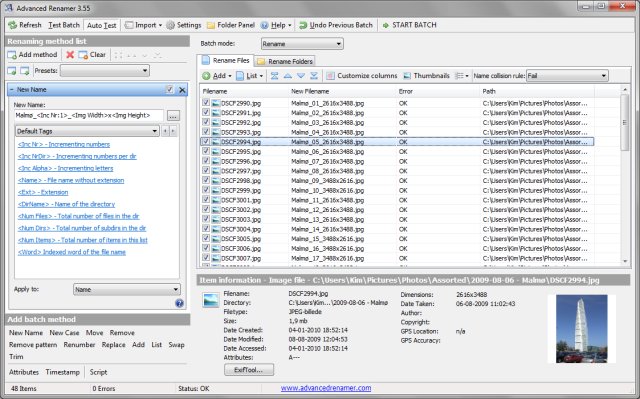
Advanced Renamer 4.21 is a free software designed to facilitate the renaming of multiple files and folders simultaneously. The program boasts a user-friendly setup, allowing users to configure advanced batch jobs using various methods applicable to a large number of files. With 13 different renaming methods, users can alter names, attributes, and timestamps all at once, as well as move or copy files to new locations based on their existing information.
The software can generate new file names by adding, removing, replacing, or altering text cases, or even creating entirely new names derived from known file information. A notable feature is the ability to preview changes in real-time before executing them, providing an opportunity to ensure accuracy. In the event of a mistaken rename, users can easily undo the entire batch operation.
Key features of Advanced Renamer include:
- Unicode support
- Real-time name preview
- Tag-based renaming
- Integration with MP3/ID3 metadata
- Use of regular expressions and wildcards
- Image renaming with EXIF support
- Thumbnail displays for images
- Video tag renaming
- Utilization of GPS information from images
- Support for both files and folders
- Batch modes for renaming, copying, and moving
- Custom method creation using JavaScript
- Ability to set file timestamps and attributes
In addition to its robust features, users may find similar tools for managing file associations, resetting folder view settings, or clearing recent items in Windows. Advanced Renamer is an ideal solution for users looking to streamline their file management process while maintaining flexibility and precision in renaming tasks.
Looking ahead, future updates could enhance the program's capabilities by introducing more automated features, improved user interfaces, and expanded support for additional file formats. This would further solidify Advanced Renamer's position as a go-to tool for efficient file management
The software can generate new file names by adding, removing, replacing, or altering text cases, or even creating entirely new names derived from known file information. A notable feature is the ability to preview changes in real-time before executing them, providing an opportunity to ensure accuracy. In the event of a mistaken rename, users can easily undo the entire batch operation.
Key features of Advanced Renamer include:
- Unicode support
- Real-time name preview
- Tag-based renaming
- Integration with MP3/ID3 metadata
- Use of regular expressions and wildcards
- Image renaming with EXIF support
- Thumbnail displays for images
- Video tag renaming
- Utilization of GPS information from images
- Support for both files and folders
- Batch modes for renaming, copying, and moving
- Custom method creation using JavaScript
- Ability to set file timestamps and attributes
In addition to its robust features, users may find similar tools for managing file associations, resetting folder view settings, or clearing recent items in Windows. Advanced Renamer is an ideal solution for users looking to streamline their file management process while maintaining flexibility and precision in renaming tasks.
Looking ahead, future updates could enhance the program's capabilities by introducing more automated features, improved user interfaces, and expanded support for additional file formats. This would further solidify Advanced Renamer's position as a go-to tool for efficient file management
Advanced Renamer 4.21 released
Advanced Renamer is a free program for renaming multiple files and folders at once.