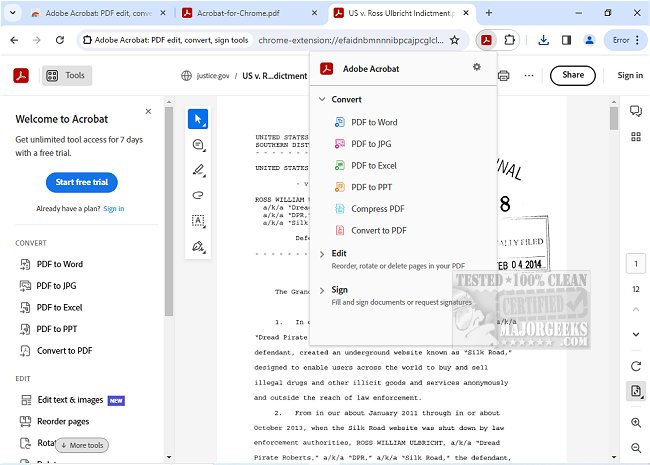
Adobe has released version 26.9.2.0 of its Acrobat extension for Google Chrome, which enhances the PDF viewing and editing experience directly within the browser. This extension grants users access to a comprehensive suite of PDF tools, allowing them to view, fill, comment, sign, convert, and compress PDF files seamlessly.
Adobe Acrobat is renowned for its robust PDF capabilities, and this extension makes it easier for users to manage their PDFs while browsing online. The free features include adding comments with sticky notes, text, and highlights, enhancing collaboration and feedback on documents. For users needing advanced functionalities, the extension also supports exporting to and from PDF formats, creating new PDFs, merging multiple PDFs, organizing existing documents, and reducing file sizes.
To use Adobe Acrobat for Chrome, users simply need to install the extension and pin it for quick access. Once installed, any PDF opened in the browser can be manipulated using the available tools. The extension ensures a smooth PDF reading experience, allowing for quick downloads or printing. Users can also store their documents online for easy access from any device.
Furthermore, the extension includes features for filling and signing forms, where users can e-sign documents with their signature or initials. Users have the flexibility to write directly on PDFs using editing tools, making it easier to personalize documents on the fly.
In summary, Adobe Acrobat for Chrome is a powerful tool that streamlines PDF management and enhances productivity by providing quick access to both free and premium features. It is ideal for anyone looking to work with PDFs more efficiently while navigating the web.
In addition to these features, future updates could potentially include enhanced collaboration tools, improved cloud integration for sharing and storing documents, and more sophisticated editing options to cater to a wider range of user needs. This would further solidify Adobe Acrobat's position as a leading solution for PDF management in the digital workspace
Adobe Acrobat is renowned for its robust PDF capabilities, and this extension makes it easier for users to manage their PDFs while browsing online. The free features include adding comments with sticky notes, text, and highlights, enhancing collaboration and feedback on documents. For users needing advanced functionalities, the extension also supports exporting to and from PDF formats, creating new PDFs, merging multiple PDFs, organizing existing documents, and reducing file sizes.
To use Adobe Acrobat for Chrome, users simply need to install the extension and pin it for quick access. Once installed, any PDF opened in the browser can be manipulated using the available tools. The extension ensures a smooth PDF reading experience, allowing for quick downloads or printing. Users can also store their documents online for easy access from any device.
Furthermore, the extension includes features for filling and signing forms, where users can e-sign documents with their signature or initials. Users have the flexibility to write directly on PDFs using editing tools, making it easier to personalize documents on the fly.
In summary, Adobe Acrobat for Chrome is a powerful tool that streamlines PDF management and enhances productivity by providing quick access to both free and premium features. It is ideal for anyone looking to work with PDFs more efficiently while navigating the web.
In addition to these features, future updates could potentially include enhanced collaboration tools, improved cloud integration for sharing and storing documents, and more sophisticated editing options to cater to a wider range of user needs. This would further solidify Adobe Acrobat's position as a leading solution for PDF management in the digital workspace
Adobe Acrobat for Chrome 26.9.2.0 released
Access Adobe Acrobat PDF tools in Chrome; view, fill, comment, sign, convert, and compress tools available.