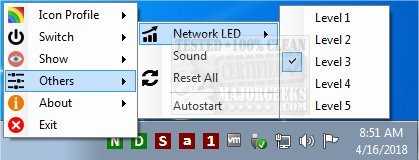
The latest version, addLEDs 2.0.0.5, has been released, enhancing the functionality of this compact system tray indicator. Designed for convenience, addLEDs allows users to easily monitor the status of various keyboard locks such as scroll, number, and caps lock, making it a practical tool for users of all kinds.
In addition to standard key indicators, addLEDs offers unique features that set it apart from similar utilities. Notably, it includes visual alerts for network activity, with adjustable sensitivity levels that provide five different settings to suit user preferences. The tool also monitors disk activity, ensuring users remain informed about their system's performance.
A particularly useful feature is the ability to enable or disable scroll, number, and caps locks using the mouse. This is especially beneficial for users whose keyboards may be malfunctioning or have damaged keys, allowing them to maintain productivity without the immediate need for replacement.
Furthermore, addLEDs offers customization options, enabling users to change the colors of the indicators and adjust transparency settings to fit their aesthetic preferences.
In summary, addLEDs 2.0.0.5 is a versatile utility that not only simplifies keyboard status monitoring but also enhances user experience with customizable features and additional indicators for network and disk activity. This makes it an essential tool for anyone looking to improve their workflow and system awareness
In addition to standard key indicators, addLEDs offers unique features that set it apart from similar utilities. Notably, it includes visual alerts for network activity, with adjustable sensitivity levels that provide five different settings to suit user preferences. The tool also monitors disk activity, ensuring users remain informed about their system's performance.
A particularly useful feature is the ability to enable or disable scroll, number, and caps locks using the mouse. This is especially beneficial for users whose keyboards may be malfunctioning or have damaged keys, allowing them to maintain productivity without the immediate need for replacement.
Furthermore, addLEDs offers customization options, enabling users to change the colors of the indicators and adjust transparency settings to fit their aesthetic preferences.
In summary, addLEDs 2.0.0.5 is a versatile utility that not only simplifies keyboard status monitoring but also enhances user experience with customizable features and additional indicators for network and disk activity. This makes it an essential tool for anyone looking to improve their workflow and system awareness
addLEDs 2.0.0.5 released
addLEDs is a tiny systray indicator that provides at-a-glance views for scroll, number, caps lock and more.