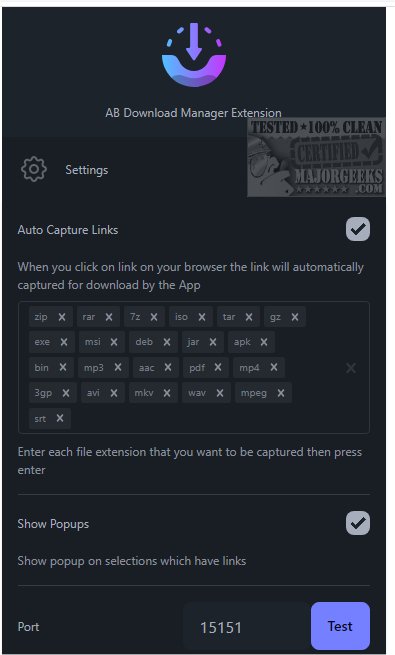
The recently released AB Download Manager version 1.10.3 is designed to simplify and enhance the file downloading experience from various online sources. This user-friendly tool caters to a wide range of needs, whether you are downloading documents, images, videos, or software, by streamlining the process for efficiency.
User-Friendly Interface
The application boasts an intuitive and visually appealing interface, featuring a sleek dark mode that not only enhances aesthetics but also reduces eye strain during long usage sessions, particularly in low-light conditions. This thoughtful design aims to improve the overall user experience, making file downloads both efficient and enjoyable.
Fast Downloading Capabilities
AB Download Manager is engineered to optimize download speed, utilizing multiple connections to boost speeds by up to 500% compared to standard downloading methods. This powerful capability allows users to manage and organize their downloads effectively, ensuring quick access to files.
Download Queue Management
A key feature of AB Download Manager is its ability to create and manage download queues. Users can line up multiple files for sequential downloading, which is particularly useful for handling large datasets or multiple files at once. This feature minimizes interruptions and streamlines the downloading process.
Download Scheduling
Additionally, the application includes a scheduling feature, allowing users to set specific times for downloads to start and stop automatically. This is ideal for optimizing internet usage during off-peak hours or for managing downloads at specific times, providing users with more control over their downloading activities.
Speed Control
AB Download Manager also offers the ability to set download speed limits, which is crucial for users sharing their internet connection. This feature ensures that downloads do not adversely affect the overall internet performance for other users, striking a balance between download speed and network efficiency.
Conclusion
In summary, AB Download Manager is an essential tool for anyone looking to enhance their downloading experience, providing a smooth and efficient way to manage file downloads. With features like download queue management, scheduling, and speed control, users can optimize their downloading activities effortlessly. Don't miss out on incorporating this powerful application into your toolkit for fast and reliable content downloads.
Key Features of AB Download Manager:
- "Download With AB DM" option in the browser context menu
- Pop-up notifications for selected links to initiate downloads
- Automatic capture of download links and seamless integration with the AB Download Manager app
By utilizing these features, users can significantly improve their downloading experience and ensure they have access to files when needed
User-Friendly Interface
The application boasts an intuitive and visually appealing interface, featuring a sleek dark mode that not only enhances aesthetics but also reduces eye strain during long usage sessions, particularly in low-light conditions. This thoughtful design aims to improve the overall user experience, making file downloads both efficient and enjoyable.
Fast Downloading Capabilities
AB Download Manager is engineered to optimize download speed, utilizing multiple connections to boost speeds by up to 500% compared to standard downloading methods. This powerful capability allows users to manage and organize their downloads effectively, ensuring quick access to files.
Download Queue Management
A key feature of AB Download Manager is its ability to create and manage download queues. Users can line up multiple files for sequential downloading, which is particularly useful for handling large datasets or multiple files at once. This feature minimizes interruptions and streamlines the downloading process.
Download Scheduling
Additionally, the application includes a scheduling feature, allowing users to set specific times for downloads to start and stop automatically. This is ideal for optimizing internet usage during off-peak hours or for managing downloads at specific times, providing users with more control over their downloading activities.
Speed Control
AB Download Manager also offers the ability to set download speed limits, which is crucial for users sharing their internet connection. This feature ensures that downloads do not adversely affect the overall internet performance for other users, striking a balance between download speed and network efficiency.
Conclusion
In summary, AB Download Manager is an essential tool for anyone looking to enhance their downloading experience, providing a smooth and efficient way to manage file downloads. With features like download queue management, scheduling, and speed control, users can optimize their downloading activities effortlessly. Don't miss out on incorporating this powerful application into your toolkit for fast and reliable content downloads.
Key Features of AB Download Manager:
- "Download With AB DM" option in the browser context menu
- Pop-up notifications for selected links to initiate downloads
- Automatic capture of download links and seamless integration with the AB Download Manager app
By utilizing these features, users can significantly improve their downloading experience and ensure they have access to files when needed
AB Download Manager 1.10.3 released
AB Download Manager provides a user-friendly tool designed to help you efficiently download files from various sources on the internet.