XnConvert version 1.116.0 has been released, enhancing its reputation as a user-friendly yet powerful image conversion tool, developed by the creators of the renowned XnView and XnView MP applications. A portable version is also available for users who prefer mobile solutions.
This software supports over 400 file formats, including popular types like JPEG, TIFF, PNG, GIF, and more specialized formats such as camera raw and WebP. With its intuitive interface, users can easily navigate through various image-processing tools designed to simplify tasks like resizing, watermarking, and adjusting image properties such as contrast, brightness, and gamma levels.
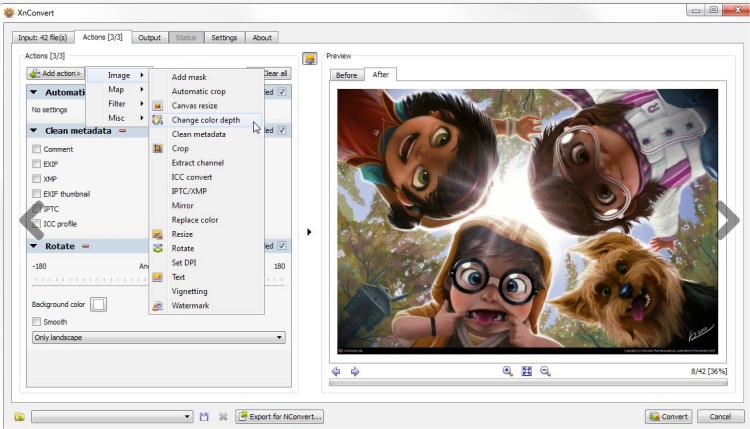
XnConvert offers a diverse range of operations, categorized into several processing modes: image, map, filter, and miscellaneous. Users can select from over 80 different operations, which include metadata editing, transformations (like rotate, crop, and resize), adjustments (brightness, contrast, saturation), and various filters (blur, emboss, sharpen). Additionally, users can apply effects such as masking, vignetting, and watermarking. The software also allows seamless exporting to NConvert for those who prefer command-line operations.
In summary, XnConvert is an essential tool for anyone looking to perform comprehensive image manipulation and conversion tasks efficiently. Its extensive features cater to both beginners and advanced users alike, making it a versatile addition to any image editing toolkit.
For those looking to explore related functionalities, they might also consider guides on editing videos with the Microsoft Photo App, restoring the Windows Photo Viewer, or troubleshooting issues with JPG files in Windows 10 and 11
This software supports over 400 file formats, including popular types like JPEG, TIFF, PNG, GIF, and more specialized formats such as camera raw and WebP. With its intuitive interface, users can easily navigate through various image-processing tools designed to simplify tasks like resizing, watermarking, and adjusting image properties such as contrast, brightness, and gamma levels.
XnConvert offers a diverse range of operations, categorized into several processing modes: image, map, filter, and miscellaneous. Users can select from over 80 different operations, which include metadata editing, transformations (like rotate, crop, and resize), adjustments (brightness, contrast, saturation), and various filters (blur, emboss, sharpen). Additionally, users can apply effects such as masking, vignetting, and watermarking. The software also allows seamless exporting to NConvert for those who prefer command-line operations.
In summary, XnConvert is an essential tool for anyone looking to perform comprehensive image manipulation and conversion tasks efficiently. Its extensive features cater to both beginners and advanced users alike, making it a versatile addition to any image editing toolkit.
For those looking to explore related functionalities, they might also consider guides on editing videos with the Microsoft Photo App, restoring the Windows Photo Viewer, or troubleshooting issues with JPG files in Windows 10 and 11
XnConvert 1.116.0 released
XnConvert was developed to be a simple yet powerful tool that allows you to convert images easily. From the author of the popular XnView and XnView MP. Portable version is also available.