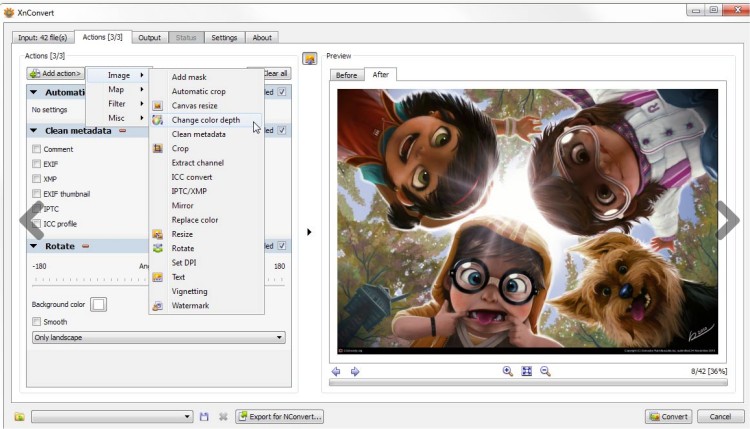
XnConvert version 1.112.0 has been released, enhancing the capabilities of this powerful image conversion tool. Created by the developers of the well-known XnView and XnView MP applications, XnConvert is designed to simplify the image conversion process while offering a range of advanced features. A portable version is also available for users who prefer flexibility.
The application supports over 400 file formats, including popular ones like JPEG, TIFF, PNG, GIF, and even camera raw formats, making it a versatile choice for various image processing tasks. XnConvert's user interface is straightforward, allowing users to navigate and utilize its features with ease.
Key functionalities include:
- Image processing options such as resizing, watermarking, and adjusting brightness, contrast, or gamma.
- A variety of filters and effects like masking, cropping, and mirroring.
- Support for different processing modes: image, map, filter, and miscellaneous.
- The ability to combine over 80 distinct operations, including metadata editing, transformations (rotate, crop, resize), adjustments (brightness, contrast, saturation), and various filters and effects.
Additionally, users can seamlessly export their projects to NConvert for command line operations, enhancing automation and efficiency.
XnConvert stands out not only for its wide range of features but also for its intuitive design, making it suitable for both novice and experienced users looking to manipulate images effectively.
In summary, XnConvert 1.112.0 offers a robust and user-friendly solution for image conversion and processing, with extensive format support and a wealth of editing tools, ideal for anyone needing to manage their images efficiently
The application supports over 400 file formats, including popular ones like JPEG, TIFF, PNG, GIF, and even camera raw formats, making it a versatile choice for various image processing tasks. XnConvert's user interface is straightforward, allowing users to navigate and utilize its features with ease.
Key functionalities include:
- Image processing options such as resizing, watermarking, and adjusting brightness, contrast, or gamma.
- A variety of filters and effects like masking, cropping, and mirroring.
- Support for different processing modes: image, map, filter, and miscellaneous.
- The ability to combine over 80 distinct operations, including metadata editing, transformations (rotate, crop, resize), adjustments (brightness, contrast, saturation), and various filters and effects.
Additionally, users can seamlessly export their projects to NConvert for command line operations, enhancing automation and efficiency.
XnConvert stands out not only for its wide range of features but also for its intuitive design, making it suitable for both novice and experienced users looking to manipulate images effectively.
In summary, XnConvert 1.112.0 offers a robust and user-friendly solution for image conversion and processing, with extensive format support and a wealth of editing tools, ideal for anyone needing to manage their images efficiently
XnConvert 1.112.0 released
XnConvert was developed to be a simple yet powerful tool that allows you to convert images easily. From the author of the popular XnView and XnView MP. Portable version is also available.