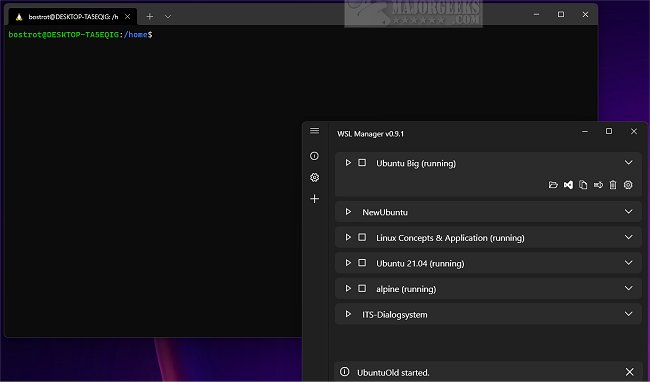
The WSL Distro Manager 2.6.0 has been released, providing users with an intuitive graphical interface for managing Windows Subsystem for Linux (WSL) distributions. This tool simplifies various tasks such as backing up and restoring distributions, configuring settings, installing and uninstalling distributions, and updating them—all with a single click. Additionally, WSL Distro Manager includes features that enhance the overall WSL experience, like the ability to share distributions across multiple machines and automate repetitive tasks through quick actions.
Key features of WSL Distro Manager include:
- Management of WSL instances
- The capability to download and use Docker images as WSL instances without needing Docker
- Quick Actions for executing predefined scripts for fast configurations
- Support for downloading and using Turnkey or other LXC containers (currently in experimental stages, with successful tests on platforms like Turnkey WordPress)
- The option to utilize personal repositories for root filesystem or LXC containers
This utility is designed to cater to both beginners and experts, ensuring that all users can maximize their experience with WSL.
Furthermore, as the WSL ecosystem continues to evolve, users can anticipate more integrations and features that enhance functionality and streamline workflows. With ongoing updates, WSL Distro Manager is poised to become an essential tool for developers and system administrators working within a Windows environment, enabling seamless Linux integration and management.
For those interested, additional resources are available, including guides on the best Linux distributions for Windows users and instructions on how to install Linux on Windows 10/11
Key features of WSL Distro Manager include:
- Management of WSL instances
- The capability to download and use Docker images as WSL instances without needing Docker
- Quick Actions for executing predefined scripts for fast configurations
- Support for downloading and using Turnkey or other LXC containers (currently in experimental stages, with successful tests on platforms like Turnkey WordPress)
- The option to utilize personal repositories for root filesystem or LXC containers
This utility is designed to cater to both beginners and experts, ensuring that all users can maximize their experience with WSL.
Furthermore, as the WSL ecosystem continues to evolve, users can anticipate more integrations and features that enhance functionality and streamline workflows. With ongoing updates, WSL Distro Manager is poised to become an essential tool for developers and system administrators working within a Windows environment, enabling seamless Linux integration and management.
For those interested, additional resources are available, including guides on the best Linux distributions for Windows users and instructions on how to install Linux on Windows 10/11
WSL Distro Manager 2.6.0 released
WSL Distro Manager allows Windows Subsystem for Linux distribution management via a user-friendly graphical interface.