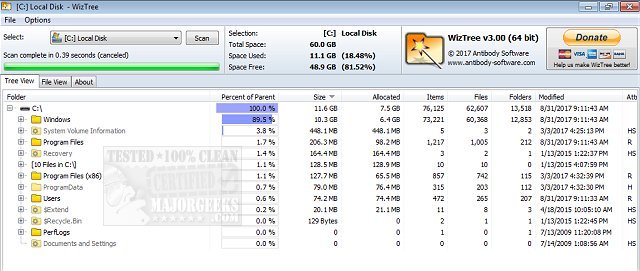
WizTree is a powerful and efficient disk space analyzer designed to help users quickly identify which files and folders are consuming the most storage on their hard drives. As a free and lightweight tool for Windows, WizTree stands out in the crowded field of disk management software by delivering rapid results and an intuitive user experience.
Why Choose WizTree?
The primary advantage of WizTree lies in its speed. Unlike traditional disk analyzers that scan files sequentially, WizTree utilizes a unique approach by scanning the Master File Table (MFT) on NTFS-formatted drives. This allows it to generate insights about storage usage in a fraction of the time that other tools take. Moreover, WizTree supports a variety of file systems, including FAT, FAT32, and external storage devices like USB drives and cameras.
Visual and Functional Features
WizTree offers a visually appealing treemap view, which presents storage usage in an easily comprehensible manner. Users can instantly spot large files or folders that may be cluttering their drives. Key features include:
- Disk Space Management: Quickly locate space-hogging files and folders.
- Treemap Visualization: A live, color-coded, zoomable overview of storage.
- Top 1000 Files: Identify your largest files effortlessly.
- Duplicate Finder: Eliminate unnecessary duplicates to free up space.
- CSV Export: Track changes or share scan results with others.
- Flexible Sorting & Filtering: Search files by various criteria, including type and size.
- Batch Deletion: Remove unwanted files directly from the interface.
- Non-NTFS Support: Clean up external and network drives as well.
Who Can Benefit?
WizTree caters to a wide range of users, from casual computer users looking to free up space for new games to professionals needing to optimize their system's performance. Its fast scanning capabilities and user-friendly interface make it accessible for all, regardless of tech expertise.
What’s New in Version 4.34?
The latest version includes enhanced duplicate file detection and improved support for high DPI displays. New filtering options and convenient drag-and-drop functionality further enrich the user experience, making it easier to manage files effectively.
Performance Highlights
WizTree is renowned for its speed, often hailed as the fastest disk space analyzer available. Its direct reading from the MFT makes scanning feel almost instantaneous, ensuring users spend less time waiting and more time enjoying a decluttered storage environment.
Cost and Accessibility
WizTree is available for free for personal use, while businesses can access commercial licenses or supporter codes to unlock additional features. This model supports continued development and innovation in the software.
Conclusion
WizTree is a must-have tool for anyone serious about managing disk space efficiently. Its combination of speed, simplicity, and powerful functionality makes it an essential resource for both tech-savvy individuals and everyday users. Download WizTree today, and experience how it can revolutionize your approach to digital storage management.
Further Reading:
- Compare disk cleaners: CCleaner vs. Wise Disk Cleaner vs. PrivaZer.
- Explore automated file deletion with Storage Sense in Windows 10.
- Learn how to clean up the WinSxS folder in Windows 10.
- Understand the $Windows.~Bt folder and whether it can be deleted
Why Choose WizTree?
The primary advantage of WizTree lies in its speed. Unlike traditional disk analyzers that scan files sequentially, WizTree utilizes a unique approach by scanning the Master File Table (MFT) on NTFS-formatted drives. This allows it to generate insights about storage usage in a fraction of the time that other tools take. Moreover, WizTree supports a variety of file systems, including FAT, FAT32, and external storage devices like USB drives and cameras.
Visual and Functional Features
WizTree offers a visually appealing treemap view, which presents storage usage in an easily comprehensible manner. Users can instantly spot large files or folders that may be cluttering their drives. Key features include:
- Disk Space Management: Quickly locate space-hogging files and folders.
- Treemap Visualization: A live, color-coded, zoomable overview of storage.
- Top 1000 Files: Identify your largest files effortlessly.
- Duplicate Finder: Eliminate unnecessary duplicates to free up space.
- CSV Export: Track changes or share scan results with others.
- Flexible Sorting & Filtering: Search files by various criteria, including type and size.
- Batch Deletion: Remove unwanted files directly from the interface.
- Non-NTFS Support: Clean up external and network drives as well.
Who Can Benefit?
WizTree caters to a wide range of users, from casual computer users looking to free up space for new games to professionals needing to optimize their system's performance. Its fast scanning capabilities and user-friendly interface make it accessible for all, regardless of tech expertise.
What’s New in Version 4.34?
The latest version includes enhanced duplicate file detection and improved support for high DPI displays. New filtering options and convenient drag-and-drop functionality further enrich the user experience, making it easier to manage files effectively.
Performance Highlights
WizTree is renowned for its speed, often hailed as the fastest disk space analyzer available. Its direct reading from the MFT makes scanning feel almost instantaneous, ensuring users spend less time waiting and more time enjoying a decluttered storage environment.
Cost and Accessibility
WizTree is available for free for personal use, while businesses can access commercial licenses or supporter codes to unlock additional features. This model supports continued development and innovation in the software.
Conclusion
WizTree is a must-have tool for anyone serious about managing disk space efficiently. Its combination of speed, simplicity, and powerful functionality makes it an essential resource for both tech-savvy individuals and everyday users. Download WizTree today, and experience how it can revolutionize your approach to digital storage management.
Further Reading:
- Compare disk cleaners: CCleaner vs. Wise Disk Cleaner vs. PrivaZer.
- Explore automated file deletion with Storage Sense in Windows 10.
- Learn how to clean up the WinSxS folder in Windows 10.
- Understand the $Windows.~Bt folder and whether it can be deleted
WizTree 4.34 released
WizTree is a disk space analyzer for quickly scanning your entire hard drive and showing you which files and folders are using the most disk space.