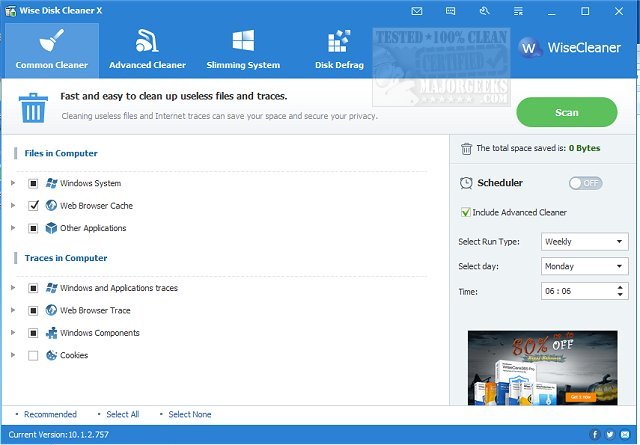
Wise Disk Cleaner is a free and user-friendly application designed to help users reclaim disk space and improve their computer's performance. The latest version, 11.3.9.859, introduces a streamlined experience for users looking to tackle issues related to storage capacity and system speed. A video tutorial is also available to guide users through its features.
Why Choose Wise Disk Cleaner?
As Windows systems accumulate unnecessary files over time, Wise Disk Cleaner provides an effective solution by thoroughly scanning for and removing various types of digital clutter. Its key features include:
- Deep Junk File Removal: The tool eliminates temporary files, system logs, old downloads, and other space-consuming data.
- Privacy Protection: It securely wipes browsing history, cookies, and cached data from all major web browsers to safeguard user privacy.
- Disk Defragmentation & Optimization: In addition to cleaning, it also defragments and reorganizes your disk, enhancing overall performance.
- Customizable & Fast: Users can select what they wish to clean, with the application providing rapid scans that do not hinder system performance.
- Automated Maintenance: The scheduling feature allows for automatic cleanups, whether daily, weekly, or monthly, ensuring continuous optimization without manual intervention.
Practical Usage of Wise Disk Cleaner
For those frequently encountering low disk space warnings, Wise Disk Cleaner can recover substantial storage within minutes. Gamers can clear game caches to free up space for new installations, while office users will notice enhanced speed when handling large files. The tool also addresses privacy concerns by allowing quick removal of sensitive browsing data.
Conclusion: A Must-Have Tool
Overall, Wise Disk Cleaner stands out as an essential application for anyone intent on maintaining a fast, organized, and optimized computer. Its lightweight design, comprehensive cleaning capabilities, and focus on user privacy make it a valuable addition to any software toolkit. Users are encouraged to try it out and experience the noticeable performance improvements firsthand.
Related Resources:
- Comparison of Drive Cleaning Tools: CCleaner vs. Wise Disk Cleaner vs. PrivaZer.
- Guide to Using Storage Sense for Automatic Junk File Deletion in Windows 10 & 11.
In summary, if you're looking to enhance your PC performance and free up storage space, Wise Disk Cleaner is a smart choice that combines efficiency and simplicity in one powerful package
Why Choose Wise Disk Cleaner?
As Windows systems accumulate unnecessary files over time, Wise Disk Cleaner provides an effective solution by thoroughly scanning for and removing various types of digital clutter. Its key features include:
- Deep Junk File Removal: The tool eliminates temporary files, system logs, old downloads, and other space-consuming data.
- Privacy Protection: It securely wipes browsing history, cookies, and cached data from all major web browsers to safeguard user privacy.
- Disk Defragmentation & Optimization: In addition to cleaning, it also defragments and reorganizes your disk, enhancing overall performance.
- Customizable & Fast: Users can select what they wish to clean, with the application providing rapid scans that do not hinder system performance.
- Automated Maintenance: The scheduling feature allows for automatic cleanups, whether daily, weekly, or monthly, ensuring continuous optimization without manual intervention.
Practical Usage of Wise Disk Cleaner
For those frequently encountering low disk space warnings, Wise Disk Cleaner can recover substantial storage within minutes. Gamers can clear game caches to free up space for new installations, while office users will notice enhanced speed when handling large files. The tool also addresses privacy concerns by allowing quick removal of sensitive browsing data.
Conclusion: A Must-Have Tool
Overall, Wise Disk Cleaner stands out as an essential application for anyone intent on maintaining a fast, organized, and optimized computer. Its lightweight design, comprehensive cleaning capabilities, and focus on user privacy make it a valuable addition to any software toolkit. Users are encouraged to try it out and experience the noticeable performance improvements firsthand.
Related Resources:
- Comparison of Drive Cleaning Tools: CCleaner vs. Wise Disk Cleaner vs. PrivaZer.
- Guide to Using Storage Sense for Automatic Junk File Deletion in Windows 10 & 11.
In summary, if you're looking to enhance your PC performance and free up storage space, Wise Disk Cleaner is a smart choice that combines efficiency and simplicity in one powerful package
Wise Disk Cleaner 11.3.9.859 released
Wise Disk Cleaner is a free, user-friendly, fast, and easy-to-use application developed to free up disk space. Video tutorial available.