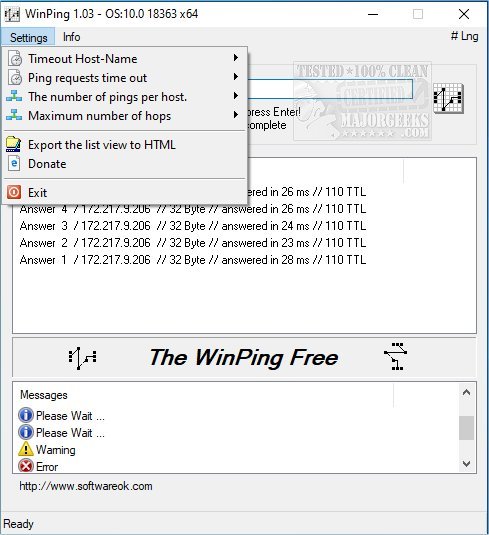
WinPing 2.92 has been released, offering users the capability to assess and monitor connections both within their local network and across the internet. This tool is particularly beneficial for individuals managing internet servers, such as game servers, as it allows for accurate measurement of response times. Users generally prefer shorter response times, which can significantly enhance their online experience.
WinPing stands out as a straightforward alternative to the standard Windows Ping, featuring customizable options for conducting ping tests. Users can select specific host query intervals, the number of pings, and set time limits for these tests. Additionally, WinPing includes an auto-completion feature for pinged servers and allows users to export results in HTML format for easy comparison of ping times.
However, users may encounter a "Failed – Virus Detected" error, which is not uncommon with network utility tools.
To further assist users, guides and resources are available, including topics such as how to use the Ping command in Windows, troubleshooting slow internet issues on Windows 10 and 11, improving wireless network performance, and understanding Windows Auto-Tuning.
In conclusion, WinPing 2.92 is a powerful tool for anyone needing to monitor network performance, with features that enhance usability and efficiency. As internet connectivity continues to be crucial for various applications, tools like WinPing can help users optimize their online experiences and troubleshoot connectivity issues effectively
WinPing stands out as a straightforward alternative to the standard Windows Ping, featuring customizable options for conducting ping tests. Users can select specific host query intervals, the number of pings, and set time limits for these tests. Additionally, WinPing includes an auto-completion feature for pinged servers and allows users to export results in HTML format for easy comparison of ping times.
However, users may encounter a "Failed – Virus Detected" error, which is not uncommon with network utility tools.
To further assist users, guides and resources are available, including topics such as how to use the Ping command in Windows, troubleshooting slow internet issues on Windows 10 and 11, improving wireless network performance, and understanding Windows Auto-Tuning.
In conclusion, WinPing 2.92 is a powerful tool for anyone needing to monitor network performance, with features that enhance usability and efficiency. As internet connectivity continues to be crucial for various applications, tools like WinPing can help users optimize their online experiences and troubleshoot connectivity issues effectively
WinPing 2.92 released
WinPing provides you with the ability to check or measure connections in your local network as well as on the internet.