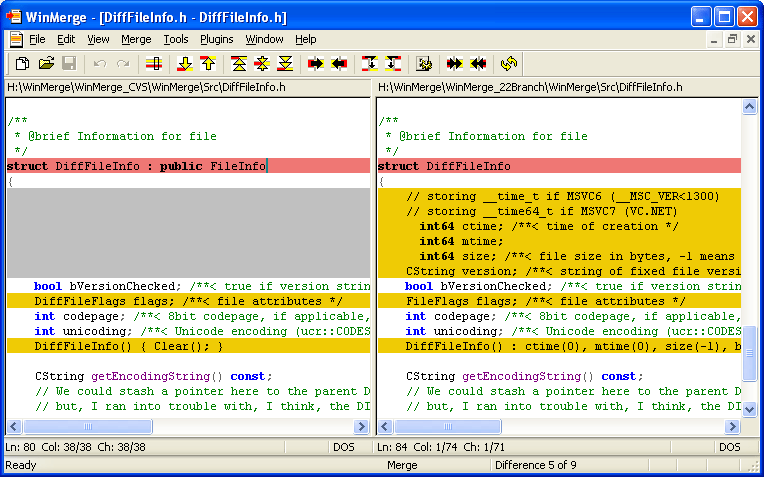
WinMerge 2.16.58 has been released, offering an updated version of this open-source visual text file comparison and merging tool for Windows users. WinMerge is particularly useful for developers and project managers as it helps identify changes between different versions of files and facilitates the merging of those changes.
Key features of WinMerge include:
- A visual interface for comparing and merging text files.
- A flexible editor that supports syntax highlighting.
- Compatibility with various text file formats including DOS, UNIX, and MAC.
- Support for Unicode, allowing for the comparison of files in multiple languages.
- A Difference pane that displays changes side by side.
- A Location pane for easy navigation of the compared files.
- In-line difference highlighting to pinpoint specific changes within lines.
- File filtering capabilities during directory comparisons.
- Detection of moved lines during file comparisons.
- Integration with the Windows shell for easy access.
- Basic integration with Visual SourceSafe and Rational ClearCase for version control.
- Support for archive files using 7-Zip.
- A plugin architecture for extending functionality.
- A localizable interface through resource DLLs.
- An HTML-based manual for user guidance.
In addition to these features, users may find related resources, such as how to customize the "Open With Notepad" context menu or manage Microsoft WordPad in Windows 10 and 11, helpful for enhancing their overall Windows experience.
As software continues to evolve, WinMerge remains a valuable tool for anyone needing efficient file comparison and merging capabilities, especially in collaborative or version-controlled environments. Future updates may further enhance its features and improve usability, cementing its place in the toolkit of developers and tech enthusiasts alike
Key features of WinMerge include:
- A visual interface for comparing and merging text files.
- A flexible editor that supports syntax highlighting.
- Compatibility with various text file formats including DOS, UNIX, and MAC.
- Support for Unicode, allowing for the comparison of files in multiple languages.
- A Difference pane that displays changes side by side.
- A Location pane for easy navigation of the compared files.
- In-line difference highlighting to pinpoint specific changes within lines.
- File filtering capabilities during directory comparisons.
- Detection of moved lines during file comparisons.
- Integration with the Windows shell for easy access.
- Basic integration with Visual SourceSafe and Rational ClearCase for version control.
- Support for archive files using 7-Zip.
- A plugin architecture for extending functionality.
- A localizable interface through resource DLLs.
- An HTML-based manual for user guidance.
In addition to these features, users may find related resources, such as how to customize the "Open With Notepad" context menu or manage Microsoft WordPad in Windows 10 and 11, helpful for enhancing their overall Windows experience.
As software continues to evolve, WinMerge remains a valuable tool for anyone needing efficient file comparison and merging capabilities, especially in collaborative or version-controlled environments. Future updates may further enhance its features and improve usability, cementing its place in the toolkit of developers and tech enthusiasts alike
WinMerge 2.16.58 released
WinMerge is an Open Source visual text file differentiating and merging tool for Windows.