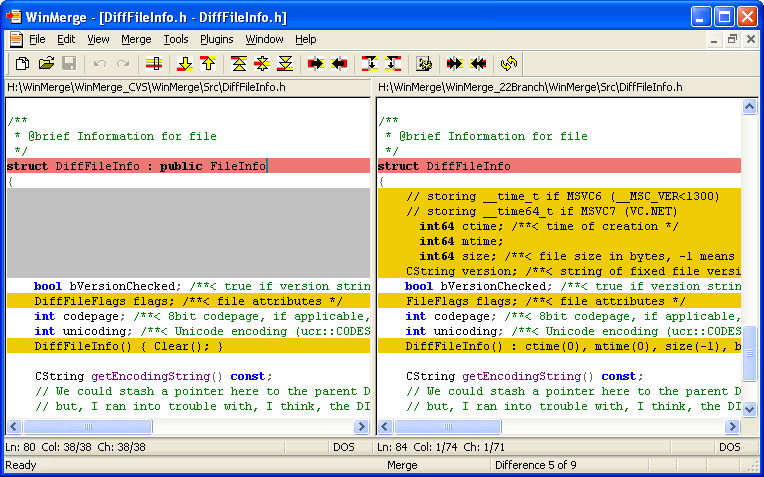
WinMerge 2.16.56 has been released, enhancing its functionality as an open-source visual text file differentiation and merging tool for Windows. This software is particularly useful for developers and project managers who need to identify changes between different versions of files and merge them accordingly.
Key features of WinMerge include:
- Visual differentiation and merging of text files, allowing users to see changes at a glance.
- A flexible editor that supports syntax highlighting, making it easier to read and understand code.
- Compatibility with various text file formats, including DOS, UNIX, and MAC.
- Unicode support, enabling users to work with a wide range of character sets.
- A Difference pane that displays current differences side-by-side in two vertical panes for easy comparison.
- A Location pane that acts as a map of the files being compared, providing additional context.
- Inline highlighting of differences within lines for quick identification of changes.
- File filters for directory comparisons, making it easier to manage large sets of files.
- Detection of moved lines in file comparisons, helping users track changes more effectively.
- Integration with the Windows shell for seamless access.
- Basic integration with version control systems like Visual SourceSafe and Rational ClearCase.
- Support for archive files via 7-Zip.
- An extensible plugin system for additional functionality.
- A localizable interface that can be adjusted via resource DLLs.
- Comprehensive HTML-based documentation to assist users.
In addition to these features, WinMerge serves as a valuable tool for collaborative projects, allowing teams to streamline their workflow by efficiently managing file changes. Whether working on coding projects, documentation, or any text-based files, WinMerge provides essential tools for effective version control and merging.
For users looking to enhance their experience, there are also similar tutorials available, such as adding 'Open With Notepad' to the context menu, installing or uninstalling Microsoft WordPad on Windows 10 and 11, and guides on how to run and reset WordPad. These resources can help users optimize their text editing and file management tasks on Windows systems
Key features of WinMerge include:
- Visual differentiation and merging of text files, allowing users to see changes at a glance.
- A flexible editor that supports syntax highlighting, making it easier to read and understand code.
- Compatibility with various text file formats, including DOS, UNIX, and MAC.
- Unicode support, enabling users to work with a wide range of character sets.
- A Difference pane that displays current differences side-by-side in two vertical panes for easy comparison.
- A Location pane that acts as a map of the files being compared, providing additional context.
- Inline highlighting of differences within lines for quick identification of changes.
- File filters for directory comparisons, making it easier to manage large sets of files.
- Detection of moved lines in file comparisons, helping users track changes more effectively.
- Integration with the Windows shell for seamless access.
- Basic integration with version control systems like Visual SourceSafe and Rational ClearCase.
- Support for archive files via 7-Zip.
- An extensible plugin system for additional functionality.
- A localizable interface that can be adjusted via resource DLLs.
- Comprehensive HTML-based documentation to assist users.
In addition to these features, WinMerge serves as a valuable tool for collaborative projects, allowing teams to streamline their workflow by efficiently managing file changes. Whether working on coding projects, documentation, or any text-based files, WinMerge provides essential tools for effective version control and merging.
For users looking to enhance their experience, there are also similar tutorials available, such as adding 'Open With Notepad' to the context menu, installing or uninstalling Microsoft WordPad on Windows 10 and 11, and guides on how to run and reset WordPad. These resources can help users optimize their text editing and file management tasks on Windows systems
WinMerge 2.16.56 released
WinMerge is an Open Source visual text file differentiating and merging tool for Windows.