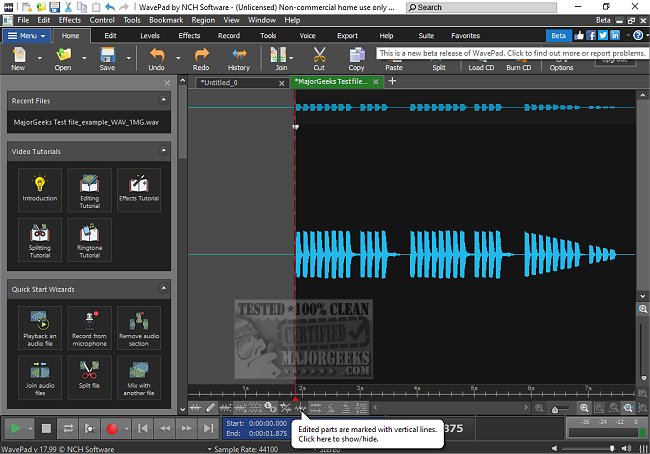
WavePad, an advanced audio editing software developed by NCH Software, has recently launched its 24.23 version, bringing a host of features tailored for both professionals and audio enthusiasts. Whether you're engaged in music production, podcasting, or simply refining a recording, WavePad offers a robust set of tools suitable for various tasks.
Why WavePad Stands Out
WavePad is not merely an ordinary audio editor; it serves as an all-encompassing toolkit capable of managing everything from basic edits to intricate sound restoration. Its intuitive interface ensures that users, regardless of experience level, can navigate and utilize its extensive functionalities with ease. For instance, users can effortlessly remove unwanted background noise, add effects like reverb, and process numerous audio files in batches—all while supporting a wide range of audio formats.
Key Features of WavePad
The software boasts a comprehensive suite of editing tools, including cut, copy, paste, delete, insert, silence, auto-trim, compression, and pitch shifting. Users can apply various effects, such as amplification, normalization, equalization, and reverb, and can further enhance their audio with VST plugins for additional customization. WavePad supports multiple audio formats, including MP3, WAV, FLAC, OGG, AAC, AMR, and WMA. Its batch processing capabilities make it an ideal choice for podcasters and musicians who need to handle multiple files simultaneously. Advanced features like spectral analysis (FFT), voice changing, and speech synthesis contribute to detailed audio manipulation, while restoration tools help eliminate noise, clicks, and hums. For those working with video content, WavePad allows easy extraction and editing of audio tracks, complete with visual aids like waveforms and FFT displays. The software also includes a built-in library of royalty-free sounds and music clips. Importantly, WavePad is accessible across various platforms, including Windows, macOS, iOS, Android, and Kindle, facilitating audio editing on the go.
Pros and Cons
Pros:
- User-friendly interface with powerful tools
- Extensive support for various file formats
- Advanced features such as spectral analysis and batch processing
- VST plugin compatibility for professional audio tasks
- Multi-platform availability
Cons:
- The free version has limited advanced features
- The interface may appear somewhat outdated compared to newer audio editors, though it remains functional
- Some tools necessitate an upgrade to the Master's Edition for full access
Conclusion
WavePad is an impressive audio editor that combines ease of use with a wealth of features, catering to both casual users and professionals working on sophisticated audio projects. While the free version has its limitations, upgrading to the Master's Edition unlocks numerous professional-grade tools that justify the investment. For those seeking a reliable, feature-rich audio editing solution without a steep learning curve, WavePad is undoubtedly a top contender.
Related Topics:
- Enabling Windows Sonic Surround Sound on Windows 10 & 11
- Diagnosing Sound Delays, Lags, and Audio Latency in Windows 10 & 11
- Solutions for Low Computer Sound Volume on Windows
- Fixing Audio Issues on Window
Why WavePad Stands Out
WavePad is not merely an ordinary audio editor; it serves as an all-encompassing toolkit capable of managing everything from basic edits to intricate sound restoration. Its intuitive interface ensures that users, regardless of experience level, can navigate and utilize its extensive functionalities with ease. For instance, users can effortlessly remove unwanted background noise, add effects like reverb, and process numerous audio files in batches—all while supporting a wide range of audio formats.
Key Features of WavePad
The software boasts a comprehensive suite of editing tools, including cut, copy, paste, delete, insert, silence, auto-trim, compression, and pitch shifting. Users can apply various effects, such as amplification, normalization, equalization, and reverb, and can further enhance their audio with VST plugins for additional customization. WavePad supports multiple audio formats, including MP3, WAV, FLAC, OGG, AAC, AMR, and WMA. Its batch processing capabilities make it an ideal choice for podcasters and musicians who need to handle multiple files simultaneously. Advanced features like spectral analysis (FFT), voice changing, and speech synthesis contribute to detailed audio manipulation, while restoration tools help eliminate noise, clicks, and hums. For those working with video content, WavePad allows easy extraction and editing of audio tracks, complete with visual aids like waveforms and FFT displays. The software also includes a built-in library of royalty-free sounds and music clips. Importantly, WavePad is accessible across various platforms, including Windows, macOS, iOS, Android, and Kindle, facilitating audio editing on the go.
Pros and Cons
Pros:
- User-friendly interface with powerful tools
- Extensive support for various file formats
- Advanced features such as spectral analysis and batch processing
- VST plugin compatibility for professional audio tasks
- Multi-platform availability
Cons:
- The free version has limited advanced features
- The interface may appear somewhat outdated compared to newer audio editors, though it remains functional
- Some tools necessitate an upgrade to the Master's Edition for full access
Conclusion
WavePad is an impressive audio editor that combines ease of use with a wealth of features, catering to both casual users and professionals working on sophisticated audio projects. While the free version has its limitations, upgrading to the Master's Edition unlocks numerous professional-grade tools that justify the investment. For those seeking a reliable, feature-rich audio editing solution without a steep learning curve, WavePad is undoubtedly a top contender.
Related Topics:
- Enabling Windows Sonic Surround Sound on Windows 10 & 11
- Diagnosing Sound Delays, Lags, and Audio Latency in Windows 10 & 11
- Solutions for Low Computer Sound Volume on Windows
- Fixing Audio Issues on Window
Wavepad 24.23 released
WavePad is an advanced audio editing software that offers a wide range of features for professionals and enthusiasts alike.