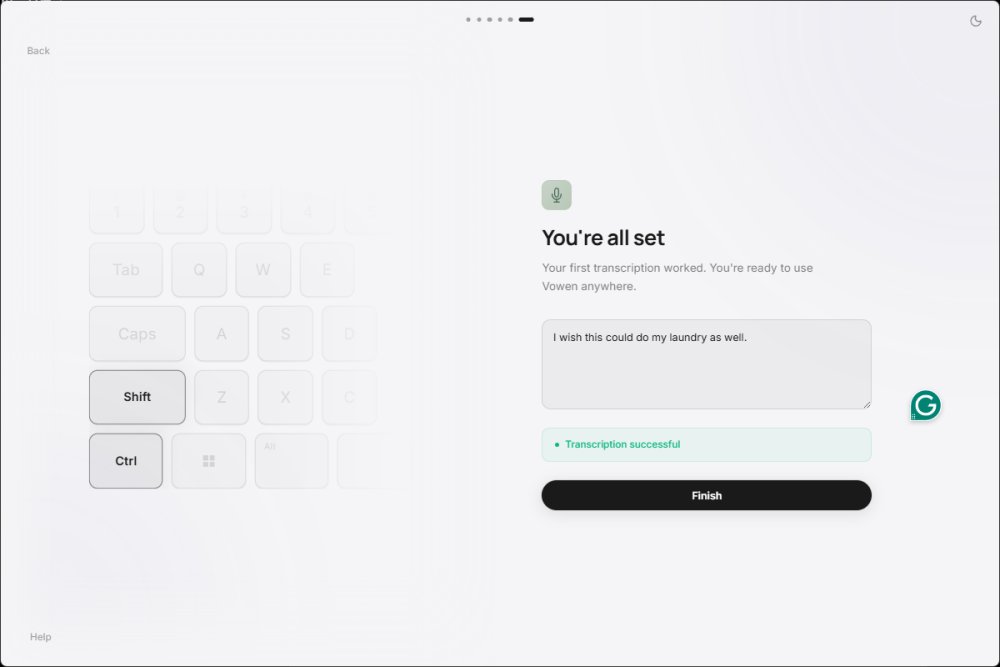
Vowen is a free, privacy-centric voice productivity application designed for both Windows and macOS. This innovative app leverages offline AI transcription technology to convert speech into text, making it an ideal tool for writers, coders, and anyone who prefers speaking over typing. A significant advantage of Vowen is its commitment to privacy; it processes dictation locally, ensuring that recordings are not sent to the cloud unless the user opts for that feature.
Core Features and Functionality
Vowen functions as a system-wide dictation and productivity tool, allowing users to dictate text into virtually any application. By holding down a designated shortcut (Control+Shift), users can effortlessly transcribe their speech into any text field, be it an email client, code editor, or chat app. The application also integrates AI assistance, meeting notes, translations, summaries, and voice commands, providing a customizable experience based on user preferences.
A notable feature is the ability to capture meeting notes. Users can record discussions during virtual meetings, and Vowen will organize the content for easy review later. This feature is especially beneficial for accessibility users or those who require a more streamlined note-taking process.
Privacy and Offline Functionality
Vowen's standout characteristic is its offline AI transcription capability, which utilizes local Whisper-based speech recognition. This feature is particularly appealing for those who handle sensitive information and prefer not to upload their data to cloud services. The application is well-suited for developers, writers, business professionals, and students who seek a reliable tool for managing private content without internet dependency.
User Experience and Setup
To get started with Vowen, users need to install the app, select their microphone, and set their dictation shortcut. Although the installation process is generally straightforward, Windows users may need to install the Microsoft Visual C++ 2010 Redistributable Package. The interface is clean and user-friendly, though beginners may require some time to familiarize themselves with the advanced features and settings.
While basic dictation is easy to use, the integration of AI services necessitates API keys, which could be overwhelming for casual users. The application also allows for voice commands and desktop automation, enabling users to perform small tasks with spoken commands, streamlining their workflow.
Limitations and Considerations
Despite its many advantages, Vowen does have limitations. Advanced features require additional setup, which may not appeal to all users. Some functionalities may feel more suited to tech-savvy individuals, while casual users might find the interface slightly complex initially. However, after a brief period of exploration, most users should feel comfortable navigating the app.
Final Thoughts
Overall, Vowen is a robust voice productivity tool that excels in providing fast, offline speech-to-text conversion while ensuring user privacy. The optional email registration and system-wide dictation capabilities enhance its usability. For power users, the ability to integrate AI tools and automate workflows adds significant value. The application stands out for its commitment to privacy and efficiency, making it an excellent choice for anyone who regularly engages in writing, coding, or multitasking during meetings.
Vowen's versatility and functionality have already proven beneficial for users, particularly those dealing with repetitive strain injuries, as evidenced by the ease of writing this review through dictation with minimal typing required. This application is definitely worth considering for anyone looking to enhance their productivity through voice input
Core Features and Functionality
Vowen functions as a system-wide dictation and productivity tool, allowing users to dictate text into virtually any application. By holding down a designated shortcut (Control+Shift), users can effortlessly transcribe their speech into any text field, be it an email client, code editor, or chat app. The application also integrates AI assistance, meeting notes, translations, summaries, and voice commands, providing a customizable experience based on user preferences.
A notable feature is the ability to capture meeting notes. Users can record discussions during virtual meetings, and Vowen will organize the content for easy review later. This feature is especially beneficial for accessibility users or those who require a more streamlined note-taking process.
Privacy and Offline Functionality
Vowen's standout characteristic is its offline AI transcription capability, which utilizes local Whisper-based speech recognition. This feature is particularly appealing for those who handle sensitive information and prefer not to upload their data to cloud services. The application is well-suited for developers, writers, business professionals, and students who seek a reliable tool for managing private content without internet dependency.
User Experience and Setup
To get started with Vowen, users need to install the app, select their microphone, and set their dictation shortcut. Although the installation process is generally straightforward, Windows users may need to install the Microsoft Visual C++ 2010 Redistributable Package. The interface is clean and user-friendly, though beginners may require some time to familiarize themselves with the advanced features and settings.
While basic dictation is easy to use, the integration of AI services necessitates API keys, which could be overwhelming for casual users. The application also allows for voice commands and desktop automation, enabling users to perform small tasks with spoken commands, streamlining their workflow.
Limitations and Considerations
Despite its many advantages, Vowen does have limitations. Advanced features require additional setup, which may not appeal to all users. Some functionalities may feel more suited to tech-savvy individuals, while casual users might find the interface slightly complex initially. However, after a brief period of exploration, most users should feel comfortable navigating the app.
Final Thoughts
Overall, Vowen is a robust voice productivity tool that excels in providing fast, offline speech-to-text conversion while ensuring user privacy. The optional email registration and system-wide dictation capabilities enhance its usability. For power users, the ability to integrate AI tools and automate workflows adds significant value. The application stands out for its commitment to privacy and efficiency, making it an excellent choice for anyone who regularly engages in writing, coding, or multitasking during meetings.
Vowen's versatility and functionality have already proven beneficial for users, particularly those dealing with repetitive strain injuries, as evidenced by the ease of writing this review through dictation with minimal typing required. This application is definitely worth considering for anyone looking to enhance their productivity through voice input
Vowen 0.4.8 released
Vowen is a free, privacy-focused voice productivity app for Windows and macOS that turns speech into text using offline AI transcription.