Vivaldi has recently released version 8.0.4033.54 of its web browser, which is developed by the original creators of the Opera Web Browser. Available for free, it is designed for both Windows and Linux operating systems. Users can download the beta version to experience the latest features.
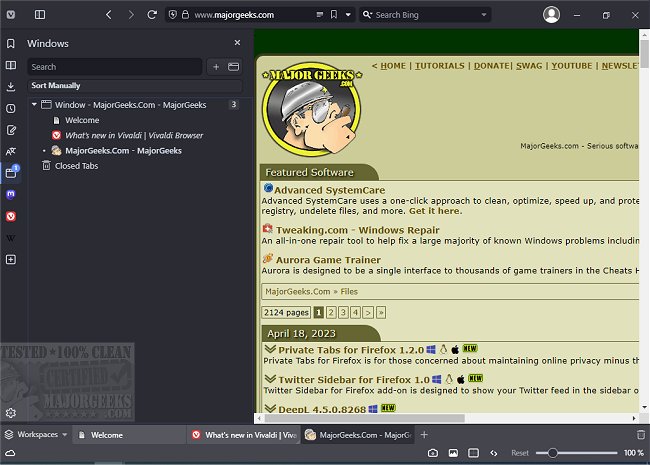
The Vivaldi browser showcases a user interface reminiscent of Google Chrome, featuring essential navigation buttons such as back, forward, refresh, and home adjacent to the address bar. New tabs can be opened easily with a "+" icon, while existing tabs can be closed using an "X" icon. A sidebar provides quick access to bookmarks, downloads, contacts, and notes, although the mail feature has not yet been implemented.
One notable aspect of Vivaldi is its customization options, particularly for users who may have difficulties reading web content. The browser allows users to adjust image visibility and cache settings to enhance loading speed. Additionally, users can zoom in or out on web pages and apply various rendering filters—such as grayscale or 3D effects—to improve readability or create a unique browsing experience.
Despite entering a competitive browser market, Vivaldi has carved out a niche for itself, attracting a dedicated user base. While its name may not be the most memorable, its functionality and user-centric features position it as a potential contender among established browsers.
As Vivaldi continues to evolve, it will be interesting to see how it adapts to user feedback and the demands of the market. With ongoing updates and enhancements, Vivaldi might not only retain its current users but also attract new ones looking for a customizable and user-friendly browsing experience.
In conclusion, Vivaldi is more than just another web browser; it represents a thoughtful approach to web navigation, catering to diverse user needs while maintaining a sleek and modern interface
The Vivaldi browser showcases a user interface reminiscent of Google Chrome, featuring essential navigation buttons such as back, forward, refresh, and home adjacent to the address bar. New tabs can be opened easily with a "+" icon, while existing tabs can be closed using an "X" icon. A sidebar provides quick access to bookmarks, downloads, contacts, and notes, although the mail feature has not yet been implemented.
One notable aspect of Vivaldi is its customization options, particularly for users who may have difficulties reading web content. The browser allows users to adjust image visibility and cache settings to enhance loading speed. Additionally, users can zoom in or out on web pages and apply various rendering filters—such as grayscale or 3D effects—to improve readability or create a unique browsing experience.
Despite entering a competitive browser market, Vivaldi has carved out a niche for itself, attracting a dedicated user base. While its name may not be the most memorable, its functionality and user-centric features position it as a potential contender among established browsers.
As Vivaldi continues to evolve, it will be interesting to see how it adapts to user feedback and the demands of the market. With ongoing updates and enhancements, Vivaldi might not only retain its current users but also attract new ones looking for a customizable and user-friendly browsing experience.
In conclusion, Vivaldi is more than just another web browser; it represents a thoughtful approach to web navigation, catering to diverse user needs while maintaining a sleek and modern interface
Vivaldi 8.0.4033.54 released
Vivaldi is a free web browser from the original Opera Web Browser founders in 1994, designed for Windows and Linux. Download the beta version here.