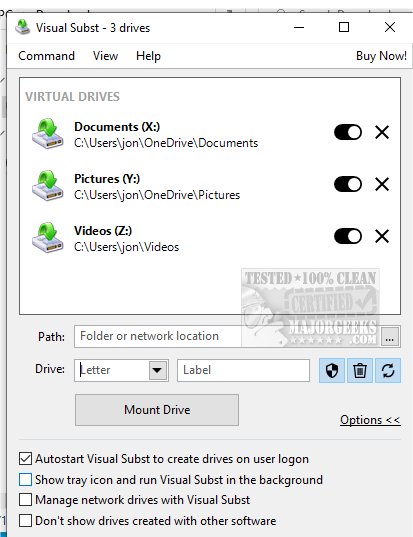
Visual Subst has launched its latest version, 6.2, featuring a user-friendly interface that simplifies the management of both virtual and network drives. This innovative application addresses key limitations of traditional commands like 'SUBST' and 'NET USE', thus enhancing user experience and efficiency in file management.
What is Visual Subst and Its Capabilities?
Visual Subst is designed to streamline the management of virtual drives, offering a solution to four major challenges faced by users of traditional drive mapping tools. It allows for easy editing of drive labels, creates User Account Control (UAC) compliant drives for applications needing elevated permissions, enables managing the Recycle Bin for deleted items, and ensures that virtual drives are automatically restored after system reboots. These enhancements significantly improve usability and convenience.
Simplifying Data Transfers and File Management
The application facilitates the creation of virtual drives from local folders, allowing users to assign custom drive letters. This feature simplifies data transfer processes between removable storage devices and enhances overall file management. Users can easily navigate their projects with organized access to virtual drives.
An Intuitive and Efficient Interface
Visual Subst prioritizes user simplicity through its streamlined interface. A well-organized list displays all added virtual drives, making navigation straightforward. The compact toolbar includes essential functions for managing drives, allowing users to add, organize, modify, or remove drives with ease. This thoughtful design minimizes complexity, enabling users to focus on their tasks.
Using Visual Subst: Key Features and Tips
When adding drives, users can only add one at a time. After a folder is loaded, a drive letter must be assigned from available options, ensuring no conflicts arise. Upon closing Visual Subst, all virtual drives are automatically dismounted, making their paths inaccessible until remounted. However, users can enable a built-in feature to load all virtual drives at startup, providing immediate access upon logging in and enhancing productivity.
Conclusion: A Game-Changer for File Management
Visual Subst is an essential tool for anyone looking to optimize their file management experience. By creating seamless shortcuts to frequently accessed folders, it revolutionizes how users handle files, significantly improving the efficiency of transferring data between fixed and removable storage. With Visual Subst, workflows become smoother and more intuitive, making it a transformative application for digital organization.
Future Enhancements and Possibilities
As Visual Subst continues to evolve, potential future enhancements may include support for additional file types, integration with cloud storage solutions, and improved collaborative features for shared drives. Such advancements would further solidify Visual Subst's position as a leader in file management solutions
What is Visual Subst and Its Capabilities?
Visual Subst is designed to streamline the management of virtual drives, offering a solution to four major challenges faced by users of traditional drive mapping tools. It allows for easy editing of drive labels, creates User Account Control (UAC) compliant drives for applications needing elevated permissions, enables managing the Recycle Bin for deleted items, and ensures that virtual drives are automatically restored after system reboots. These enhancements significantly improve usability and convenience.
Simplifying Data Transfers and File Management
The application facilitates the creation of virtual drives from local folders, allowing users to assign custom drive letters. This feature simplifies data transfer processes between removable storage devices and enhances overall file management. Users can easily navigate their projects with organized access to virtual drives.
An Intuitive and Efficient Interface
Visual Subst prioritizes user simplicity through its streamlined interface. A well-organized list displays all added virtual drives, making navigation straightforward. The compact toolbar includes essential functions for managing drives, allowing users to add, organize, modify, or remove drives with ease. This thoughtful design minimizes complexity, enabling users to focus on their tasks.
Using Visual Subst: Key Features and Tips
When adding drives, users can only add one at a time. After a folder is loaded, a drive letter must be assigned from available options, ensuring no conflicts arise. Upon closing Visual Subst, all virtual drives are automatically dismounted, making their paths inaccessible until remounted. However, users can enable a built-in feature to load all virtual drives at startup, providing immediate access upon logging in and enhancing productivity.
Conclusion: A Game-Changer for File Management
Visual Subst is an essential tool for anyone looking to optimize their file management experience. By creating seamless shortcuts to frequently accessed folders, it revolutionizes how users handle files, significantly improving the efficiency of transferring data between fixed and removable storage. With Visual Subst, workflows become smoother and more intuitive, making it a transformative application for digital organization.
Future Enhancements and Possibilities
As Visual Subst continues to evolve, potential future enhancements may include support for additional file types, integration with cloud storage solutions, and improved collaborative features for shared drives. Such advancements would further solidify Visual Subst's position as a leader in file management solutions
Visual Subst 6.2 released
Visual Subst offers an intuitive and straightforward user interface designed for effectively managing both virtual and network drives simultaneously.