Upload Remote is an advanced file-sharing application designed for seamless and secure transfers across multiple devices, including computers, smartphones, and tablets. The latest version, 2.0.1, enhances its user-friendly features and reinforces its commitment to privacy and security.
Overview of Upload Remote
Upload Remote stands out as a cross-platform solution that enables users to quickly exchange files over local networks or Wi-Fi. The application employs end-to-end encryption to ensure that all data remains exclusively on users' devices, never being transmitted to external servers. This guarantees a high level of privacy and control over shared content.
Streamlined File-Sharing Experience
One of the key features of Upload Remote is its streamlined file-sharing process. The application allows senders to directly push files into the receiver's Inbox folder without requiring the recipient's confirmation. This efficient method saves time and minimizes unnecessary interactions, enhancing the overall user experience.
The interface of Upload Remote is organized into three main tabs for easy navigation:
- Inbox Tab: Displays incoming files with new uploads at the top, similar to an email application. Users can manage files by opening, saving, sharing, or deleting them directly from this tab.
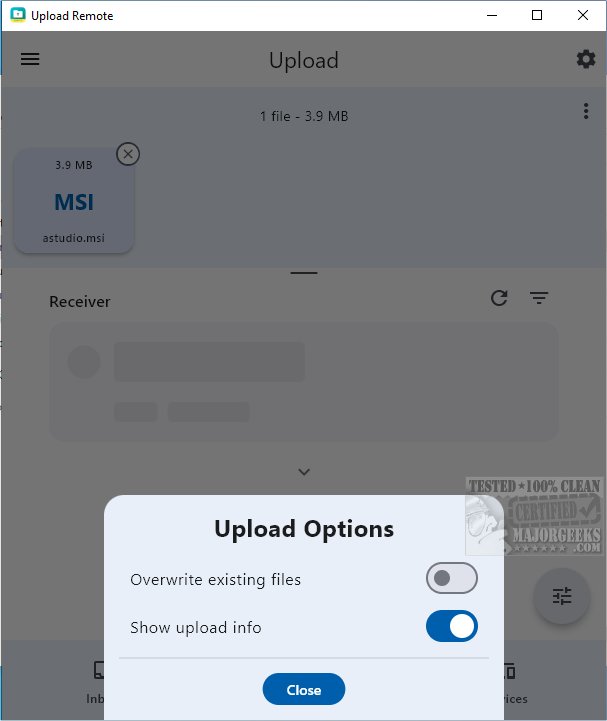
- Upload Tab: Allows users to select files to send while listing nearby devices for easy access. Users simply tap on a device to initiate the upload.
- Devices Tab: Simplifies management of paired devices, enabling users to reorder the list, edit device names, set permissions, or remove devices as needed.
User-Friendly Notifications and Permissions
To keep users informed, Upload Remote includes an "unread" indicator for recently uploaded files, ensuring that new content is easily noticeable. Additionally, if a sender attempts to upload files with names that already exist in the Inbox, the application prompts a confirmation dialog to prevent accidental overwrites or duplications.
For enhanced security, Upload Remote allows users to set up a password for granting upload permissions to others. This feature protects personal devices from unauthorized access while allowing trusted individuals to upload content.
Final Thoughts
Upload Remote 2.0.1 offers a seamless and efficient file transfer experience, making it suitable for documents, photos, videos, and more. With its intuitive user interface, the application caters to users of all technical expertise levels. Whether for personal use or sharing with trusted individuals, Upload Remote remains a reliable choice for secure file sharing across devices.
Future Enhancements
Moving forward, future versions of Upload Remote could explore additional features such as integration with cloud services for backup, enhanced collaboration tools for shared projects, and further customization options for user preferences. These enhancements could further solidify Upload Remote's position as a leading file-sharing solution in the market
Overview of Upload Remote
Upload Remote stands out as a cross-platform solution that enables users to quickly exchange files over local networks or Wi-Fi. The application employs end-to-end encryption to ensure that all data remains exclusively on users' devices, never being transmitted to external servers. This guarantees a high level of privacy and control over shared content.
Streamlined File-Sharing Experience
One of the key features of Upload Remote is its streamlined file-sharing process. The application allows senders to directly push files into the receiver's Inbox folder without requiring the recipient's confirmation. This efficient method saves time and minimizes unnecessary interactions, enhancing the overall user experience.
The interface of Upload Remote is organized into three main tabs for easy navigation:
- Inbox Tab: Displays incoming files with new uploads at the top, similar to an email application. Users can manage files by opening, saving, sharing, or deleting them directly from this tab.
- Upload Tab: Allows users to select files to send while listing nearby devices for easy access. Users simply tap on a device to initiate the upload.
- Devices Tab: Simplifies management of paired devices, enabling users to reorder the list, edit device names, set permissions, or remove devices as needed.
User-Friendly Notifications and Permissions
To keep users informed, Upload Remote includes an "unread" indicator for recently uploaded files, ensuring that new content is easily noticeable. Additionally, if a sender attempts to upload files with names that already exist in the Inbox, the application prompts a confirmation dialog to prevent accidental overwrites or duplications.
For enhanced security, Upload Remote allows users to set up a password for granting upload permissions to others. This feature protects personal devices from unauthorized access while allowing trusted individuals to upload content.
Final Thoughts
Upload Remote 2.0.1 offers a seamless and efficient file transfer experience, making it suitable for documents, photos, videos, and more. With its intuitive user interface, the application caters to users of all technical expertise levels. Whether for personal use or sharing with trusted individuals, Upload Remote remains a reliable choice for secure file sharing across devices.
Future Enhancements
Moving forward, future versions of Upload Remote could explore additional features such as integration with cloud services for backup, enhanced collaboration tools for shared projects, and further customization options for user preferences. These enhancements could further solidify Upload Remote's position as a leading file-sharing solution in the market
Upload Remote 2.0.1 released
Upload Remote is a versatile file-sharing application that facilitates seamless and secure transfers across various devices, including computers, phones, and tablets.