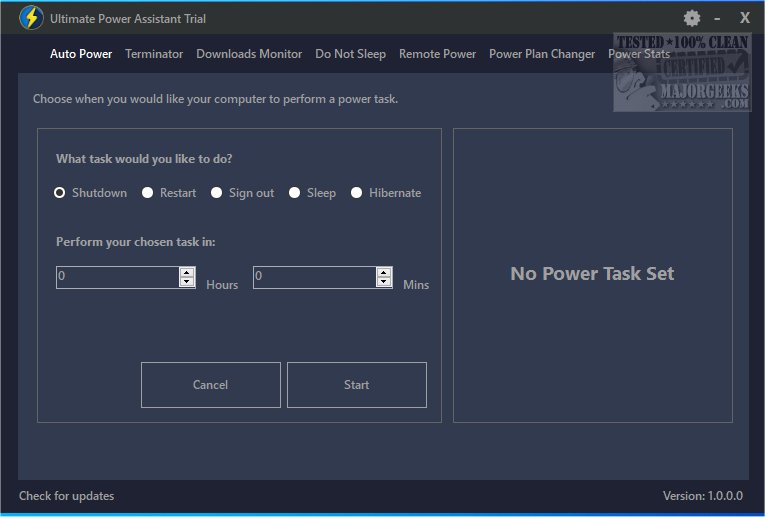
Ultimate Power Assistant is a powerful tool designed to streamline the management of your computer's power settings and tasks. This latest version enhances the user experience by allowing for customized power settings that not only optimize energy consumption but also improve battery longevity and overall system performance.
Key Features:
1. User-Friendly Interface: The application offers an intuitive interface that simplifies the process of scheduling and applying a wide range of power options within the Windows operating system. A standout feature is its ability to automatically switch power plans when you launch a specific program or game, reverting back to the previous settings once you close it.
2. Idle State Prevention: Users can prevent their computers from entering an idle state, ensuring that the display remains active, and the screensaver or standby mode does not activate. A convenient one-click option is available for those who prefer not to manually adjust settings.
3. Timed App/Game Termination: This functionality allows users to set a specific duration for running applications or games, after which the program will be automatically terminated. This helps in managing power effectively and releasing system resources.
Conclusion:
With Ultimate Power Assistant, you gain comprehensive control over your computer's power management. This advanced tool not only optimizes energy usage but also enhances your overall computing experience by automating tasks and providing convenient features that cater to your specific needs.
Future Developments:
Looking ahead, further updates may introduce additional features such as enhanced analytics for tracking power usage trends, more customizable automation options, and improved integrations with other system management tools. Users can look forward to ongoing enhancements that will continue to optimize their power management experience.
Related Resources:
For those seeking additional guidance, similar articles include:
- How to Change Power Plan Settings in Windows 10 & 11
- How to See Your Active Power Plan in Windows
- How to Turn on the Windows 10 & 11 Ultimate Performance Power Plan
- How to Add or Remove Select Power Plan Context Menu in Windows 10 & 11
- How to See if Power Throttling is Enabled in Windows 10 & 11
These resources provide valuable information on maximizing the efficiency of your device’s power management capabilities
Key Features:
1. User-Friendly Interface: The application offers an intuitive interface that simplifies the process of scheduling and applying a wide range of power options within the Windows operating system. A standout feature is its ability to automatically switch power plans when you launch a specific program or game, reverting back to the previous settings once you close it.
2. Idle State Prevention: Users can prevent their computers from entering an idle state, ensuring that the display remains active, and the screensaver or standby mode does not activate. A convenient one-click option is available for those who prefer not to manually adjust settings.
3. Timed App/Game Termination: This functionality allows users to set a specific duration for running applications or games, after which the program will be automatically terminated. This helps in managing power effectively and releasing system resources.
Conclusion:
With Ultimate Power Assistant, you gain comprehensive control over your computer's power management. This advanced tool not only optimizes energy usage but also enhances your overall computing experience by automating tasks and providing convenient features that cater to your specific needs.
Future Developments:
Looking ahead, further updates may introduce additional features such as enhanced analytics for tracking power usage trends, more customizable automation options, and improved integrations with other system management tools. Users can look forward to ongoing enhancements that will continue to optimize their power management experience.
Related Resources:
For those seeking additional guidance, similar articles include:
- How to Change Power Plan Settings in Windows 10 & 11
- How to See Your Active Power Plan in Windows
- How to Turn on the Windows 10 & 11 Ultimate Performance Power Plan
- How to Add or Remove Select Power Plan Context Menu in Windows 10 & 11
- How to See if Power Throttling is Enabled in Windows 10 & 11
These resources provide valuable information on maximizing the efficiency of your device’s power management capabilities
Ultimate Power Assistant 1.1.29.0 released
Ultimate Power Assistant provides a more efficient way to manage your computer's power settings and tasks.