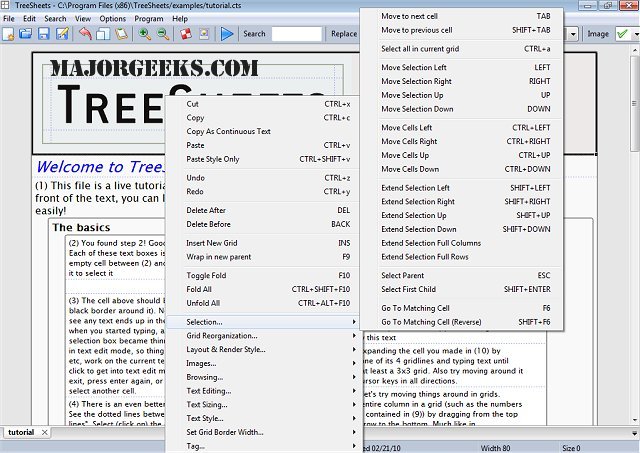
TreeSheets is a newly released application that merges various office tools into a single platform, effectively combining features of spreadsheets, mind mappers, outliners, personal information managers (PIMs), text editors, and small database utilities. This unique approach allows users to manage data in a hierarchical spreadsheet format, aiming to address the limitations of conventional tools.
Versatility and Functionality
TreeSheets is designed as a versatile solution for data organization, providing users with the ability to manage tasks and information seamlessly. Unlike traditional spreadsheets that can often feel flat or rigid, TreeSheets introduces a more dynamic experience. It allows for nested rows, enabling users to break down projects into actionable steps. Additionally, it serves as an outliner, enabling users to organize ideas hierarchically without the complexities associated with dedicated mind mapping software.
Key functionalities of TreeSheets include:
- Replacement for Traditional Spreadsheets: It offers a cleaner, tree-like structure that simplifies data organization.
- Outlining and Mind Mapping: Users can organize thoughts and tasks in a structured format.
- Personal Information Management: Ideal for managing contacts, inventories, and linking notes for presentations.
Practical Applications
TreeSheets excels in practical applications such as:
- Project Planning: Users can break down goals into manageable tasks with cross-links for easy navigation.
- To-Do Lists: More efficient than nested outlines, it allows for a straightforward task management experience.
- Brainstorming: It facilitates a hierarchical view of ideas, preventing them from getting lost across multiple sheets.
- Data Entry and Management: Users can easily handle data entry for various purposes, including contact lists and inventory management.
The software supports multiple file formats for saving work, including XML, CSV, HTML, and text, and it allows for easy data import from other projects.
System Requirements and Performance
A key advantage of TreeSheets is its lightweight and efficient design. It operates smoothly even on older systems, using approximately 5MB of memory on Windows 7 while managing multiple documents. This efficiency means users can run it in the background without significant performance drawbacks.
Final Thoughts
TreeSheets is a compelling option for those seeking an all-in-one solution for diverse data-related tasks. Its hierarchical structure offers an organized approach without overwhelming complexity. While it may not replace specialized software for every task or niche, it effectively simplifies nested lists and brainstorming activities, making it a practical tool for many users.
In conclusion, if you're looking for a streamlined application that combines the best features of spreadsheets, outlining tools, and mind mapping software without the bloat of traditional applications, TreeSheets is worth exploring. Its ability to serve multiple purposes while maintaining user-friendly functionality makes it a valuable addition to any productivity toolkit
Versatility and Functionality
TreeSheets is designed as a versatile solution for data organization, providing users with the ability to manage tasks and information seamlessly. Unlike traditional spreadsheets that can often feel flat or rigid, TreeSheets introduces a more dynamic experience. It allows for nested rows, enabling users to break down projects into actionable steps. Additionally, it serves as an outliner, enabling users to organize ideas hierarchically without the complexities associated with dedicated mind mapping software.
Key functionalities of TreeSheets include:
- Replacement for Traditional Spreadsheets: It offers a cleaner, tree-like structure that simplifies data organization.
- Outlining and Mind Mapping: Users can organize thoughts and tasks in a structured format.
- Personal Information Management: Ideal for managing contacts, inventories, and linking notes for presentations.
Practical Applications
TreeSheets excels in practical applications such as:
- Project Planning: Users can break down goals into manageable tasks with cross-links for easy navigation.
- To-Do Lists: More efficient than nested outlines, it allows for a straightforward task management experience.
- Brainstorming: It facilitates a hierarchical view of ideas, preventing them from getting lost across multiple sheets.
- Data Entry and Management: Users can easily handle data entry for various purposes, including contact lists and inventory management.
The software supports multiple file formats for saving work, including XML, CSV, HTML, and text, and it allows for easy data import from other projects.
System Requirements and Performance
A key advantage of TreeSheets is its lightweight and efficient design. It operates smoothly even on older systems, using approximately 5MB of memory on Windows 7 while managing multiple documents. This efficiency means users can run it in the background without significant performance drawbacks.
Final Thoughts
TreeSheets is a compelling option for those seeking an all-in-one solution for diverse data-related tasks. Its hierarchical structure offers an organized approach without overwhelming complexity. While it may not replace specialized software for every task or niche, it effectively simplifies nested lists and brainstorming activities, making it a practical tool for many users.
In conclusion, if you're looking for a streamlined application that combines the best features of spreadsheets, outlining tools, and mind mapping software without the bloat of traditional applications, TreeSheets is worth exploring. Its ability to serve multiple purposes while maintaining user-friendly functionality makes it a valuable addition to any productivity toolkit
TreeSheets 3380 released
TreeSheets combines spreadsheet tools, mind mappers, outliners, personal information managers, text editors and small database utilities into an all-in-one office application.