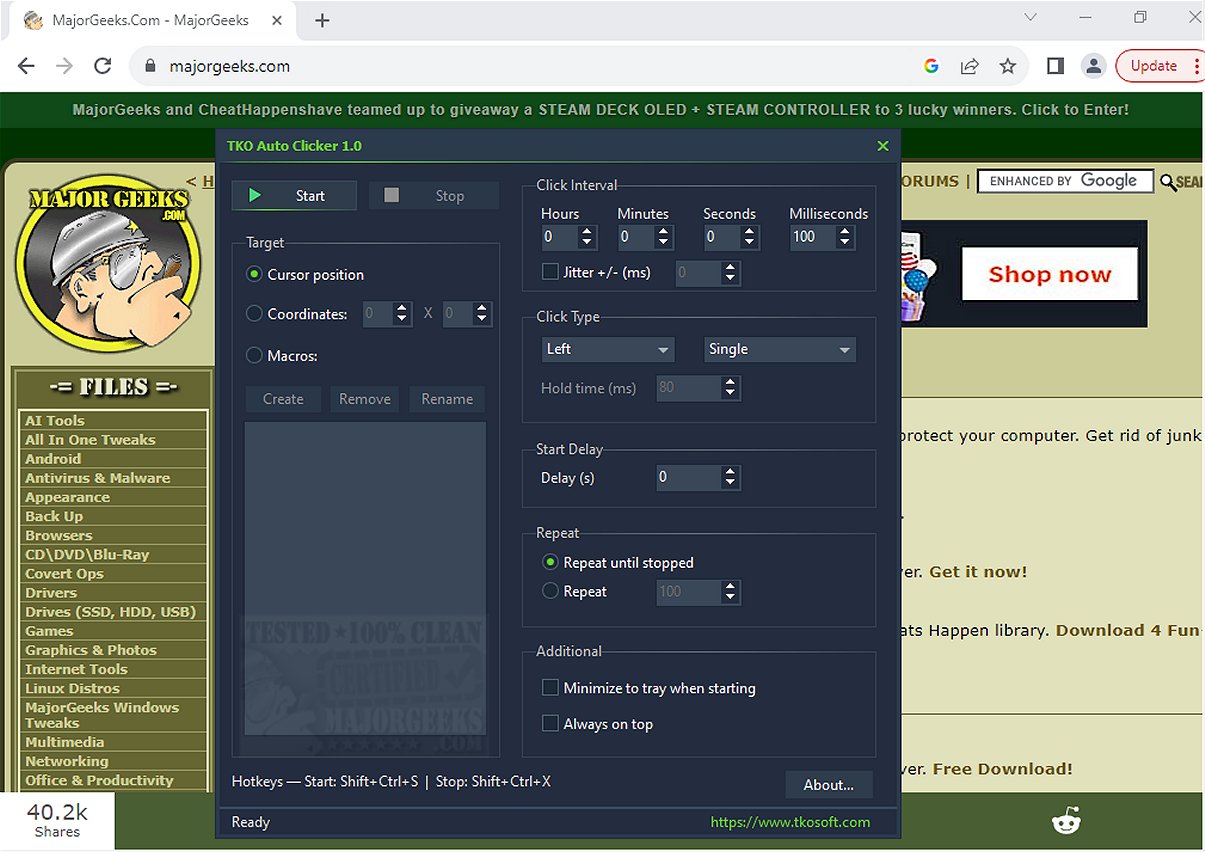
TKO Auto Clicker is a powerful tool designed to automate repetitive mouse clicks, cursor movements, and recorded mouse macros, significantly enhancing productivity by streamlining tasks that demand frequent clicking or specific mouse actions. This software offers a user-friendly interface, making it accessible for anyone looking to automate their clicking tasks.
Key Features of TKO Auto Clicker:
1. Mouse Button Automation: Users can automate left, right, and middle mouse button clicks.
2. Click Modes: The software supports single clicks, double clicks, and hold clicks, providing versatility in clicking styles.
3. Customizable Click Intervals: Users can adjust the interval between clicks with millisecond precision, allowing for tailored automation.
4. Repetition Settings: TKO Auto Clicker can repeat clicks indefinitely or for a specific number of repetitions, catering to varied user needs.
5. Start Delay and Jitter: An optional start delay can be set before the clicking begins, and a jitter feature introduces slight timing variations to mimic natural clicking patterns.
6. Cursor Position Flexibility: Users can click at the current cursor position or fixed screen coordinates, which is particularly useful for gaming or applications requiring precise clicks.
7. Built-in Macro Recorder: A mouse macro recorder captures mouse movements and button presses, enabling users to save, rename, and replay complex sequences of actions.
8. Global Hotkeys: Convenient keyboard shortcuts allow users to manage the auto-clicker without interrupting their workflow, making it ideal for gaming or full-screen applications.
Highlighted Feature: Cursor Positioning
One of TKO Auto Clicker’s standout features is its ability to execute clicks based on the cursor's current position or predefined screen coordinates. This flexibility is highly beneficial for users involved in detailed gaming or software applications, ensuring that clicks are executed precisely when and where they are needed.
User Experience and Verdict
TKO Auto Clicker is an invaluable tool for boosting productivity, allowing users to automate monotonous clicking tasks and focus on more complex activities. Whether for gaming or repetitive workflows, this software simplifies the clicking process, enabling users to reclaim their time and enhance overall efficiency.
With TKO Auto Clicker, users can say goodbye to the hassle of repetitive mouse actions and embrace a more streamlined approach to their tasks, making clicking and specific actions effortless.
Additional Resources:
- Tips on changing double-click settings for files and folders
- Guidance on enabling mouse pointer trails
- Troubleshooting advice for slow or lagging mice
- Logitech firmware and software update tools
In summary, TKO Auto Clicker 2.2 is not just about automating clicks; it’s about optimizing your workflow, enhancing focus, and creating a more efficient working environment
Key Features of TKO Auto Clicker:
1. Mouse Button Automation: Users can automate left, right, and middle mouse button clicks.
2. Click Modes: The software supports single clicks, double clicks, and hold clicks, providing versatility in clicking styles.
3. Customizable Click Intervals: Users can adjust the interval between clicks with millisecond precision, allowing for tailored automation.
4. Repetition Settings: TKO Auto Clicker can repeat clicks indefinitely or for a specific number of repetitions, catering to varied user needs.
5. Start Delay and Jitter: An optional start delay can be set before the clicking begins, and a jitter feature introduces slight timing variations to mimic natural clicking patterns.
6. Cursor Position Flexibility: Users can click at the current cursor position or fixed screen coordinates, which is particularly useful for gaming or applications requiring precise clicks.
7. Built-in Macro Recorder: A mouse macro recorder captures mouse movements and button presses, enabling users to save, rename, and replay complex sequences of actions.
8. Global Hotkeys: Convenient keyboard shortcuts allow users to manage the auto-clicker without interrupting their workflow, making it ideal for gaming or full-screen applications.
Highlighted Feature: Cursor Positioning
One of TKO Auto Clicker’s standout features is its ability to execute clicks based on the cursor's current position or predefined screen coordinates. This flexibility is highly beneficial for users involved in detailed gaming or software applications, ensuring that clicks are executed precisely when and where they are needed.
User Experience and Verdict
TKO Auto Clicker is an invaluable tool for boosting productivity, allowing users to automate monotonous clicking tasks and focus on more complex activities. Whether for gaming or repetitive workflows, this software simplifies the clicking process, enabling users to reclaim their time and enhance overall efficiency.
With TKO Auto Clicker, users can say goodbye to the hassle of repetitive mouse actions and embrace a more streamlined approach to their tasks, making clicking and specific actions effortless.
Additional Resources:
- Tips on changing double-click settings for files and folders
- Guidance on enabling mouse pointer trails
- Troubleshooting advice for slow or lagging mice
- Logitech firmware and software update tools
In summary, TKO Auto Clicker 2.2 is not just about automating clicks; it’s about optimizing your workflow, enhancing focus, and creating a more efficient working environment
TKO Auto Clicker 2.2 released
TKO Auto Clicker automates repetitive mouse clicks, cursor movements, and recorded mouse macros. This tool can enhance productivity by streamlining tasks that require frequent clicking or specific mouse actions.