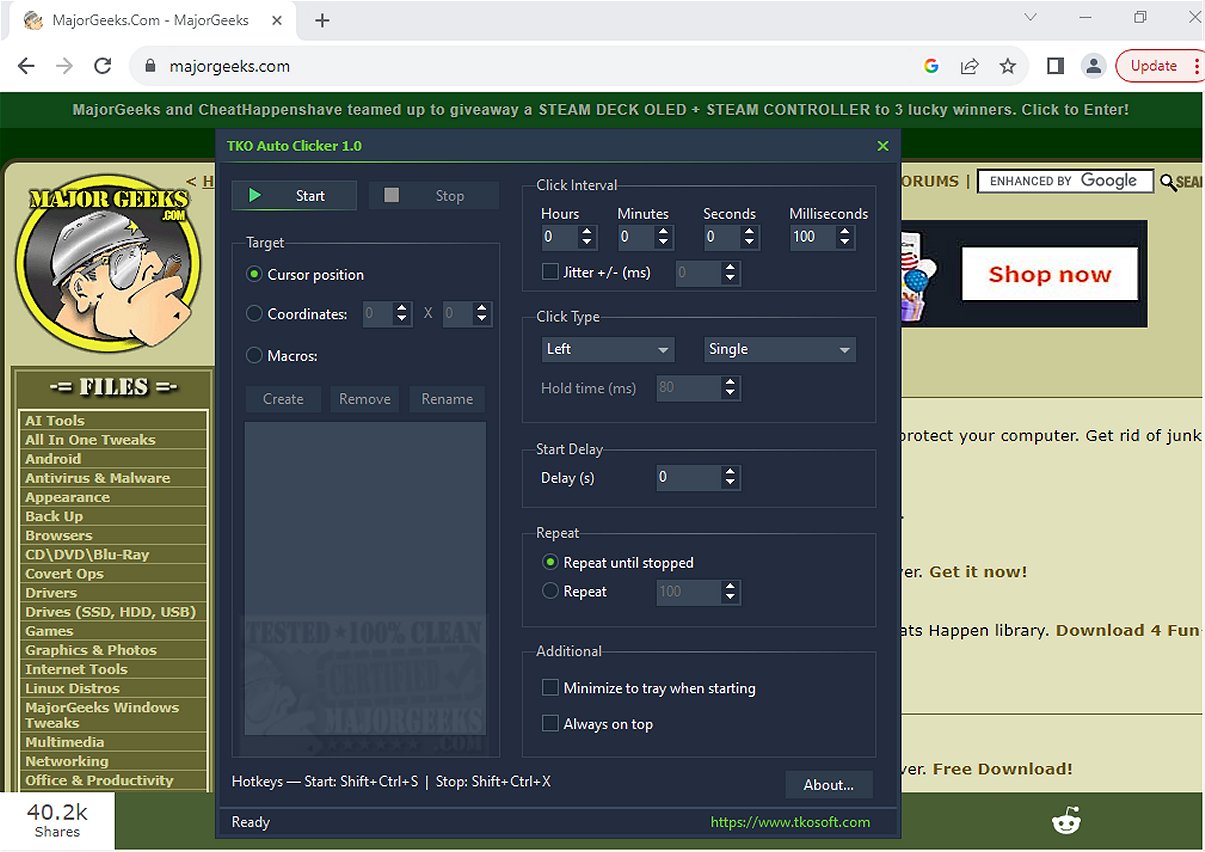
The newly released TKO Auto Clicker 1.0 is a powerful tool designed to automate repetitive mouse clicks, cursor movements, and recorded mouse macros, ultimately enhancing productivity for tasks that require frequent clicking or specific mouse actions.
Key Features of TKO Auto Clicker:
- Mouse Button Automation: Supports left, right, and middle mouse button clicks.
- Click Modes: Offers single, double, and hold click options to accommodate different user needs.
- Customizable Click Intervals: Users can adjust the clicking frequency with millisecond precision and set a start delay for automation.
- Flexible Repetition: Clicks can be set to repeat indefinitely or a specified number of times.
- Jitter Setting: Optional feature to introduce slight timing variations for a more organic clicking experience.
- Cursor Positioning: Execute clicks based on the current cursor position or fixed screen coordinates, ideal for gaming and specific application workflows.
- Mouse Macro Recorder: Capture, save, and play back mouse movements and clicks, allowing for complex automation of tasks.
- Global Hotkeys: Manage the auto-clicking features via keyboard shortcuts without needing to switch back to the TKO Auto Clicker window.
Highlighted Benefits:
One of the standout features of TKO Auto Clicker is its flexibility in executing clicks either at the cursor's current location or at preset coordinates. This functionality is particularly beneficial for gamers and users engaged in applications requiring precise input, ensuring that automation occurs exactly where and when necessary.
The inclusion of a mouse macro recorder further enhances its utility, enabling users to automate entire sequences of mouse actions, making it an excellent choice for those with intricate workflows.
User Experience:
The global hotkeys allow users to manage TKO Auto Clicker efficiently, making it easy to start, stop, or record macros without interrupting their current tasks, especially during gaming or full-screen applications.
Conclusion:
Overall, TKO Auto Clicker serves as a valuable tool for boosting productivity by removing the monotony of repetitive mouse tasks. By automating clicks and complex actions, users can streamline their workflows, reclaim time, and enhance their overall efficiency.
For those looking to improve their productivity and automate their clicking tasks, TKO Auto Clicker 1.0 is a must-have tool.
Related Tools and Tips:
- Explore ways to change double-click settings for file management.
- Learn how to enable mouse pointer trails for better visibility.
- Discover troubleshooting tips for slow or lagging mouse performance.
- Check out Logitech's firmware update tools for optimal mouse functionality.
Whether you're a gamer or a professional, TKO Auto Clicker can significantly enhance your experience by simplifying repetitive tasks and allowing you to focus on more critical aspects of your work or play
Key Features of TKO Auto Clicker:
- Mouse Button Automation: Supports left, right, and middle mouse button clicks.
- Click Modes: Offers single, double, and hold click options to accommodate different user needs.
- Customizable Click Intervals: Users can adjust the clicking frequency with millisecond precision and set a start delay for automation.
- Flexible Repetition: Clicks can be set to repeat indefinitely or a specified number of times.
- Jitter Setting: Optional feature to introduce slight timing variations for a more organic clicking experience.
- Cursor Positioning: Execute clicks based on the current cursor position or fixed screen coordinates, ideal for gaming and specific application workflows.
- Mouse Macro Recorder: Capture, save, and play back mouse movements and clicks, allowing for complex automation of tasks.
- Global Hotkeys: Manage the auto-clicking features via keyboard shortcuts without needing to switch back to the TKO Auto Clicker window.
Highlighted Benefits:
One of the standout features of TKO Auto Clicker is its flexibility in executing clicks either at the cursor's current location or at preset coordinates. This functionality is particularly beneficial for gamers and users engaged in applications requiring precise input, ensuring that automation occurs exactly where and when necessary.
The inclusion of a mouse macro recorder further enhances its utility, enabling users to automate entire sequences of mouse actions, making it an excellent choice for those with intricate workflows.
User Experience:
The global hotkeys allow users to manage TKO Auto Clicker efficiently, making it easy to start, stop, or record macros without interrupting their current tasks, especially during gaming or full-screen applications.
Conclusion:
Overall, TKO Auto Clicker serves as a valuable tool for boosting productivity by removing the monotony of repetitive mouse tasks. By automating clicks and complex actions, users can streamline their workflows, reclaim time, and enhance their overall efficiency.
For those looking to improve their productivity and automate their clicking tasks, TKO Auto Clicker 1.0 is a must-have tool.
Related Tools and Tips:
- Explore ways to change double-click settings for file management.
- Learn how to enable mouse pointer trails for better visibility.
- Discover troubleshooting tips for slow or lagging mouse performance.
- Check out Logitech's firmware update tools for optimal mouse functionality.
Whether you're a gamer or a professional, TKO Auto Clicker can significantly enhance your experience by simplifying repetitive tasks and allowing you to focus on more critical aspects of your work or play
TKO Auto Clicker 1.0 released
TKO Auto Clicker automates repetitive mouse clicks, cursor movements, and recorded mouse macros. This tool can enhance productivity by streamlining tasks that require frequent clicking or specific mouse actions.