TimVer has launched version 0.12.0, providing users with an enhanced tool for gathering detailed information about their installed Windows operating system. This application serves as a superior alternative to the standard Winver command, which typically offers only basic version details. Unlike Winver, TimVer presents an extensive overview that includes the version number, build number, release date, and other vital system information, making it particularly useful for users troubleshooting software and hardware conflicts.
TimVer is designed to assist users in verifying the compatibility of their systems with new applications or hardware upgrades, ensuring they have the insights necessary for informed decision-making. The software is easy to install and operates by extracting information from the Environment, Windows Management Information (WMI), and the Windows registry.
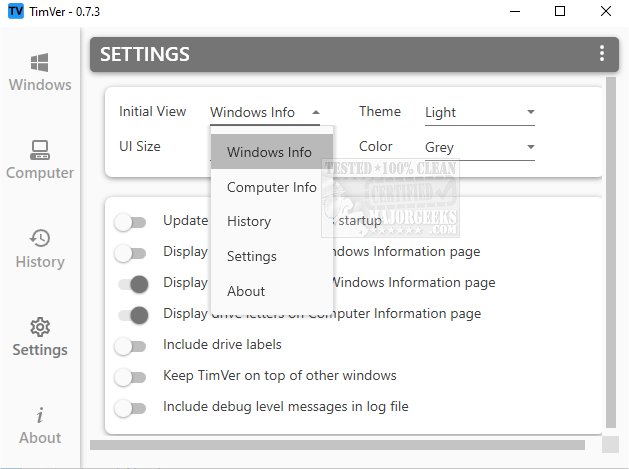
The user-friendly interface organizes information into various sections, accessible via a left-hand menu, allowing users to view detailed specifications and performance metrics of their systems. Additionally, TimVer features a comprehensive history log to track past activities and changes, providing an overview of system modifications. Users can also customize the application's appearance with different themes, colors, and layouts, giving them the flexibility to personalize their experience.
The intriguing name "TimVer" initially attracted attention, but its open-source nature and the wealth of information it offers over the standard Winver ultimately solidified its appeal.
In conclusion, TimVer 0.12.0 stands out as a valuable tool for Windows users seeking deeper insights into their operating system. As it continues to evolve, it may incorporate even more features and functionalities to further enhance user experience and system management capabilities. Users can look forward to future updates that may expand its compatibility and performance tracking abilities, solidifying its position as a go-to resource for system information
TimVer is designed to assist users in verifying the compatibility of their systems with new applications or hardware upgrades, ensuring they have the insights necessary for informed decision-making. The software is easy to install and operates by extracting information from the Environment, Windows Management Information (WMI), and the Windows registry.
The user-friendly interface organizes information into various sections, accessible via a left-hand menu, allowing users to view detailed specifications and performance metrics of their systems. Additionally, TimVer features a comprehensive history log to track past activities and changes, providing an overview of system modifications. Users can also customize the application's appearance with different themes, colors, and layouts, giving them the flexibility to personalize their experience.
The intriguing name "TimVer" initially attracted attention, but its open-source nature and the wealth of information it offers over the standard Winver ultimately solidified its appeal.
In conclusion, TimVer 0.12.0 stands out as a valuable tool for Windows users seeking deeper insights into their operating system. As it continues to evolve, it may incorporate even more features and functionalities to further enhance user experience and system management capabilities. Users can look forward to future updates that may expand its compatibility and performance tracking abilities, solidifying its position as a go-to resource for system information
TimVer 0.12.0 released
TimVer offers comprehensive information about the Windows version installed on your system.