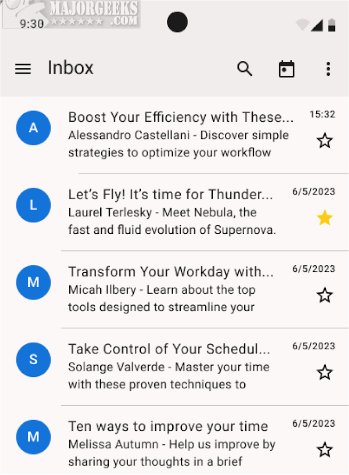
The recently released Thunderbird for Android 19.0 Beta 1 offers users the chance to experience the full range of Thunderbird's robust email management features on their Android devices. This beta version is designed to enhance productivity while on the move, allowing users to stay connected and organized more conveniently.
Key Functionalities of Thunderbird for Android Beta:
The beta version enables users to set up email accounts easily, either automatically or manually. Users can read, fetch, and manage messages with ease, swiftly switch between accounts, and receive timely notifications for new emails. Composing and sending emails is straightforward, as is performing essential actions such as replying, forwarding, and deleting messages. Furthermore, an integration feature allows users to transition smoothly from K-9 Mail, the foundation on which Thunderbird for Android is built.
Features Users Will Appreciate:
Thunderbird for Android Beta retains all the beloved features of its desktop counterpart, including advanced inbox organization, automatic account setup, and push notifications. Users can quickly set up their accounts by entering their email address and password, with manual configuration available for those needing to specify server settings. The app facilitates seamless reading and fetching of emails, as well as efficient account switching.
The application also allows comprehensive message composition and editing capabilities, letting users handle drafts and new messages directly from their devices. With customization options, users can select between light and dark themes, create personalized email signatures, and manage their inbox in a unified view. Additional features include the ability to enable or disable contact pictures and threaded views for better email conversation tracking.
For privacy-conscious users, the beta version offers an option to opt-out of data collection. It also excels in organization, allowing users to categorize messages into different folders and stay updated with push notifications for incoming emails.
Conclusion and Future Outlook:
With a stable version also available, Thunderbird for Android 19.0 Beta 1 represents a significant step forward in mobile email management. It equips users with essential tools to manage communications effectively, whether at work or on the go. As the development continues, users can expect further enhancements and refinements based on feedback, ensuring that Thunderbird remains a leading choice for email management across platforms
Key Functionalities of Thunderbird for Android Beta:
The beta version enables users to set up email accounts easily, either automatically or manually. Users can read, fetch, and manage messages with ease, swiftly switch between accounts, and receive timely notifications for new emails. Composing and sending emails is straightforward, as is performing essential actions such as replying, forwarding, and deleting messages. Furthermore, an integration feature allows users to transition smoothly from K-9 Mail, the foundation on which Thunderbird for Android is built.
Features Users Will Appreciate:
Thunderbird for Android Beta retains all the beloved features of its desktop counterpart, including advanced inbox organization, automatic account setup, and push notifications. Users can quickly set up their accounts by entering their email address and password, with manual configuration available for those needing to specify server settings. The app facilitates seamless reading and fetching of emails, as well as efficient account switching.
The application also allows comprehensive message composition and editing capabilities, letting users handle drafts and new messages directly from their devices. With customization options, users can select between light and dark themes, create personalized email signatures, and manage their inbox in a unified view. Additional features include the ability to enable or disable contact pictures and threaded views for better email conversation tracking.
For privacy-conscious users, the beta version offers an option to opt-out of data collection. It also excels in organization, allowing users to categorize messages into different folders and stay updated with push notifications for incoming emails.
Conclusion and Future Outlook:
With a stable version also available, Thunderbird for Android 19.0 Beta 1 represents a significant step forward in mobile email management. It equips users with essential tools to manage communications effectively, whether at work or on the go. As the development continues, users can expect further enhancements and refinements based on feedback, ensuring that Thunderbird remains a leading choice for email management across platforms
Thunderbird for Android 19.0 Beta 1 released
Thunderbird for Android Beta allows you to access and test the full range of Thunderbird features on your Android device. Stable version is also available.