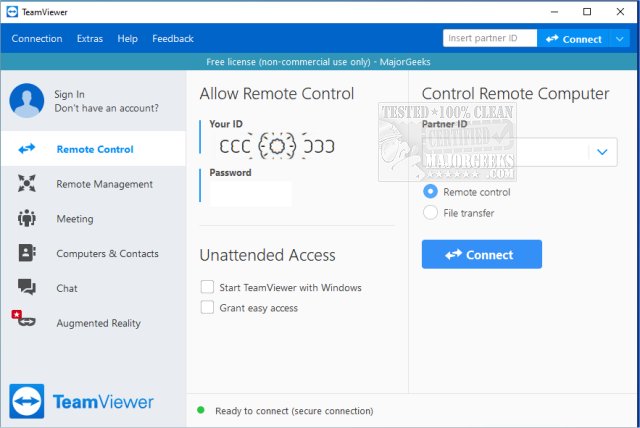
TeamViewer has recently released version 15.83.7 of its widely-used remote access software, which remains free for non-commercial use. This application allows users to remotely access and manage computers from anywhere, making it particularly useful for assisting friends and family with tech issues. TeamViewer supports a range of operating systems, including Windows, macOS, Linux, Android, and iOS, and can be used either as a portable application or through installation.
The software is designed for ease of use, generating a unique 9-digit ID and password for each session, ensuring secure access that changes with every use. This feature makes it accessible even for individuals who may not be very tech-savvy. Users can take full control of the remote computer, enabling them to view screens, move the mouse, install applications, and resolve issues as if they were physically present.
TeamViewer is particularly effective for tasks such as helping with software installations, troubleshooting problems, and accessing home PCs while traveling. It also allows users to share their screens, making it useful for presentations and collaborative projects. The connections are encrypted with AES (256-bit) end-to-end encryption, ensuring that sensitive information remains protected during remote sessions.
The software has several pros, including its free version for personal use, the availability of a portable version that requires no installation, and support for features like file transfer and chat. However, users should be aware that frequent commercial use may lead to license pop-ups and restrictions, and some advanced features require a full installation.
In summary, TeamViewer is a powerful yet simple tool that strikes a balance between functionality and user-friendliness, making it an ideal choice for tech support scenarios. Its speed, security, and flexibility have made it a go-to solution for both technical support professionals and everyday users alike.
Extension:
As remote work and online collaboration continue to rise, tools like TeamViewer are becoming increasingly important. Beyond personal use, businesses can leverage TeamViewer for remote support and IT management, helping employees troubleshoot issues without needing to be on-site. The software's capacity for multi-monitor setups and file transfers enhances its utility in a professional environment, making it suitable for IT departments and remote teams.
Additionally, TeamViewer's encrypted connections ensure compliance with data security regulations, which is vital for industries handling sensitive information. The possibility of integrating TeamViewer with other software solutions can further streamline workflows, enabling organizations to provide seamless remote assistance.
With the growing trend of digital nomadism, TeamViewer allows users to maintain access to their workstations from anywhere, ensuring productivity isn't hindered by location. As technology evolves, TeamViewer may also expand its features, potentially adding more integrations with cloud services and enhancing its capabilities to meet the demands of a dynamic workspace.
In conclusion, TeamViewer not only simplifies remote access but also plays a crucial role in facilitating efficient and secure remote work, underscoring its value in today’s fast-paced digital landscape
The software is designed for ease of use, generating a unique 9-digit ID and password for each session, ensuring secure access that changes with every use. This feature makes it accessible even for individuals who may not be very tech-savvy. Users can take full control of the remote computer, enabling them to view screens, move the mouse, install applications, and resolve issues as if they were physically present.
TeamViewer is particularly effective for tasks such as helping with software installations, troubleshooting problems, and accessing home PCs while traveling. It also allows users to share their screens, making it useful for presentations and collaborative projects. The connections are encrypted with AES (256-bit) end-to-end encryption, ensuring that sensitive information remains protected during remote sessions.
The software has several pros, including its free version for personal use, the availability of a portable version that requires no installation, and support for features like file transfer and chat. However, users should be aware that frequent commercial use may lead to license pop-ups and restrictions, and some advanced features require a full installation.
In summary, TeamViewer is a powerful yet simple tool that strikes a balance between functionality and user-friendliness, making it an ideal choice for tech support scenarios. Its speed, security, and flexibility have made it a go-to solution for both technical support professionals and everyday users alike.
Extension:
As remote work and online collaboration continue to rise, tools like TeamViewer are becoming increasingly important. Beyond personal use, businesses can leverage TeamViewer for remote support and IT management, helping employees troubleshoot issues without needing to be on-site. The software's capacity for multi-monitor setups and file transfers enhances its utility in a professional environment, making it suitable for IT departments and remote teams.
Additionally, TeamViewer's encrypted connections ensure compliance with data security regulations, which is vital for industries handling sensitive information. The possibility of integrating TeamViewer with other software solutions can further streamline workflows, enabling organizations to provide seamless remote assistance.
With the growing trend of digital nomadism, TeamViewer allows users to maintain access to their workstations from anywhere, ensuring productivity isn't hindered by location. As technology evolves, TeamViewer may also expand its features, potentially adding more integrations with cloud services and enhancing its capabilities to meet the demands of a dynamic workspace.
In conclusion, TeamViewer not only simplifies remote access but also plays a crucial role in facilitating efficient and secure remote work, underscoring its value in today’s fast-paced digital landscape
TeamViewer 15.83.7 released
TeamViewer is a popular, easy-to-use free remote access program to access or let someone remotely access your computer. It can be installed or run as portable. Video tutorial available.