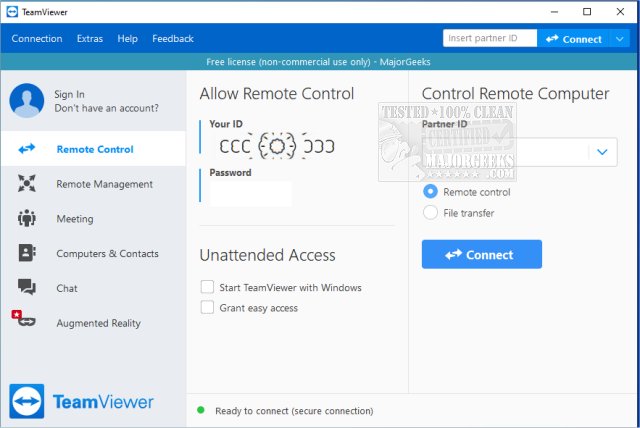
TeamViewer has recently released version 15.83.3, enhancing its reputation as a versatile and user-friendly remote access program. Ideal for non-commercial use, it allows users to connect to other computers from anywhere, making it an invaluable tool for troubleshooting and IT support. The application is available across multiple platforms, including Windows, macOS, Linux, Android, and iOS, and can be run either as a portable version or installed directly.
The appeal of TeamViewer lies in its simplicity and efficiency. Users can quickly download the program, generate a unique 9-digit ID and password for access, and initiate remote sessions without extensive technical knowledge. This makes it particularly helpful for guiding less tech-savvy individuals through troubleshooting processes. Once connected, users can take full control of the remote computer, enabling them to assist with software installation, repairs, and other tasks seamlessly.
TeamViewer's two-way support feature allows users to share their screens, making it suitable for collaborative efforts such as presentations or project walkthroughs. Security is a top priority, with all connections encrypted using AES (256-bit) for added protection against data breaches. The software performs reliably, providing fast screen updates and minimal lag, even on slower internet connections.
Users can choose between installing TeamViewer for additional features like unattended access or utilizing the portable version, which requires no installation and is perfect for one-off sessions. However, commercial users may encounter license restrictions, and some advanced features necessitate a full installation.
In summary, TeamViewer stands out for its balance of power and user-friendliness, making it the go-to tool for remote assistance among tech enthusiasts and everyday users alike. Its combination of speed, security, and accessibility has made it a daily tool for many, reducing the need for on-site visits for tech-related issues.
Extension:
As remote work and digital collaboration continue to grow, tools like TeamViewer are becoming increasingly important. The recent update may also introduce new features or enhancements that further improve user experience and security, making it a valuable asset for businesses and individuals alike. With its cross-platform functionality and ease of use, TeamViewer not only streamlines the process of remote support but also encourages a more connected, efficient work environment. Future updates could focus on expanding features for commercial use, enhancing multi-user capabilities, or even integrating with other productivity tools to create a more comprehensive remote work solution
The appeal of TeamViewer lies in its simplicity and efficiency. Users can quickly download the program, generate a unique 9-digit ID and password for access, and initiate remote sessions without extensive technical knowledge. This makes it particularly helpful for guiding less tech-savvy individuals through troubleshooting processes. Once connected, users can take full control of the remote computer, enabling them to assist with software installation, repairs, and other tasks seamlessly.
TeamViewer's two-way support feature allows users to share their screens, making it suitable for collaborative efforts such as presentations or project walkthroughs. Security is a top priority, with all connections encrypted using AES (256-bit) for added protection against data breaches. The software performs reliably, providing fast screen updates and minimal lag, even on slower internet connections.
Users can choose between installing TeamViewer for additional features like unattended access or utilizing the portable version, which requires no installation and is perfect for one-off sessions. However, commercial users may encounter license restrictions, and some advanced features necessitate a full installation.
In summary, TeamViewer stands out for its balance of power and user-friendliness, making it the go-to tool for remote assistance among tech enthusiasts and everyday users alike. Its combination of speed, security, and accessibility has made it a daily tool for many, reducing the need for on-site visits for tech-related issues.
Extension:
As remote work and digital collaboration continue to grow, tools like TeamViewer are becoming increasingly important. The recent update may also introduce new features or enhancements that further improve user experience and security, making it a valuable asset for businesses and individuals alike. With its cross-platform functionality and ease of use, TeamViewer not only streamlines the process of remote support but also encourages a more connected, efficient work environment. Future updates could focus on expanding features for commercial use, enhancing multi-user capabilities, or even integrating with other productivity tools to create a more comprehensive remote work solution
TeamViewer 15.83.3 released
TeamViewer is a popular, easy-to-use free remote access program to access or let someone remotely access your computer. It can be installed or run as portable. Video tutorial available.