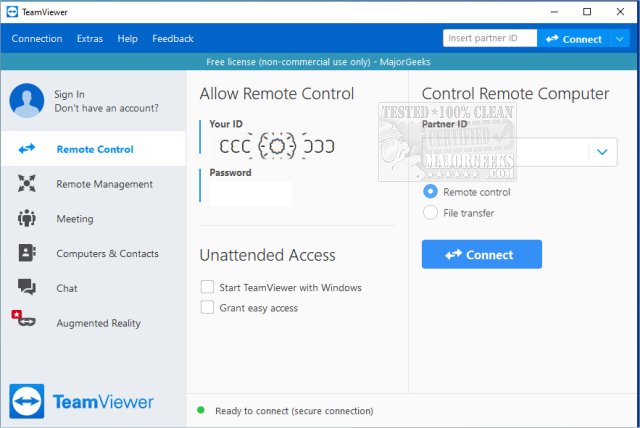
TeamViewer has released version 15.79.4, enhancing its position as a user-friendly remote access software that allows individuals to access or grant access to their computers from virtually anywhere. This versatile application can be run as a portable version, making it convenient to use without installation. A video tutorial is available for new users.
What is TeamViewer?
TeamViewer is ideal for those who find themselves helping friends and family with tech issues remotely—an often frustrating task that can feel like assembling furniture with confusing instructions from afar. This tool simplifies the process by enabling users to connect to other PCs, providing them with the ability to control the computer, view screens, install applications, and resolve issues as if they were physically present.
Key Features
- Multi-Platform Support: TeamViewer is compatible with Windows, macOS, Linux, Android, and iOS, catering to a wide range of users.
- Easy to Use: With a simple interface that generates a unique 9-digit ID and a session-specific password that changes with each login, even non-technical users can navigate the setup.
- Two-Way Support: The software allows both users to share and view screens, making it suitable for collaborative projects and real-time demonstrations.
- Security: End-to-end encryption using AES (256-bit) ensures that connections remain secure, safeguarding sensitive information during use.
Installation Options
Users can opt for a full installation to access advanced features like unattended access, or they can use the portable version for quick, one-time sessions without needing admin rights.
Pros and Cons
Pros:
- Free for personal use
- No installation required for the portable version
- Supports file transfer and chat
- Works across various platforms
- Offers secure, encrypted connections
Cons:
- Frequent use for commercial purposes may prompt licensing issues
- Certain features require full installation
Conclusion
TeamViewer strikes a balance between functionality and ease of use, making it an essential tool for tech support, whether for family or personal use. Its speed, reliability, and security make it a go-to solution for remote assistance. The software is a daily companion for many users, eliminating the need for in-person visits for minor tech problems.
Extension: As the demand for remote support tools continues to grow in a world that increasingly relies on digital interactions, TeamViewer remains a competitive player, particularly for personal use. Future updates could focus on enhancing user experience, integrating more collaboration features, or even offering tiered plans to accommodate commercial users without intrusive pop-ups. The rise of remote work and learning may lead to further innovations, making tools like TeamViewer even more vital for seamless communication and support across distances
What is TeamViewer?
TeamViewer is ideal for those who find themselves helping friends and family with tech issues remotely—an often frustrating task that can feel like assembling furniture with confusing instructions from afar. This tool simplifies the process by enabling users to connect to other PCs, providing them with the ability to control the computer, view screens, install applications, and resolve issues as if they were physically present.
Key Features
- Multi-Platform Support: TeamViewer is compatible with Windows, macOS, Linux, Android, and iOS, catering to a wide range of users.
- Easy to Use: With a simple interface that generates a unique 9-digit ID and a session-specific password that changes with each login, even non-technical users can navigate the setup.
- Two-Way Support: The software allows both users to share and view screens, making it suitable for collaborative projects and real-time demonstrations.
- Security: End-to-end encryption using AES (256-bit) ensures that connections remain secure, safeguarding sensitive information during use.
Installation Options
Users can opt for a full installation to access advanced features like unattended access, or they can use the portable version for quick, one-time sessions without needing admin rights.
Pros and Cons
Pros:
- Free for personal use
- No installation required for the portable version
- Supports file transfer and chat
- Works across various platforms
- Offers secure, encrypted connections
Cons:
- Frequent use for commercial purposes may prompt licensing issues
- Certain features require full installation
Conclusion
TeamViewer strikes a balance between functionality and ease of use, making it an essential tool for tech support, whether for family or personal use. Its speed, reliability, and security make it a go-to solution for remote assistance. The software is a daily companion for many users, eliminating the need for in-person visits for minor tech problems.
Extension: As the demand for remote support tools continues to grow in a world that increasingly relies on digital interactions, TeamViewer remains a competitive player, particularly for personal use. Future updates could focus on enhancing user experience, integrating more collaboration features, or even offering tiered plans to accommodate commercial users without intrusive pop-ups. The rise of remote work and learning may lead to further innovations, making tools like TeamViewer even more vital for seamless communication and support across distances
TeamViewer 15.79.4 released
TeamViewer is a popular, easy-to-use free remote access program to access or let someone remotely access your computer. It can be installed or run as portable. Video tutorial available.