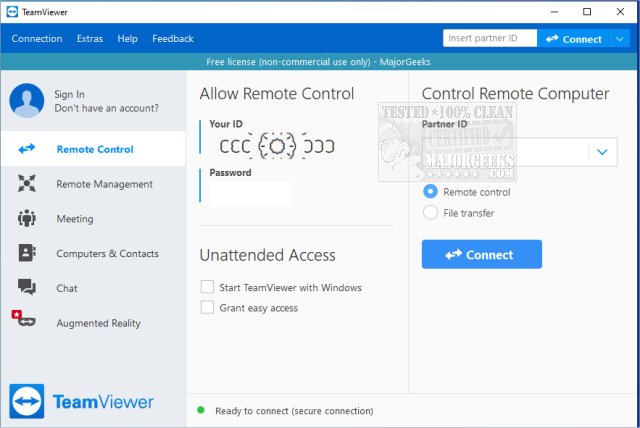
TeamViewer has recently released version 15.76.6, further solidifying its reputation as a user-friendly remote access software. This program allows users to either access their own computers remotely or provide assistance to others without geographical limitations. It can be easily installed or utilized as a portable application, making it accessible for various platforms including Windows, macOS, Linux, Android, and iOS. For those unfamiliar with its functionality, a video tutorial is available to guide new users.
The software is particularly beneficial for individuals who frequently assist friends or family with technical issues, as it simplifies remote troubleshooting. Users can connect to another PC by generating a unique 9-digit ID and a constantly changing password for each session, ensuring secure access. This feature makes TeamViewer an ideal solution for non-commercial use, allowing users to help others without the hassle of complicated installations or setups.
Among the many advantages of TeamViewer is its ease of use; it is designed to cater to even the least tech-savvy individuals. Once connected, users can control the remote computer as if they were physically present, enabling them to fix problems, install applications, and provide real-time support. The app is also useful for accessing personal computers while traveling, allowing for seamless management of files and applications.
Moreover, TeamViewer supports two-way communication, meaning users can share their desktop with others for collaborative projects or presentations. The software prioritizes security with end-to-end encryption using AES (256-bit), ensuring that sensitive information remains protected during connections. Additionally, it boasts impressive performance with minimal lag, even on slower internet connections.
For those who prefer a hassle-free experience, the portable version of TeamViewer requires no installation and does not necessitate admin rights, making it perfect for quick support sessions.
Pros and Cons
Pros:
- Free for personal use
- Portable version available
- Supports file transfer, chat, and multi-monitor setups
- End-to-end encrypted connections
- Compatible with all major platforms
Cons:
- Commercial use may trigger license pop-ups and restrictions
- Certain features, such as remote printing, require full installation
Geek Verdict
TeamViewer strikes a balance between functionality and simplicity, making it a go-to tool for tech support and remote access. Whether assisting family members or checking files remotely, TeamViewer consistently delivers speed, security, and reliability without the need for extensive installations. Its widespread use among tech enthusiasts speaks to its effectiveness, and many users keep it installed across multiple devices for convenient access.
In conclusion, TeamViewer continues to be a leading remote desktop solution, and its recent updates only enhance its capabilities. As technology evolves, tools like TeamViewer will remain essential for remote assistance and collaboration, ensuring that users can navigate tech challenges effectively, regardless of their location
The software is particularly beneficial for individuals who frequently assist friends or family with technical issues, as it simplifies remote troubleshooting. Users can connect to another PC by generating a unique 9-digit ID and a constantly changing password for each session, ensuring secure access. This feature makes TeamViewer an ideal solution for non-commercial use, allowing users to help others without the hassle of complicated installations or setups.
Among the many advantages of TeamViewer is its ease of use; it is designed to cater to even the least tech-savvy individuals. Once connected, users can control the remote computer as if they were physically present, enabling them to fix problems, install applications, and provide real-time support. The app is also useful for accessing personal computers while traveling, allowing for seamless management of files and applications.
Moreover, TeamViewer supports two-way communication, meaning users can share their desktop with others for collaborative projects or presentations. The software prioritizes security with end-to-end encryption using AES (256-bit), ensuring that sensitive information remains protected during connections. Additionally, it boasts impressive performance with minimal lag, even on slower internet connections.
For those who prefer a hassle-free experience, the portable version of TeamViewer requires no installation and does not necessitate admin rights, making it perfect for quick support sessions.
Pros and Cons
Pros:
- Free for personal use
- Portable version available
- Supports file transfer, chat, and multi-monitor setups
- End-to-end encrypted connections
- Compatible with all major platforms
Cons:
- Commercial use may trigger license pop-ups and restrictions
- Certain features, such as remote printing, require full installation
Geek Verdict
TeamViewer strikes a balance between functionality and simplicity, making it a go-to tool for tech support and remote access. Whether assisting family members or checking files remotely, TeamViewer consistently delivers speed, security, and reliability without the need for extensive installations. Its widespread use among tech enthusiasts speaks to its effectiveness, and many users keep it installed across multiple devices for convenient access.
In conclusion, TeamViewer continues to be a leading remote desktop solution, and its recent updates only enhance its capabilities. As technology evolves, tools like TeamViewer will remain essential for remote assistance and collaboration, ensuring that users can navigate tech challenges effectively, regardless of their location
TeamViewer 15.76.6 released
TeamViewer is a popular, easy-to-use free remote access program to access or let someone remotely access your computer. It can be installed or run as portable. Video tutorial available.