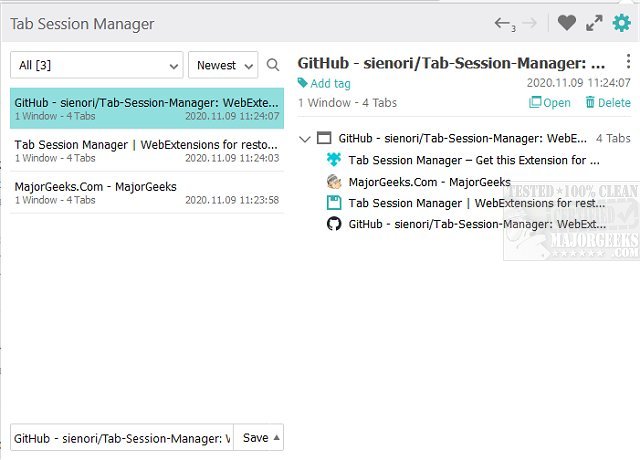
The Tab Session Manager extension for Chrome, Firefox, and Edge has been updated to version 7.4.0. This tool is specifically designed to enhance your browsing experience by saving and restoring the state of your windows and tabs. It addresses a common issue where users accidentally close multiple tabs, risking the loss of their work. With Tab Session Manager, users can effortlessly save their current tab states either manually or automatically, ensuring that all their hard work is preserved even if the browser is closed.
The extension includes a variety of features to improve usability and functionality. Users can define custom keyboard shortcuts, export sessions for backup, prioritize sessions, and more. Specifically, the Tab Session Manager allows you to manage sessions by naming and tagging them, autosave when a window is closed or at regular intervals, import and export sessions, and offers compatibility with Chrome extensions. Additionally, it provides cloud sync capabilities for easy access across devices.
For anyone who routinely navigates multiple tabs, Tab Session Manager serves as a vital tool for managing sessions and safeguarding against accidental data loss.
Extended Features and Benefits:
In addition to the aforementioned features, the latest version may include enhanced user interfaces for easier navigation, improved performance for faster saving and restoring of tabs, and expanded compatibility with other popular browser extensions. Users can also expect bug fixes and security updates to ensure a smooth experience. As browsing habits evolve, extensions like Tab Session Manager are becoming increasingly essential, making it easier for users to work efficiently and manage their online activities without the fear of losing important information
The extension includes a variety of features to improve usability and functionality. Users can define custom keyboard shortcuts, export sessions for backup, prioritize sessions, and more. Specifically, the Tab Session Manager allows you to manage sessions by naming and tagging them, autosave when a window is closed or at regular intervals, import and export sessions, and offers compatibility with Chrome extensions. Additionally, it provides cloud sync capabilities for easy access across devices.
For anyone who routinely navigates multiple tabs, Tab Session Manager serves as a vital tool for managing sessions and safeguarding against accidental data loss.
Extended Features and Benefits:
In addition to the aforementioned features, the latest version may include enhanced user interfaces for easier navigation, improved performance for faster saving and restoring of tabs, and expanded compatibility with other popular browser extensions. Users can also expect bug fixes and security updates to ensure a smooth experience. As browsing habits evolve, extensions like Tab Session Manager are becoming increasingly essential, making it easier for users to work efficiently and manage their online activities without the fear of losing important information
Tab Session Manager for Chrome, Firefox, and Edge 7.4.0 released
Tab Session Manager for Chrome, Firefox, and Edge will save/restore the state of your windows and tabs.
Tab Session Manager for Chrome, Firefox, and Edge 7.4.0 released @ MajorGeeks