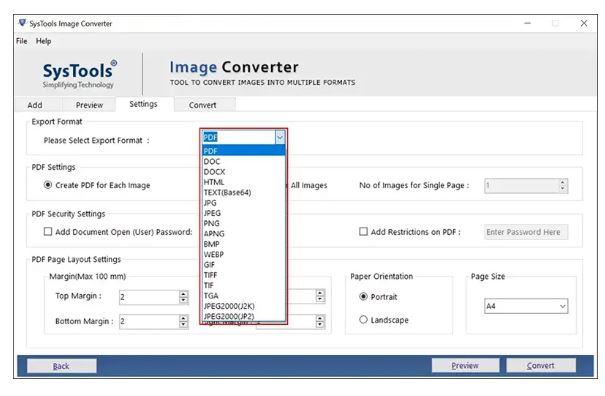
SysTools Image Converter has released version 7.0, enhancing its capabilities as a robust batch image conversion tool for Windows. This software allows users to convert various image formats—such as JPG, PNG, BMP, GIF, and TIFF—into versatile document types including PDF, DOC, DOCX, HTML, and TEXT. It streamlines the process of transforming large quantities of images into more functional formats like searchable PDFs or editable Word documents, making it an invaluable asset for managing photo archives, creating HTML content, or organizing scanned documents.
While its name suggests a narrow function, SysTools Image Converter serves as a comprehensive document builder that transcends simple image conversion. By facilitating bulk conversions efficiently, it saves users from the tedious task of manually converting numerous images. The application supports all major image formats and offers customizable output options, including page size, margins, and orientation, ensuring a professional appearance without extensive manual adjustments.
Key features of SysTools Image Converter include:
- Support for reading and exporting multiple image formats,
- Batch processing capability to handle entire folders,
- Maintenance of image quality throughout the conversion,
- Custom output folder options,
- A built-in preview feature to avoid exporting undesirable results.
Real-world applications for this software are vast. Educators can compile screenshots into handouts, office administrators can transform scanned documents into editable formats, developers can generate HTML-ready diagrams, and hobbyists can digitize family photos into searchable archives.
Pros of SysTools Image Converter include its user-friendly interface, capacity for handling hundreds of files, and versatility in output formats. However, the free version has limitations on the number of files that can be exported, and it does not support SVG or other vector file types.
In summary, SysTools Image Converter 7.0 is a practical utility that excels in bulk image conversions and document formatting, making it a great choice for educators, office workers, students, and anyone dealing with frequent image processing. Despite minor interface quirks, such as non-functional tabs, it offers a straightforward solution to enhance productivity and reduce reliance on cumbersome online converters. With this tool, users can streamline their workflow and efficiently manage their image files, transforming tedious tasks into quick and manageable operations
While its name suggests a narrow function, SysTools Image Converter serves as a comprehensive document builder that transcends simple image conversion. By facilitating bulk conversions efficiently, it saves users from the tedious task of manually converting numerous images. The application supports all major image formats and offers customizable output options, including page size, margins, and orientation, ensuring a professional appearance without extensive manual adjustments.
Key features of SysTools Image Converter include:
- Support for reading and exporting multiple image formats,
- Batch processing capability to handle entire folders,
- Maintenance of image quality throughout the conversion,
- Custom output folder options,
- A built-in preview feature to avoid exporting undesirable results.
Real-world applications for this software are vast. Educators can compile screenshots into handouts, office administrators can transform scanned documents into editable formats, developers can generate HTML-ready diagrams, and hobbyists can digitize family photos into searchable archives.
Pros of SysTools Image Converter include its user-friendly interface, capacity for handling hundreds of files, and versatility in output formats. However, the free version has limitations on the number of files that can be exported, and it does not support SVG or other vector file types.
In summary, SysTools Image Converter 7.0 is a practical utility that excels in bulk image conversions and document formatting, making it a great choice for educators, office workers, students, and anyone dealing with frequent image processing. Despite minor interface quirks, such as non-functional tabs, it offers a straightforward solution to enhance productivity and reduce reliance on cumbersome online converters. With this tool, users can streamline their workflow and efficiently manage their image files, transforming tedious tasks into quick and manageable operations
SysTools Image Converter 7.0 released
SysTools Image Converter is a powerful batch image conversion tool for Windows that lets you convert JPG, PNG, BMP, GIF, and TIFF images into formats like PDF, DOC, DOCX, HTML, and TEXT.