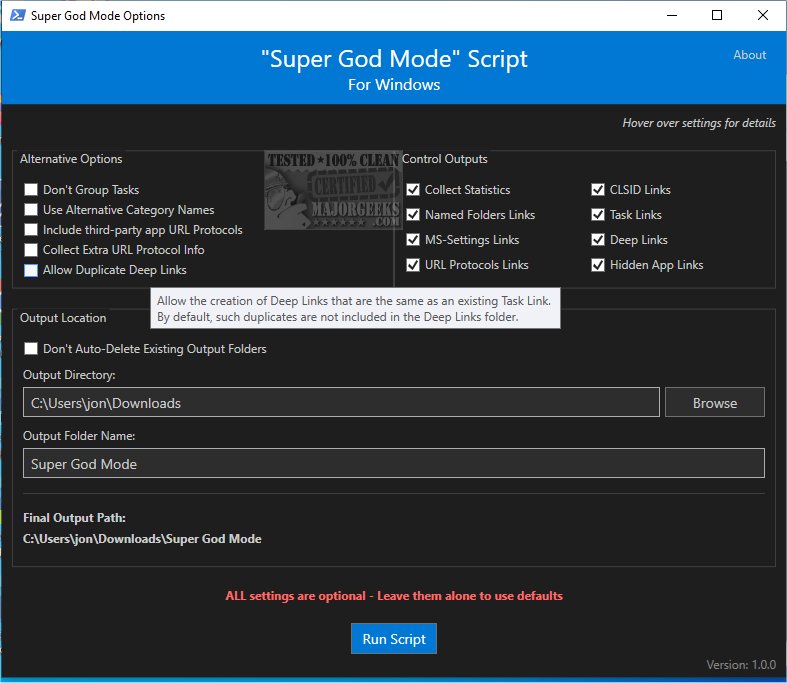
Super God Mode is a PowerShell script designed to streamline user access to a variety of Windows system settings and features by automatically generating shortcuts. This tool enhances productivity by providing quick links to special shell folders, named folders, task links, system settings, deep links, and URL protocols.
Key Features and Functionality
Super God Mode is inspired by the hidden God Mode folder found in modern Windows versions but expands upon its capabilities by offering over 1,200 shortcuts categorized by Windows version. Unlike traditional systems that rely on hardcoded links, Super God Mode allows users to personalize their shortcut organization, making it more adaptable to individual needs.
In addition to creating shortcuts, the script also generates CSV files that detail each link, serving as a comprehensive guide for navigating Windows components with Explorer commands and protocols. Users have the flexibility to customize which features to include or exclude, either through a graphical user interface (GUI) or command-line interface (CLI) parameters.
User Implementation
There are two primary methods for utilizing Super God Mode, with the simpler option being through a .Bat launcher:
1. Download the latest version of the script.
2. Download the launcher batch file to the same directory.
3. Execute the batch file.
It's advisable to create a system restore point before running the script to safeguard against potential issues.
Unlocking Windows Potential
Super God Mode empowers users to fully leverage their Windows operating system by effortlessly creating shortcuts to essential components, thus improving overall workflow and efficiency.
Comprehensive Features:
- Generates shortcuts for:
- CLSID-based shell folders
- Special folders with names
- Task links linking to sub-pages and Control Panel menus
- System settings via ms-settings: links
- Deep links to various settings throughout Windows
- URL protocols
- Hidden app links used internally by applications
- Produces CSV files with detailed shortcut information
- Saves XML content from shell32.dll and other resources for reference
- Offers a user-friendly GUI for easy configuration
To activate God Mode for various Windows versions, such as 11, 10, 8, and 7, users can explore additional resources and guides.
Conclusion
Super God Mode 1.2.3 is a powerful tool for Windows users looking for enhanced convenience and efficiency. By creating extensive shortcuts and providing detailed information, it simplifies the navigation of system settings, ultimately unlocking the full potential of the Windows operating system. Users are encouraged to explore its features and tailor the experience to their specific needs
Key Features and Functionality
Super God Mode is inspired by the hidden God Mode folder found in modern Windows versions but expands upon its capabilities by offering over 1,200 shortcuts categorized by Windows version. Unlike traditional systems that rely on hardcoded links, Super God Mode allows users to personalize their shortcut organization, making it more adaptable to individual needs.
In addition to creating shortcuts, the script also generates CSV files that detail each link, serving as a comprehensive guide for navigating Windows components with Explorer commands and protocols. Users have the flexibility to customize which features to include or exclude, either through a graphical user interface (GUI) or command-line interface (CLI) parameters.
User Implementation
There are two primary methods for utilizing Super God Mode, with the simpler option being through a .Bat launcher:
1. Download the latest version of the script.
2. Download the launcher batch file to the same directory.
3. Execute the batch file.
It's advisable to create a system restore point before running the script to safeguard against potential issues.
Unlocking Windows Potential
Super God Mode empowers users to fully leverage their Windows operating system by effortlessly creating shortcuts to essential components, thus improving overall workflow and efficiency.
Comprehensive Features:
- Generates shortcuts for:
- CLSID-based shell folders
- Special folders with names
- Task links linking to sub-pages and Control Panel menus
- System settings via ms-settings: links
- Deep links to various settings throughout Windows
- URL protocols
- Hidden app links used internally by applications
- Produces CSV files with detailed shortcut information
- Saves XML content from shell32.dll and other resources for reference
- Offers a user-friendly GUI for easy configuration
To activate God Mode for various Windows versions, such as 11, 10, 8, and 7, users can explore additional resources and guides.
Conclusion
Super God Mode 1.2.3 is a powerful tool for Windows users looking for enhanced convenience and efficiency. By creating extensive shortcuts and providing detailed information, it simplifies the navigation of system settings, ultimately unlocking the full potential of the Windows operating system. Users are encouraged to explore its features and tailor the experience to their specific needs
Super God Mode 1.2.3 released
Super God Mode provides a useful PowerShell script designed to automatically generate shortcuts to a wide range of special shell folders, named folders, task links, system settings, deep links, and URL protocols within Windows.