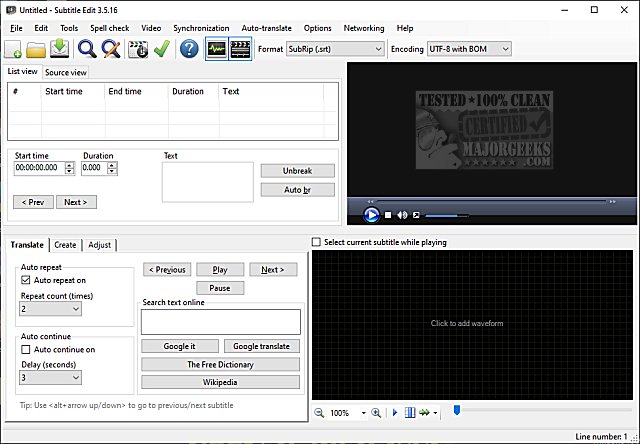
Subtitle Edit is a versatile and free subtitle editor designed for video subtitles, and its latest version, 5.3.0, enhances its already impressive capabilities. While it is free to use, the software competes with professional subtitle editing applications thanks to its extensive features. For those interested in exploring its functionalities, it's recommended to check out the feature list or try the software online.
Key Features of Subtitle Edit:
- Subtitle Management: Users can create, adjust, sync, and translate subtitle lines with ease.
- Format Conversion: The software supports over 280 different subtitle formats, including SubRip, MicroDVD, and Advanced SubStation Alpha.
- Audio Visualization: Subtitle Edit boasts a cool audio visualizer that can display waveforms and spectrograms, enhancing the editing experience.
- Integrated Video Playback: The built-in video player supports DirectShow, VLC media player, and MPlayer for seamless editing.
- Visual Synchronization: Users can visually sync and adjust subtitles by manipulating start/end positions and speeds.
- Auto Translation: Integrates Google Translate for automatic subtitle translations.
- Subtitle Extraction: Capable of ripping subtitles from decrypted DVDs and importing various subtitle formats, including VobSub and Blu-ray.
- File Compatibility: Can open subtitles embedded in various video formats, such as Matroska, mp4/mv4, and .m2ts files.
- Language Support: Reads and writes in UTF-8, Unicode, and ANSI, ensuring support for all languages and encodings on the user's PC.
- Synchronization Tools: Offers synchronization options like showing texts earlier/later, point synchronization, and merging/splitting subtitles.
- Error Correction: Features a common error fixing wizard and spell checking with Open Office dictionaries.
- Subtitle Effects: Includes effects like typewriter and karaoke styles for creative subtitle presentations.
- Editing History: A history/undo manager allows users to revert changes easily.
- Export Options: Users can export subtitles to various formats, including PNG images, Adobe Encore scripts, and plain text.
Conclusion:
Subtitle Edit 5.3.0 is a powerful tool for anyone working with video subtitles, combining user-friendly features with professional-grade capabilities. Whether you are a casual user needing basic editing or a professional looking for advanced functionalities, Subtitle Edit offers a comprehensive solution for all your subtitle needs. With ongoing updates and enhancements, it remains a top choice in the realm of subtitle editing software
Key Features of Subtitle Edit:
- Subtitle Management: Users can create, adjust, sync, and translate subtitle lines with ease.
- Format Conversion: The software supports over 280 different subtitle formats, including SubRip, MicroDVD, and Advanced SubStation Alpha.
- Audio Visualization: Subtitle Edit boasts a cool audio visualizer that can display waveforms and spectrograms, enhancing the editing experience.
- Integrated Video Playback: The built-in video player supports DirectShow, VLC media player, and MPlayer for seamless editing.
- Visual Synchronization: Users can visually sync and adjust subtitles by manipulating start/end positions and speeds.
- Auto Translation: Integrates Google Translate for automatic subtitle translations.
- Subtitle Extraction: Capable of ripping subtitles from decrypted DVDs and importing various subtitle formats, including VobSub and Blu-ray.
- File Compatibility: Can open subtitles embedded in various video formats, such as Matroska, mp4/mv4, and .m2ts files.
- Language Support: Reads and writes in UTF-8, Unicode, and ANSI, ensuring support for all languages and encodings on the user's PC.
- Synchronization Tools: Offers synchronization options like showing texts earlier/later, point synchronization, and merging/splitting subtitles.
- Error Correction: Features a common error fixing wizard and spell checking with Open Office dictionaries.
- Subtitle Effects: Includes effects like typewriter and karaoke styles for creative subtitle presentations.
- Editing History: A history/undo manager allows users to revert changes easily.
- Export Options: Users can export subtitles to various formats, including PNG images, Adobe Encore scripts, and plain text.
Conclusion:
Subtitle Edit 5.3.0 is a powerful tool for anyone working with video subtitles, combining user-friendly features with professional-grade capabilities. Whether you are a casual user needing basic editing or a professional looking for advanced functionalities, Subtitle Edit offers a comprehensive solution for all your subtitle needs. With ongoing updates and enhancements, it remains a top choice in the realm of subtitle editing software
Subtitle Edit 5.3.0 released
Subtitle Edit is a free, portable editor for video subtitles.