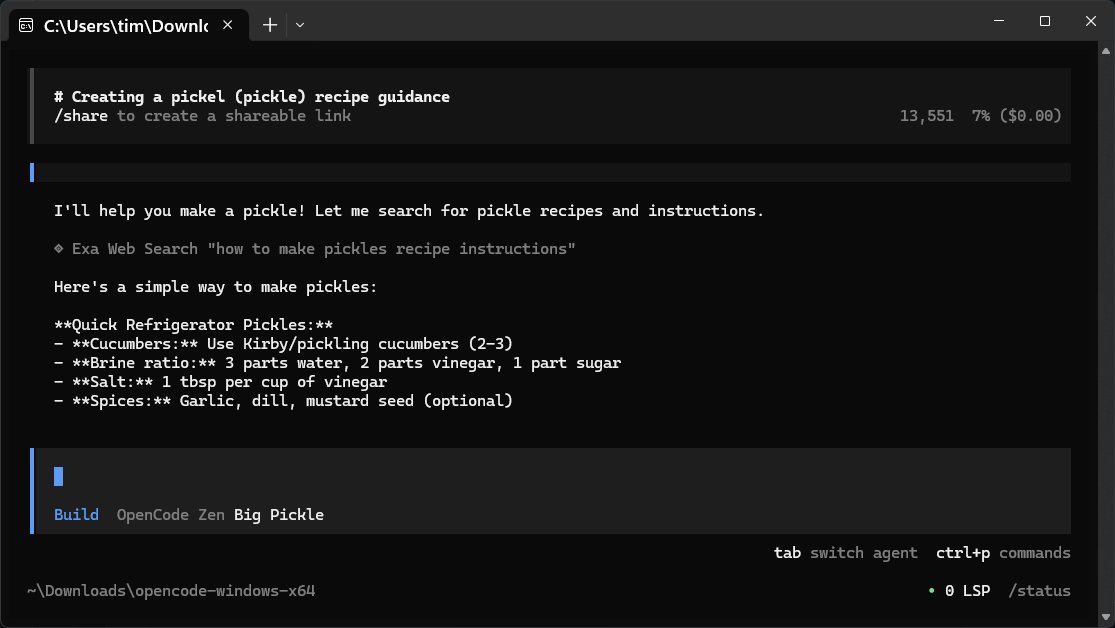
OpenCode is a free and open-source AI coding assistant designed for developers, enabling them to write code, debug, and comprehend their project files with ease. Running directly on your computer, OpenCode acts as a command-line companion that interprets natural language queries into actionable coding tasks, compatible with various programming languages.
Key Features of OpenCode:
- User-Friendly: OpenCode is designed for efficiency, offering a slim interface without a GUI, making it ideal for users who prefer terminal-based interactions.
- Local Operation: It operates locally with your files, ensuring privacy and security, as there's no external data sharing.
- Flexibility: Users can choose from over 75 different language models, including popular ones like OpenAI and Anthropic, to enhance functionality according to their needs.
How OpenCode Works:
The application connects to its online repository to answer queries, allowing it to leverage external models without the need for frequent updates. Users must have an internet connection for functionality, and it's advisable to consult the manual for optimal use.
Setup and Usage:
Setting up OpenCode involves navigating through the command prompt, authenticating your chosen language model, and managing API keys securely. Users can switch between different models easily, ensuring flexibility for various tasks.
Local Model Compatibility:
OpenCode is compatible with local AI models, allowing users to run everything from their own hardware if desired, which adds another layer of customization for those who prefer local processing.
User Experience and Recommendations:
While OpenCode is streamlined and effective, it may not appeal to those who prefer more graphical interfaces. Nonetheless, it offers an excellent balance for those comfortable with command-line operations, emphasizing speed, flexibility, and user control. Users are encouraged to participate in forums for community support.
Conclusion:
OpenCode 2.0.29 represents a significant tool for developers seeking an efficient, private, and customizable AI coding assistant without the typical limitations of commercial alternatives. It empowers users by maintaining control over their coding environment and resources, making it a noteworthy addition to any developer's toolkit.
In the future, OpenCode could further enhance user experience by incorporating optional GUI features or tutorials for beginners, making it accessible to a broader audience while retaining its core strengths
Key Features of OpenCode:
- User-Friendly: OpenCode is designed for efficiency, offering a slim interface without a GUI, making it ideal for users who prefer terminal-based interactions.
- Local Operation: It operates locally with your files, ensuring privacy and security, as there's no external data sharing.
- Flexibility: Users can choose from over 75 different language models, including popular ones like OpenAI and Anthropic, to enhance functionality according to their needs.
How OpenCode Works:
The application connects to its online repository to answer queries, allowing it to leverage external models without the need for frequent updates. Users must have an internet connection for functionality, and it's advisable to consult the manual for optimal use.
Setup and Usage:
Setting up OpenCode involves navigating through the command prompt, authenticating your chosen language model, and managing API keys securely. Users can switch between different models easily, ensuring flexibility for various tasks.
Local Model Compatibility:
OpenCode is compatible with local AI models, allowing users to run everything from their own hardware if desired, which adds another layer of customization for those who prefer local processing.
User Experience and Recommendations:
While OpenCode is streamlined and effective, it may not appeal to those who prefer more graphical interfaces. Nonetheless, it offers an excellent balance for those comfortable with command-line operations, emphasizing speed, flexibility, and user control. Users are encouraged to participate in forums for community support.
Conclusion:
OpenCode 2.0.29 represents a significant tool for developers seeking an efficient, private, and customizable AI coding assistant without the typical limitations of commercial alternatives. It empowers users by maintaining control over their coding environment and resources, making it a noteworthy addition to any developer's toolkit.
In the future, OpenCode could further enhance user experience by incorporating optional GUI features or tutorials for beginners, making it accessible to a broader audience while retaining its core strengths
OpenCode 2.0.29 released
OpenCode is a free, Open Source AI assistant that runs on your computer and helps you write code, fix bugs, and understand what your files are doing.