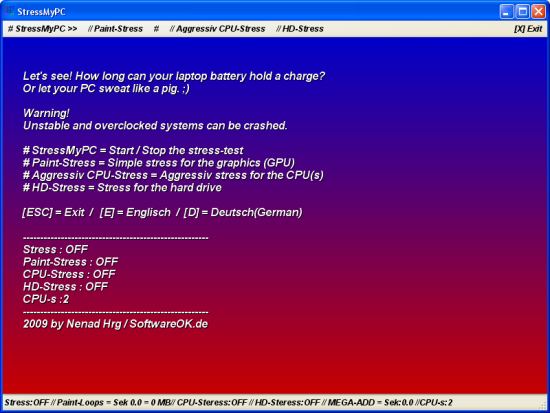
StressMyPC version 5.88 has been released, offering a free tool for users to perform stress tests on their computers. This software is particularly useful for assessing the performance and stability of a system under load, allowing users to determine how long their laptop battery can sustain a charge or how well their PC handles intensive tasks. However, users are cautioned that unstable or overclocked systems may crash during testing.
Key features of StressMyPC include:
- Start / Stop Functionality: Users can easily initiate or halt the stress test.
- Paint-Stress: A simple test focused on the graphics processing unit (GPU).
- Aggressive CPU-Stress: A rigorous test designed for maximizing CPU performance.
- HD-Stress: A test tailored for evaluating hard drive performance.
One of the advantages of StressMyPC is that it is a portable application, meaning it does not require installation and can be run directly from the desktop or a USB thumb drive, making it convenient for quick assessments.
In addition to StressMyPC, users may also find value in related tools and guides, such as how to update and find their Windows Experience Index score, how to utilize the Windows Memory Diagnostic Tool, and how to identify the hardware components within their computer systems.
Future versions of StressMyPC could potentially expand its testing capabilities to include more specific benchmarks for newer hardware, offer enhanced user interfaces for easier navigation, or integrate cloud-based analytics to compare results with other users. Additionally, incorporating machine learning algorithms could help predict system stability based on previous stress test outcomes, further enhancing the utility of this software for tech enthusiasts and professionals alike
Key features of StressMyPC include:
- Start / Stop Functionality: Users can easily initiate or halt the stress test.
- Paint-Stress: A simple test focused on the graphics processing unit (GPU).
- Aggressive CPU-Stress: A rigorous test designed for maximizing CPU performance.
- HD-Stress: A test tailored for evaluating hard drive performance.
One of the advantages of StressMyPC is that it is a portable application, meaning it does not require installation and can be run directly from the desktop or a USB thumb drive, making it convenient for quick assessments.
In addition to StressMyPC, users may also find value in related tools and guides, such as how to update and find their Windows Experience Index score, how to utilize the Windows Memory Diagnostic Tool, and how to identify the hardware components within their computer systems.
Future versions of StressMyPC could potentially expand its testing capabilities to include more specific benchmarks for newer hardware, offer enhanced user interfaces for easier navigation, or integrate cloud-based analytics to compare results with other users. Additionally, incorporating machine learning algorithms could help predict system stability based on previous stress test outcomes, further enhancing the utility of this software for tech enthusiasts and professionals alike
StressMyPC 5.88 released
Stress My PC is a freeware stress testing software designed to perform a computer stress test.