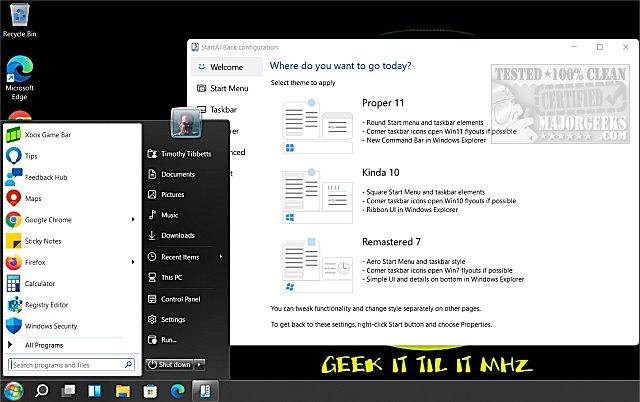
StartAllBack is a versatile tool that enhances the Windows 11 experience by allowing users to revert their Start Menu, Taskbar, and File Explorer to resemble those of Windows 7 or 10. While Windows 11 features a sleek and modern design, many users miss the familiar layout they have grown accustomed to. StartAllBack offers a solution to blend Windows 11's performance with the classic interface many prefer.
Key Features of StartAllBack:
- Customizable Start Menu: Users can select their desired Start Menu style, choosing from options like "Proper 11," "Kinda 10," or "Remastered 7."
- Revamped Taskbar: The tool restores traditional features such as task icon labels, adjustable icon sizes, and the flexibility to reposition the taskbar on various screen edges.
- Enhanced File Explorer: StartAllBack reinstates classic elements like the ribbon, command bar, and details pane, along with appealing translucent effects.
- Context Menu Improvements: Users can enjoy rounded acrylic menus that are fast, responsive, and optimized for touch.
Who Can Benefit from StartAllBack?
StartAllBack is ideal for those who find Windows 11's new layout challenging or inefficient. This includes professionals who depend on a streamlined workflow, casual users who appreciate a vintage aesthetic, or anyone resistant to unnecessary changes. With just a few adjustments, users can transform Windows 11 into a more familiar and efficient experience.
Affordability and Value:
StartAllBack is a premium tool priced at $4.99 for a single PC license. This one-time payment secures a lifetime license, representing excellent value for users seeking a comfortable and effective Windows environment.
Conclusion:
In summary, StartAllBack is a lightweight yet powerful solution for those frustrated by Windows 11's interface changes. Its customizable features allow for a seamless integration of familiar elements, making it a worthy investment for anyone looking to restore functionality and layout preferences. If you've been struggling with Windows 11, StartAllBack may be the perfect tweak to enhance your experience.
Further Exploration:
For users looking to customize their Windows experience further, consider exploring guides on moving the Windows 11 taskbar or adjusting its size for a more personalized interface
Key Features of StartAllBack:
- Customizable Start Menu: Users can select their desired Start Menu style, choosing from options like "Proper 11," "Kinda 10," or "Remastered 7."
- Revamped Taskbar: The tool restores traditional features such as task icon labels, adjustable icon sizes, and the flexibility to reposition the taskbar on various screen edges.
- Enhanced File Explorer: StartAllBack reinstates classic elements like the ribbon, command bar, and details pane, along with appealing translucent effects.
- Context Menu Improvements: Users can enjoy rounded acrylic menus that are fast, responsive, and optimized for touch.
Who Can Benefit from StartAllBack?
StartAllBack is ideal for those who find Windows 11's new layout challenging or inefficient. This includes professionals who depend on a streamlined workflow, casual users who appreciate a vintage aesthetic, or anyone resistant to unnecessary changes. With just a few adjustments, users can transform Windows 11 into a more familiar and efficient experience.
Affordability and Value:
StartAllBack is a premium tool priced at $4.99 for a single PC license. This one-time payment secures a lifetime license, representing excellent value for users seeking a comfortable and effective Windows environment.
Conclusion:
In summary, StartAllBack is a lightweight yet powerful solution for those frustrated by Windows 11's interface changes. Its customizable features allow for a seamless integration of familiar elements, making it a worthy investment for anyone looking to restore functionality and layout preferences. If you've been struggling with Windows 11, StartAllBack may be the perfect tweak to enhance your experience.
Further Exploration:
For users looking to customize their Windows experience further, consider exploring guides on moving the Windows 11 taskbar or adjusting its size for a more personalized interface
StartAllBack 3.9.24 released
StartAllBack can modify your Windows 11 Start Menu, Taskbar, File Explorer, and more to look like Windows 7 or 10.