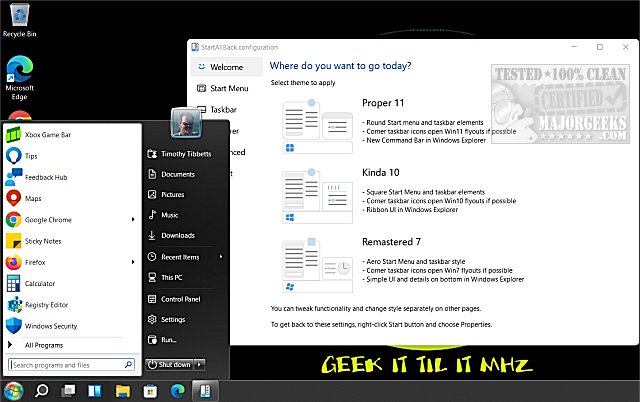
StartAllBack version 3.9.23 has been released, offering users the ability to customize their Windows 11 experience by restoring familiar elements from Windows 7 and 10. This lightweight tool modifies the Start Menu, Taskbar, File Explorer, and more, allowing users to enjoy the performance of Windows 11 while reverting to a layout they are comfortable with.
- Customizable Start Menu: Users can select from options like "Proper 11," "Kinda 10," or "Remastered 7" to restore the Start Menu they prefer.
- Revamped Taskbar: Features such as label displays on task icons, adjustable icon sizes, and the flexibility to move the Taskbar to different screen edges are included.
- Improved File Explorer: Users can revert to a classic ribbon and command bar, along with a details pane featuring translucent effects.
- Context Menu Enhancements: The tool offers rounded acrylic menus that are designed to be fast, responsive, and touch-friendly.
- How to Move the Windows 11 Taskbar to the Top of Your Screen
- How to Get a Larger or Smaller Taskbar in Windows 11
StartAllBack exemplifies the balance between modern performance and classic usability, making it a valuable tool for many Windows users
Why Choose StartAllBack?
Windows 11 introduced a modern interface that some users may find cumbersome or unintuitive. StartAllBack addresses these concerns by providing various customization options to enhance user experience:- Customizable Start Menu: Users can select from options like "Proper 11," "Kinda 10," or "Remastered 7" to restore the Start Menu they prefer.
- Revamped Taskbar: Features such as label displays on task icons, adjustable icon sizes, and the flexibility to move the Taskbar to different screen edges are included.
- Improved File Explorer: Users can revert to a classic ribbon and command bar, along with a details pane featuring translucent effects.
- Context Menu Enhancements: The tool offers rounded acrylic menus that are designed to be fast, responsive, and touch-friendly.
Who Benefits from StartAllBack?
StartAllBack is particularly valuable for professionals who depend on an efficient workflow, casual users who appreciate the nostalgic aesthetic, and anyone who prefers a stable interface over constant change. With just a few clicks, users can transform Windows 11 into an environment that feels more familiar and efficient.Affordable Pricing
Although StartAllBack is a premium tool, it is priced reasonably at $4.99 for a single PC license. This one-time payment grants users a lifetime license, making it a worthwhile investment for those seeking a more familiar Windows experience.Conclusion
StartAllBack serves as a practical solution for users frustrated by Windows 11's user interface. It is lightweight, customizable, and integrates seamlessly into the system, enhancing functionality while maintaining a classic look. For anyone struggling with the new layout, StartAllBack may be the ideal tweak to restore a user-friendly and efficient computing experience.Further Resources
For users looking to further personalize their Windows 11 experience, similar guides include:- How to Move the Windows 11 Taskbar to the Top of Your Screen
- How to Get a Larger or Smaller Taskbar in Windows 11
StartAllBack exemplifies the balance between modern performance and classic usability, making it a valuable tool for many Windows users
StartAllBack 3.9.23 released
StartAllBack can modify your Windows 11 Start Menu, Taskbar, File Explorer, and more to look like Windows 7 or 10.