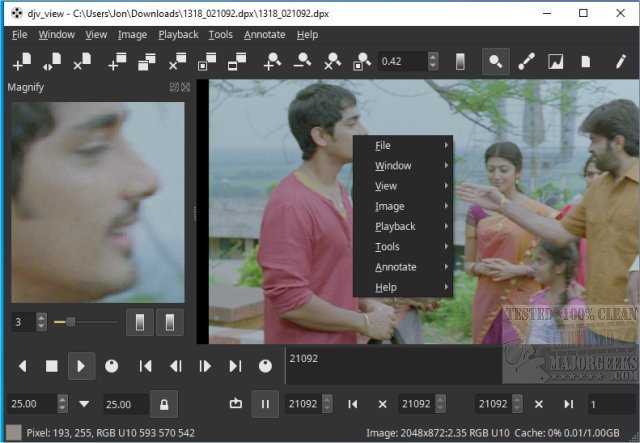
DJV 3.7.5 has been released, enhancing its reputation as a free and robust tool for managing image sequences. This software is particularly favored by filmmakers, colorists, and video editors due to its ability to deliver stunning visuals, precise audio control, and smooth playback of high-resolution images.
- Menu Bar: Located at the top, it houses essential commands and settings.
- Toolbars: Positioned below or alongside the menu bar, these offer quick access to vital functions, such as transport controls and layer manipulation.
- Tab Bar: Found near the top-left, it allows users to switch between different image sequences without cluttering the interface.
- Viewport: This is where the current image sequence is displayed in high quality.
- Timeline: Located below the viewport, it visualizes the structure of animations, including frame timing and keyframes, with integration options for complex timelines.
- Hiding Toolbars: Users can hide unnecessary toolbars to focus solely on playback.
- Hiding the Tab Bar: For those working on a single file, hiding the tab bar can create a cleaner workspace.
- Hiding Status Bar Info: Users can choose to hide the status bar if the information it displays is distracting.
The emphasis on customization allows users to tailor their workspace according to their specific needs, ultimately improving productivity and focus.
Overview of DJV's Interface
When you launch DJV on Windows, you're greeted with a user-friendly layout that combines elements of a video editing suite with those of an image viewer. The design is logical and uncluttered, allowing users to focus on their tasks without feeling overwhelmed. Key components of the DJV interface include:- Menu Bar: Located at the top, it houses essential commands and settings.
- Toolbars: Positioned below or alongside the menu bar, these offer quick access to vital functions, such as transport controls and layer manipulation.
- Tab Bar: Found near the top-left, it allows users to switch between different image sequences without cluttering the interface.
- Viewport: This is where the current image sequence is displayed in high quality.
- Timeline: Located below the viewport, it visualizes the structure of animations, including frame timing and keyframes, with integration options for complex timelines.
Customizing Your Workspace
DJV also offers customization options to enhance user experience by minimizing clutter. The Window menu is crucial for managing the interface:- Hiding Toolbars: Users can hide unnecessary toolbars to focus solely on playback.
- Hiding the Tab Bar: For those working on a single file, hiding the tab bar can create a cleaner workspace.
- Hiding Status Bar Info: Users can choose to hide the status bar if the information it displays is distracting.
The emphasis on customization allows users to tailor their workspace according to their specific needs, ultimately improving productivity and focus.
Conclusion
DJV stands out as a highly capable tool for anyone involved in image sequence management. With features like A/B comparison tools, OpenTimelineIO integration, and OpenColorIO support, it caters to both professionals and enthusiasts. Its versatility and customization capabilities make DJV an invaluable asset in the realm of video editing and image management.Future Prospects
As DJV continues to evolve, future updates may bring even more advanced features, enhancing its applicability across various platforms and workflows. Users can look forward to more seamless integrations with other tools and possibly improved performance for even larger image sequences. As the landscape of digital media continues to change, DJV's commitment to providing a free, powerful solution ensures it remains relevant and useful for years to comeDJV 3.7.5 released
DJV is a free and powerful tool for managing image sequences that offers stunning visuals, precise audio control, and seamless playback of high-resolution images, making it an excellent choice for filmmakers, colorists, and video editors.