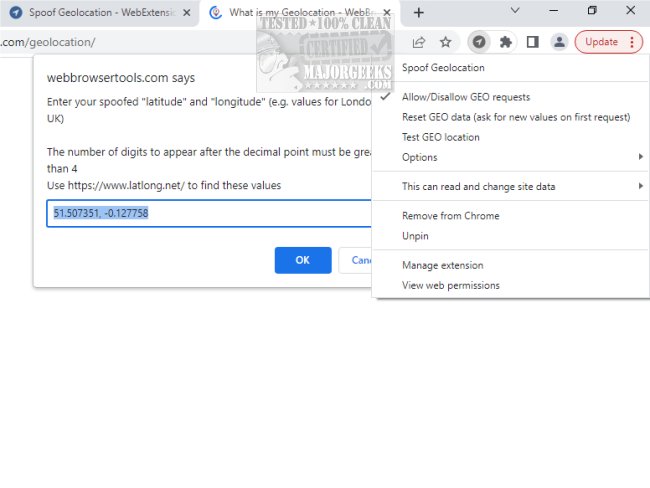
The latest update of Spoof Geolocation for Chrome allows users to alter their browser's geolocation data by changing latitude and longitude values to a desired location. This extension enables users to disguise their actual location, functioning effectively even when the device's location services are turned off or inaccessible. It employs a polyfill to support cases where the navigator.geolocation object is absent, giving users control over location access via a simple right-click context menu on the action button.
Easy Setup and Usage
Spoof Geolocation for Chrome requires minimal configuration, asking for location permission only once per webpage. Users can effortlessly modify latitude and longitude values through the right-click menu and can also block location requests. The toolbar color changes to indicate whether a webpage is receiving a spoofed location.
Customizable Features
The extension offers extensive customization options, allowing users to specify their latitude and longitude manually, generate randomized geolocation data, and spoof permissions to simulate geolocation access. Users can also adjust the accuracy of the location data, with the tool remembering the last used coordinates for convenience.
Testing the Extension
To experience the functionality of Spoof Geolocation, users can visit the website https://webbrowsertools.com/geolocation/, where they will be prompted to input their latitude and longitude. They can choose to use the default settings or enter their own, which will apply to all subsequent requests. Users wishing to block geolocation access can do so through the right-click context menu and can refresh the page to observe the changes.
For optimal results, users are advised to configure the recommended latitude and longitude based on their browser’s proxy settings. They can obtain their IP location by visiting https://webbrowsertools.com/ip-address/ (with SOCKS5 as the preferred mode) and then convert this information into latitude and longitude coordinates using https://www.latlong.net/.
Technical Spoofing Capabilities
The extension effectively spoofs key JavaScript methods, including:
- navigator.geolocation.getCurrentPosition
- navigator.geolocation.watchPosition
- navigator.permissions.query
This makes it a powerful tool for users seeking privacy or testing web applications that rely on location data.
Conclusion and Related Topics
Spoof Geolocation for Chrome provides a simple yet effective means of managing geolocation data, enhancing user privacy and flexibility. Users interested in browser privacy may also explore related topics, such as starting Google Chrome in incognito mode, preventing the storage of browser history, and managing saved credit card information across various browsers.
As the digital landscape continues to evolve, tools like Spoof Geolocation are essential for users who value their online anonymity and wish to maintain control over their personal data
Easy Setup and Usage
Spoof Geolocation for Chrome requires minimal configuration, asking for location permission only once per webpage. Users can effortlessly modify latitude and longitude values through the right-click menu and can also block location requests. The toolbar color changes to indicate whether a webpage is receiving a spoofed location.
Customizable Features
The extension offers extensive customization options, allowing users to specify their latitude and longitude manually, generate randomized geolocation data, and spoof permissions to simulate geolocation access. Users can also adjust the accuracy of the location data, with the tool remembering the last used coordinates for convenience.
Testing the Extension
To experience the functionality of Spoof Geolocation, users can visit the website https://webbrowsertools.com/geolocation/, where they will be prompted to input their latitude and longitude. They can choose to use the default settings or enter their own, which will apply to all subsequent requests. Users wishing to block geolocation access can do so through the right-click context menu and can refresh the page to observe the changes.
For optimal results, users are advised to configure the recommended latitude and longitude based on their browser’s proxy settings. They can obtain their IP location by visiting https://webbrowsertools.com/ip-address/ (with SOCKS5 as the preferred mode) and then convert this information into latitude and longitude coordinates using https://www.latlong.net/.
Technical Spoofing Capabilities
The extension effectively spoofs key JavaScript methods, including:
- navigator.geolocation.getCurrentPosition
- navigator.geolocation.watchPosition
- navigator.permissions.query
This makes it a powerful tool for users seeking privacy or testing web applications that rely on location data.
Conclusion and Related Topics
Spoof Geolocation for Chrome provides a simple yet effective means of managing geolocation data, enhancing user privacy and flexibility. Users interested in browser privacy may also explore related topics, such as starting Google Chrome in incognito mode, preventing the storage of browser history, and managing saved credit card information across various browsers.
As the digital landscape continues to evolve, tools like Spoof Geolocation are essential for users who value their online anonymity and wish to maintain control over their personal data
Spoof Geolocation for Chrome 0.3.1 released
Spoof Geolocation for Chrome allows you to change your browser's latitude and longitude values to a specified location.