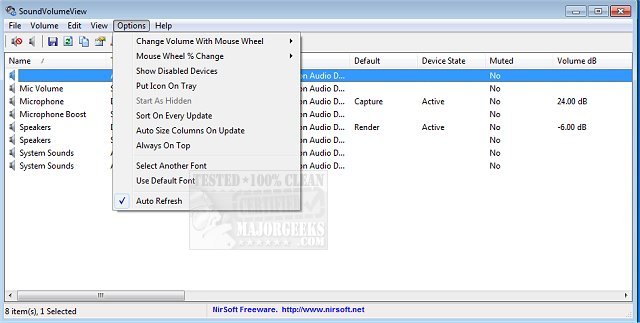
The latest version of SoundVolumeView, 2.53, has been released, offering users a streamlined way to access and manage audio settings on their PCs. This tool provides a comprehensive overview of the current audio information, including volume levels for all active sound components. In addition to displaying this information, SoundVolumeView allows users to save their current sound profiles into a file. This file captures the volume levels and the mute/unmute state of each sound component, including the default sound devices. Users can easily load this file later to restore their previous audio settings.
Moreover, SoundVolumeView includes robust command-line support, enabling users to perform various actions such as saving and loading profiles, adjusting the volume for all sound components, and muting or unmuting them—all without the need for a graphical user interface.
This release aligns with other helpful guides for Windows users, including topics on enabling Windows Sonic Surround Sound, toggling key sounds, renaming sound devices, addressing low sound volume issues, and troubleshooting sound problems on Windows 10 and 11.
In future updates, SoundVolumeView could potentially enhance its functionality by integrating more advanced audio analysis tools, offering customizable sound profiles based on user preferences, or even providing visual representations of audio levels for better accessibility. Additionally, expanding support for various audio formats and devices could further improve user experience and versatility
Moreover, SoundVolumeView includes robust command-line support, enabling users to perform various actions such as saving and loading profiles, adjusting the volume for all sound components, and muting or unmuting them—all without the need for a graphical user interface.
This release aligns with other helpful guides for Windows users, including topics on enabling Windows Sonic Surround Sound, toggling key sounds, renaming sound devices, addressing low sound volume issues, and troubleshooting sound problems on Windows 10 and 11.
In future updates, SoundVolumeView could potentially enhance its functionality by integrating more advanced audio analysis tools, offering customizable sound profiles based on user preferences, or even providing visual representations of audio levels for better accessibility. Additionally, expanding support for various audio formats and devices could further improve user experience and versatility
SoundVolumeView 2.53 released
SoundVolumeView will quickly display your PC's general audio information, including current volume levels for all active sound components.