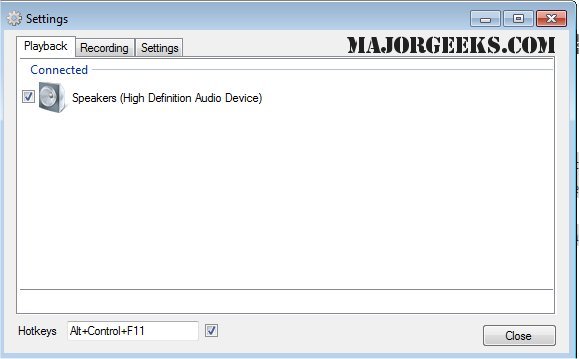
SoundSwitch is a user-friendly tool designed to streamline the process of switching between various audio playback devices on Windows. This utility addresses a common frustration for users who frequently alternate between speakers, headphones, USB DACs, and other audio devices. By utilizing customizable hotkeys, SoundSwitch enables users to switch audio outputs instantly without navigating through cumbersome menus.
Key Features:
- Hotkey Functionality: After installation, users can configure a hotkey (the default is Ctrl+Alt+F11) to cycle through their selected audio devices. You can customize which devices are included in the rotation, eliminating the risk of accidentally switching to less desirable outputs, like low-quality monitor speakers.
- Background Operation: Once set up, SoundSwitch operates quietly in the system tray, allowing for seamless toggling with a simple key press and providing notifications to confirm which device is currently active.
Practical Use Cases:
- Effortlessly switch between headphones and speakers without adjusting the volume mixer.
- Instantly toggle to an audio interface or capture card during streaming or gaming.
- Quickly change between headset and speakers for meetings and casual listening.
- Resolve Bluetooth audio issues, such as reverting to "hands-free mode," with a quick keystroke.
Pros and Cons:
Pros:
- Free and open-source under the GPL 3.0 license.
- Significantly reduces the number of clicks required to switch audio devices.
- Lightweight and non-intrusive, making it easy to run in the background.
- Simple configuration process allows for a "set-and-forget" experience.
Cons:
- Lacks built-in audio profiles or per-application audio routing.
- Currently only available for Windows; no support for macOS or Linux.
- Limited functionality focused solely on playback and recording switches, without comprehensive audio management features.
Conclusion:
SoundSwitch is an essential tool for anyone who routinely switches between different audio outputs. Its lightweight and straightforward design makes it an invaluable resource for gamers, streamers, and remote workers alike. By addressing a gap in Windows' native functionality, SoundSwitch enhances user experience and efficiency, making audio management hassle-free.
Further Reading:
For those interested in optimizing their audio experience, additional resources are available, including guides on enabling Windows Sonic Surround Sound, diagnosing audio delays, and renaming sound devices in Windows
Key Features:
- Hotkey Functionality: After installation, users can configure a hotkey (the default is Ctrl+Alt+F11) to cycle through their selected audio devices. You can customize which devices are included in the rotation, eliminating the risk of accidentally switching to less desirable outputs, like low-quality monitor speakers.
- Background Operation: Once set up, SoundSwitch operates quietly in the system tray, allowing for seamless toggling with a simple key press and providing notifications to confirm which device is currently active.
Practical Use Cases:
- Effortlessly switch between headphones and speakers without adjusting the volume mixer.
- Instantly toggle to an audio interface or capture card during streaming or gaming.
- Quickly change between headset and speakers for meetings and casual listening.
- Resolve Bluetooth audio issues, such as reverting to "hands-free mode," with a quick keystroke.
Pros and Cons:
Pros:
- Free and open-source under the GPL 3.0 license.
- Significantly reduces the number of clicks required to switch audio devices.
- Lightweight and non-intrusive, making it easy to run in the background.
- Simple configuration process allows for a "set-and-forget" experience.
Cons:
- Lacks built-in audio profiles or per-application audio routing.
- Currently only available for Windows; no support for macOS or Linux.
- Limited functionality focused solely on playback and recording switches, without comprehensive audio management features.
Conclusion:
SoundSwitch is an essential tool for anyone who routinely switches between different audio outputs. Its lightweight and straightforward design makes it an invaluable resource for gamers, streamers, and remote workers alike. By addressing a gap in Windows' native functionality, SoundSwitch enhances user experience and efficiency, making audio management hassle-free.
Further Reading:
For those interested in optimizing their audio experience, additional resources are available, including guides on enabling Windows Sonic Surround Sound, diagnosing audio delays, and renaming sound devices in Windows
SoundSwitch 7.2.0 Beta 1 / 7.1.0 released
SoundSwitch allows you to easily switch between the different playback devices currently connected to your machine via hotkeys.