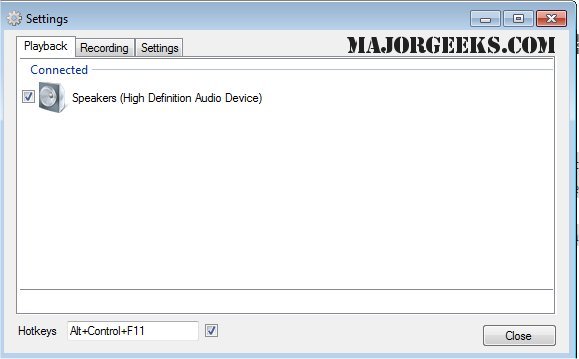
SoundSwitch 7.1.0 has been released, providing users with an efficient tool for managing multiple audio playback devices on Windows. This lightweight application allows seamless switching between connected audio outputs, such as speakers, headphones, and USB DACs, via customizable hotkeys.
Once installed, SoundSwitch integrates into the system tray, where users can configure their preferred hotkey (defaulting to Ctrl+Alt+F11) and select which playback devices to include in the cycling list. This means users can avoid accidentally switching to undesirable devices, such as a monitor's speakers. When a hotkey is pressed, SoundSwitch toggles to the next device in the user-defined list, accompanied by a subtle notification indicating the active device.
The utility proves particularly beneficial in various scenarios, such as quickly switching between headphones and speakers, managing audio during streaming or gaming sessions, or toggling between a headset and speakers during remote meetings. Additionally, it can resolve issues with Bluetooth audio reverting to "hands-free mode" with just a quick toggle.
Pros and Cons
Pros:
- Free and open-source under GPL 3.0
- Hotkey functionality streamlines the switching process
- Minimal resource usage and unobtrusive presence
- Simple setup and ease of use
Cons:
- Lacks built-in audio profiles or application-specific routing
- Limited to Windows, with no support for macOS or Linux
- Focuses solely on playback/recording device switching, rather than comprehensive audio management
Geek Verdict: SoundSwitch addresses a common frustration for Windows users managing multiple audio outputs, making it a valuable addition for anyone who frequently switches between devices. Its straightforward design and functionality can significantly enhance user experience, especially for those engaged in gaming, streaming, or remote work.
In addition to the features outlined, it would be beneficial for future versions to consider adding support for audio profiles and per-application routing, which would enhance usability for more advanced users. Furthermore, expanding compatibility to other operating systems could broaden its audience and utility. Overall, SoundSwitch is an essential tool for those looking to streamline their audio management on Windows
Once installed, SoundSwitch integrates into the system tray, where users can configure their preferred hotkey (defaulting to Ctrl+Alt+F11) and select which playback devices to include in the cycling list. This means users can avoid accidentally switching to undesirable devices, such as a monitor's speakers. When a hotkey is pressed, SoundSwitch toggles to the next device in the user-defined list, accompanied by a subtle notification indicating the active device.
The utility proves particularly beneficial in various scenarios, such as quickly switching between headphones and speakers, managing audio during streaming or gaming sessions, or toggling between a headset and speakers during remote meetings. Additionally, it can resolve issues with Bluetooth audio reverting to "hands-free mode" with just a quick toggle.
Pros and Cons
Pros:
- Free and open-source under GPL 3.0
- Hotkey functionality streamlines the switching process
- Minimal resource usage and unobtrusive presence
- Simple setup and ease of use
Cons:
- Lacks built-in audio profiles or application-specific routing
- Limited to Windows, with no support for macOS or Linux
- Focuses solely on playback/recording device switching, rather than comprehensive audio management
Geek Verdict: SoundSwitch addresses a common frustration for Windows users managing multiple audio outputs, making it a valuable addition for anyone who frequently switches between devices. Its straightforward design and functionality can significantly enhance user experience, especially for those engaged in gaming, streaming, or remote work.
In addition to the features outlined, it would be beneficial for future versions to consider adding support for audio profiles and per-application routing, which would enhance usability for more advanced users. Furthermore, expanding compatibility to other operating systems could broaden its audience and utility. Overall, SoundSwitch is an essential tool for those looking to streamline their audio management on Windows
SoundSwitch 7.1.0 released
SoundSwitch allows you to easily switch between the different playback devices currently connected to your machine via hotkeys.