SoundSwitch has recently released version 7.0.0 Beta 2 alongside 6.14.2, providing users with a simplified way to switch between multiple audio playback devices on Windows via customizable hotkeys. This small yet effective utility addresses the common frustration of navigating through menus to change audio outputs, whether users have speakers, headphones, or USB DACs connected.
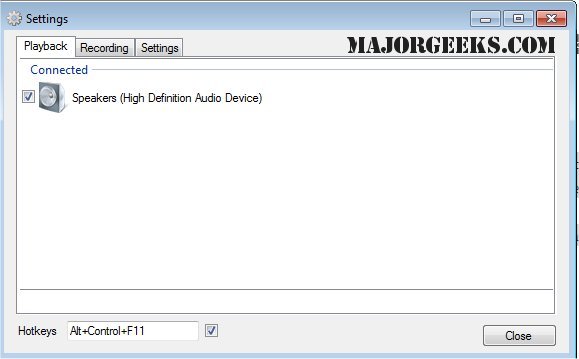
After installation, SoundSwitch places an icon in the system tray. By right-clicking this icon, users can access settings where they can assign a hotkey (defaulting to Ctrl+Alt+F11) and select the audio devices they want to include in the switching cycle. This prevents accidental switching to less desirable outputs, ensuring a seamless audio experience. Once configured, the tool operates quietly in the background, enabling users to toggle between devices with a simple keystroke while receiving a notification showing which device is currently active.
Real-world applications for SoundSwitch are diverse:
- Users can easily switch between headphones and speakers without accessing the volume mixer.
- Content creators can swiftly toggle to their capture card or audio interface during live streams or recordings.
- Remote workers can alternate between headsets and speakers based on their current activity, such as meetings or casual listening.
- The tool is particularly beneficial for those using Bluetooth audio devices that may unintentionally revert to "hands-free mode," allowing for quick corrections.
Pros and Cons
Pros:
- Free and open-source (GPL 3.0)
- Saves time with hotkey-based switching
- Lightweight and unobtrusive
- Simple configuration
Cons:
- Lacks built-in audio profiles or application-specific routing
- Exclusively for Windows (no support for macOS or Linux)
- Limited to playback and recording options without comprehensive audio management features
Geek Verdict
SoundSwitch is an invaluable tool for users who regularly switch between multiple audio outputs. It fills a gap in Windows functionality by providing a quick and efficient way to manage audio devices without cumbersome menus. Ideal for gamers, streamers, and remote workers alike, SoundSwitch enhances the audio experience with minimal disruption.
Similar Tools:
- Guidance on toggling key sounds in Windows 10 & 11
- Instructions for enabling Windows Sonic Surround Sound
- Tips for diagnosing sound delays and audio latency issues
- Advice on renaming sound input or output devices
In conclusion, SoundSwitch is a must-have utility for anyone looking to streamline their audio device management on Windows, making everyday audio tasks significantly more efficient. Its simplicity and effectiveness make it a standout choice for users who often juggle multiple sound outputs
After installation, SoundSwitch places an icon in the system tray. By right-clicking this icon, users can access settings where they can assign a hotkey (defaulting to Ctrl+Alt+F11) and select the audio devices they want to include in the switching cycle. This prevents accidental switching to less desirable outputs, ensuring a seamless audio experience. Once configured, the tool operates quietly in the background, enabling users to toggle between devices with a simple keystroke while receiving a notification showing which device is currently active.
Real-world applications for SoundSwitch are diverse:
- Users can easily switch between headphones and speakers without accessing the volume mixer.
- Content creators can swiftly toggle to their capture card or audio interface during live streams or recordings.
- Remote workers can alternate between headsets and speakers based on their current activity, such as meetings or casual listening.
- The tool is particularly beneficial for those using Bluetooth audio devices that may unintentionally revert to "hands-free mode," allowing for quick corrections.
Pros and Cons
Pros:
- Free and open-source (GPL 3.0)
- Saves time with hotkey-based switching
- Lightweight and unobtrusive
- Simple configuration
Cons:
- Lacks built-in audio profiles or application-specific routing
- Exclusively for Windows (no support for macOS or Linux)
- Limited to playback and recording options without comprehensive audio management features
Geek Verdict
SoundSwitch is an invaluable tool for users who regularly switch between multiple audio outputs. It fills a gap in Windows functionality by providing a quick and efficient way to manage audio devices without cumbersome menus. Ideal for gamers, streamers, and remote workers alike, SoundSwitch enhances the audio experience with minimal disruption.
Similar Tools:
- Guidance on toggling key sounds in Windows 10 & 11
- Instructions for enabling Windows Sonic Surround Sound
- Tips for diagnosing sound delays and audio latency issues
- Advice on renaming sound input or output devices
In conclusion, SoundSwitch is a must-have utility for anyone looking to streamline their audio device management on Windows, making everyday audio tasks significantly more efficient. Its simplicity and effectiveness make it a standout choice for users who often juggle multiple sound outputs
SoundSwitch 7.0.0 Beta 2 / 6.14.2 released
SoundSwitch allows you to easily switch between the different playback devices currently connected to your machine via hotkeys.