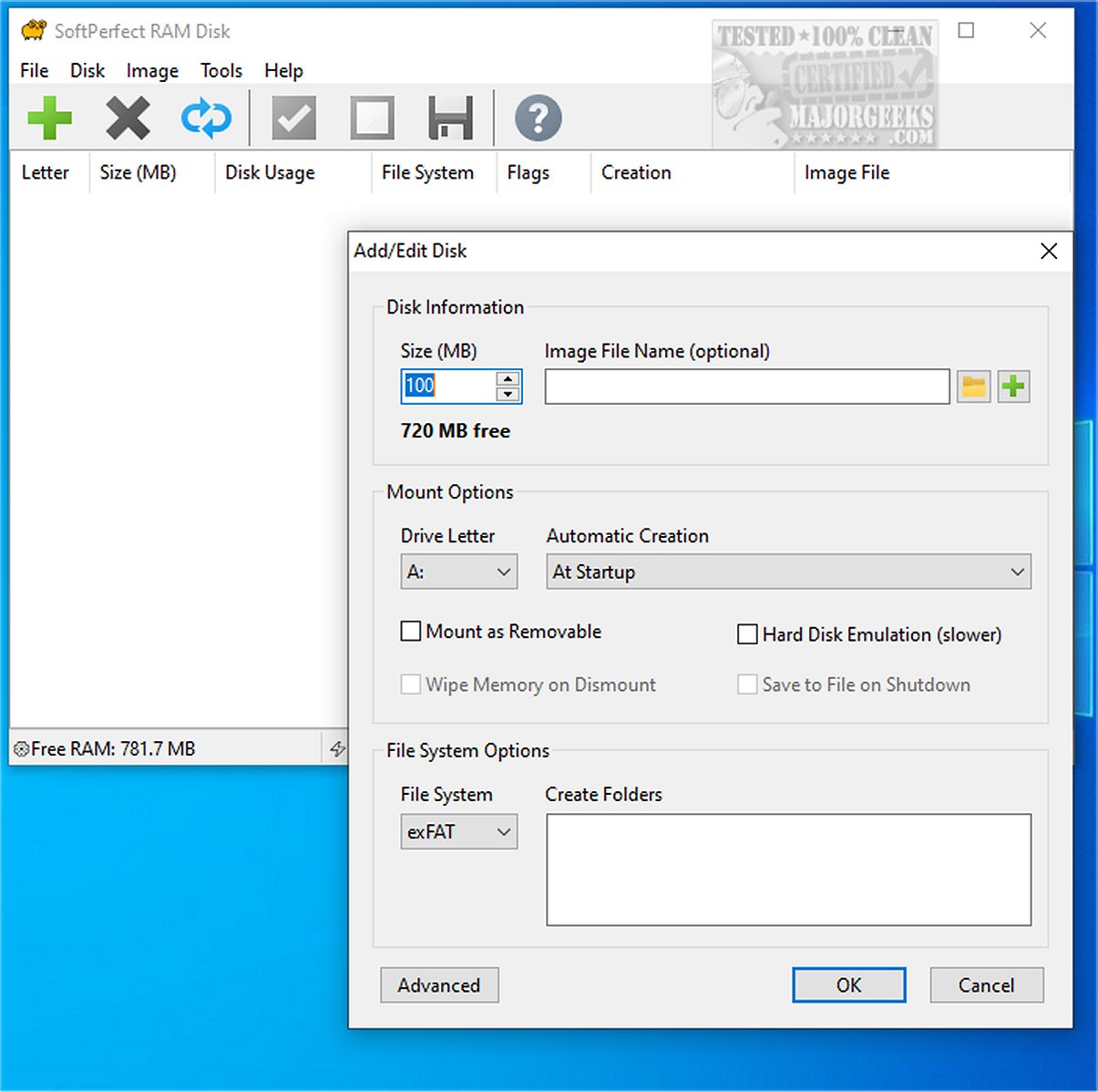
SoftPerfect RAM Disk has launched its latest version, 26.7, offering users a high-performance tool that creates a virtual disk utilizing the computer's memory. This in-memory disk significantly outpaces traditional physical hard drives, making it ideal for storing temporary data swiftly and efficiently, thereby enhancing overall task performance.
Purpose and Benefits of SoftPerfect RAM Disk
The primary function of SoftPerfect RAM Disk is to optimize computer performance by leveraging available RAM, which often remains underutilized. With modern computers typically containing at least 1 GB of RAM—often much more—users can create multiple virtual disks tailored to their needs. These configurations can serve various purposes, such as managing browser caches, game files, or any temporary data that benefits from rapid read and write speeds.
Performance Optimization
By creating a virtual disk that operates directly within the system's RAM, SoftPerfect RAM Disk allows for quick access to temporary files through Windows Explorer and other applications. This setup not only accelerates data access times but also reduces wear on traditional hard drives, as frequent temporary files generated by applications can be redirected to the RAM disk, ultimately prolonging the life of physical storage devices.
On-Disk Image Support
The software also features support for on-disk images, enabling users to maintain virtual disks that retain data across sessions. This functionality ensures important files are preserved and easily accessible, enhancing user convenience and efficiency.
Key Features of SoftPerfect RAM Disk:
- Ability to create multiple RAM disks (up to 26 due to drive letter limitations).
- Flexible RAM disk sizes on 64-bit systems, with a limit of approximately 3.5 GB on 32-bit systems.
- Creation of persistent RAM disks with associated on-disk images.
- Provision for volatile RAM disks whose data is lost upon shutdown.
- Built-in tools for disk image manipulation.
Conclusion and User Recommendations
SoftPerfect RAM Disk represents a transformative tool for users seeking to enhance their computing experience with faster data access and improved system performance. Its intuitive interface ensures accessibility for users of all tech levels, making it a viable option for those looking to maximize their workflow efficiency. While harnessing RAM for storage presents significant advantages, users should consider their specific data management needs before fully adopting this solution.
In addition, SoftPerfect retains the last freeware version of the software, which is no longer supported but still available for users interested in exploring its capabilities.
Related Articles:
- How to Clear Virtual Memory Page File at Shutdown in Windows
- How to Disable or Enable SysMain (Superfetch)
- How to Find Your RAM Speed in Windows 10 & 11
- How to Use the Windows Memory Diagnostic Tool in Windows
- How to Check Your Memory (RAM) Speed, Available Slots and More
Overall, SoftPerfect RAM Disk stands out as a powerful tool for optimizing performance while reducing strain on traditional storage solutions, making it a worthwhile addition to any computer setup
Purpose and Benefits of SoftPerfect RAM Disk
The primary function of SoftPerfect RAM Disk is to optimize computer performance by leveraging available RAM, which often remains underutilized. With modern computers typically containing at least 1 GB of RAM—often much more—users can create multiple virtual disks tailored to their needs. These configurations can serve various purposes, such as managing browser caches, game files, or any temporary data that benefits from rapid read and write speeds.
Performance Optimization
By creating a virtual disk that operates directly within the system's RAM, SoftPerfect RAM Disk allows for quick access to temporary files through Windows Explorer and other applications. This setup not only accelerates data access times but also reduces wear on traditional hard drives, as frequent temporary files generated by applications can be redirected to the RAM disk, ultimately prolonging the life of physical storage devices.
On-Disk Image Support
The software also features support for on-disk images, enabling users to maintain virtual disks that retain data across sessions. This functionality ensures important files are preserved and easily accessible, enhancing user convenience and efficiency.
Key Features of SoftPerfect RAM Disk:
- Ability to create multiple RAM disks (up to 26 due to drive letter limitations).
- Flexible RAM disk sizes on 64-bit systems, with a limit of approximately 3.5 GB on 32-bit systems.
- Creation of persistent RAM disks with associated on-disk images.
- Provision for volatile RAM disks whose data is lost upon shutdown.
- Built-in tools for disk image manipulation.
Conclusion and User Recommendations
SoftPerfect RAM Disk represents a transformative tool for users seeking to enhance their computing experience with faster data access and improved system performance. Its intuitive interface ensures accessibility for users of all tech levels, making it a viable option for those looking to maximize their workflow efficiency. While harnessing RAM for storage presents significant advantages, users should consider their specific data management needs before fully adopting this solution.
In addition, SoftPerfect retains the last freeware version of the software, which is no longer supported but still available for users interested in exploring its capabilities.
Related Articles:
- How to Clear Virtual Memory Page File at Shutdown in Windows
- How to Disable or Enable SysMain (Superfetch)
- How to Find Your RAM Speed in Windows 10 & 11
- How to Use the Windows Memory Diagnostic Tool in Windows
- How to Check Your Memory (RAM) Speed, Available Slots and More
Overall, SoftPerfect RAM Disk stands out as a powerful tool for optimizing performance while reducing strain on traditional storage solutions, making it a worthwhile addition to any computer setup
SoftPerfect RAM Disk 26.7 released
SoftPerfect RAM Disk provides a high-performance program that creates a virtual disk on your computer using its memory. This in-memory disk operates much faster than traditional physical hard drives, allowing for the storage of temporary data on a swift memory disk.